Bomrets Detailed Normal Maps for Vanilla Version 1_1
⚪ Last updated 2008⚠️ Install Order · 2 steps
Install in this order, then this mod last — most mods fail to load without their framework and dependencies in place.
Preview
🔍 Analysis
- 👍 3.4% endorsement rate — high engagement, a strong quality signal
- 🏆 #412 of 485 Models And Textures mods in this game by downloads
📋 About This Mod
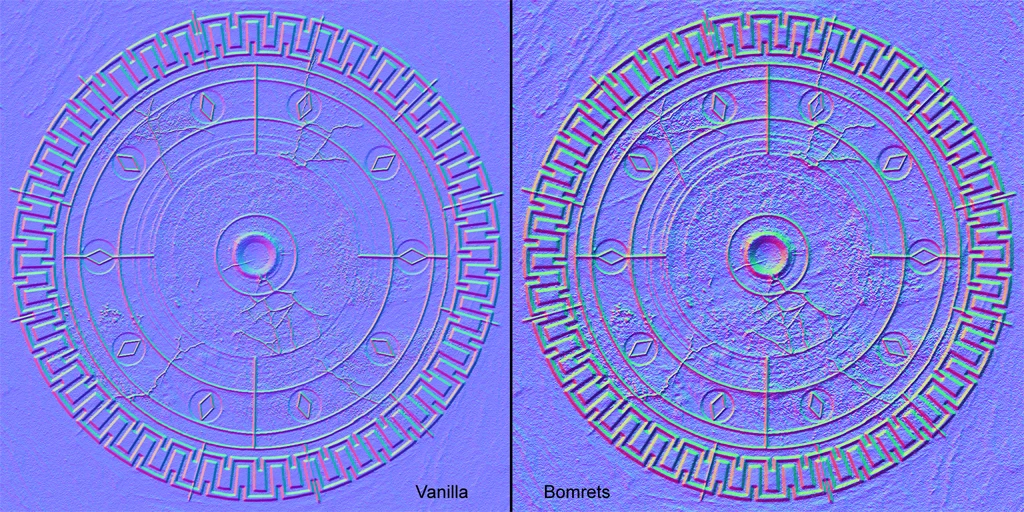
Introduction: I always thought, that the vanilla textures are suitable for Oblivion and have their own \"charm\". But the normal maps are quite smooth and not very detailed. And this is in a time, where normal maps are becoming more important. While some great texture replacers hit the road since the release of Oblivion, they often have larger textures and so increase memory usage and are hitting the performance of lower- to medium spec machines (like mine ;) ). There are other people who like the vanilla textures best. So this is where this mod jumps in. I made new and more detailed normal maps based on the vanilla ones with the same size and so the memory usage literally stays the same. There should not be any performance hit whatsoever but a nice increase in visual quality (at least I think so ;)). This new version already contains the two patches and the fixed uninstaller. What has been done? Anvil Arena Basementsections Bravil Bruma Castles (including the city walls) Castle Interiors Cathedrals Cemetery (tombstones) Cheydinhal Chorrol Cloudrulertemple Daedric statues Doorstones Farmhouse Godstatues Imperial City Kvatch Leyawiin Lowerclass buildings Priories Ships Sidewalks Skingrad Statues Stonewalls Tents Clutter (not everything: no small clutter like ingredients, tools, dishes etc.) Dungeons (ayleidruins, caves, chargen (prison), fortruins, sewers and miscellaneous stuff) Landscape Oblivion Realm + Oblivion gates Plants Rocks Trees (barks) Wood Installation: Extract the included \"textures\" folder to Oblivion/Data. As these are only normal maps, you should not need any archive invalidation. If prompted just overwrite. If you just want to test this package, I recommend creating an Omod with the Oblivion Mod Manager! Play! Un-Installation: If you have created an Omod, just delete it. If you have put in the textures like they are, extract the \"Uninstall Bomrets Normal Maps.bat\" into your Oblivion/Data folder and run it. This will delete all normal maps, that come with this pack. Next time you start Oblivion, it will use the stock normal maps again. Customization: It\'s very easy to customize everything to your taste. Look into your Oblivion/Data/textures folder. There you find various subfolders which also may contain other subfolders. Everyone should know what\'s inside when reading the foldername. For example: If you just want Chorrol or the basements etc. but nothing else, just delete the corresponding folder of what you don\'t want in Oblivion/Data/textures/. Or vice versa: You don\'t like Chorrol. Then go to Oblivion/Data/textures/architecture and delete the Chorrol folder. If you want to keep the Chorrol interiors and delete the exteriors it gets a bit tricky. Look into the Chorrol folder and you find a folder named Interior. Delete everything except of this folder. now you have stock Chorrol exterior and my Chorrol interior. Easy as that. Known Issue
Bomrets Detailed Normal Maps for Vanilla Version 1_1 is a texture mod for Oblivion that enhances the detail of vanilla normal maps while preserving the original texture charm. With 603 endorsements and 17,754 downloads, it's a popular choice for players who want improved visuals without replacing the base textures.
✨ Key Features
📊 Pros & Cons
✅ Pros
- Community-approved with 603 endorsements
- High download count (17,754) shows it's been widely used
- Improves visual depth without overhauling the game's look
⚠️ Cons
- Last updated in 2008, so may not be compatible with newer Oblivion patches or mods
- Only affects normal maps, so visual improvement is subtle
For Oblivion players who like the vanilla textures but want a bit more depth and detail in the lighting. If you're a purist who wants to keep the original look while enhancing it subtly, this is for you. Skip if you're looking for a complete texture overhaul.
💡 Beginner Tips
- Since this mod only changes normal maps, it's safe to install alongside other texture mods that don't touch normal maps.
- Make sure to place the files in your Oblivion Data folder and enable the mod in your launcher or mod manager.
- If you use a mod manager like OBMM or Wrye Bash, you can easily toggle this mod on and off to test its effect.
📊 Mod Details
- Game
- Oblivion Mods
- Author
- Bomret
- Version
- 1.1
- Downloads
- 17,754
- Endorsements
- 603
- Category
- Models And Textures
- Created
- 7/14/2008
- Updated
- 7/14/2008
🔧 How to Install Oblivion Mods
Download from Nexus.
📖 Full step-by-step install guide for Oblivion →
Visit the official mod page for specific installation instructions for this mod.
🎮 Need cheat codes or console commands? Check ur gaming wiki for Oblivion commands, item IDs, and more.
Keep browsing — more Oblivion mods await