Animated Weapons Tutorial
⚪ Last updated 2008⚠️ Install Order · 2 steps
Install in this order, then this mod last — most mods fail to load without their framework and dependencies in place.
Preview
🔍 Analysis
- 👍 4.0% endorsement rate — high engagement, a strong quality signal
- 🏆 #16 of 123 Modders Resources & Tutorials mods in this game by downloads
📋 About This Mod
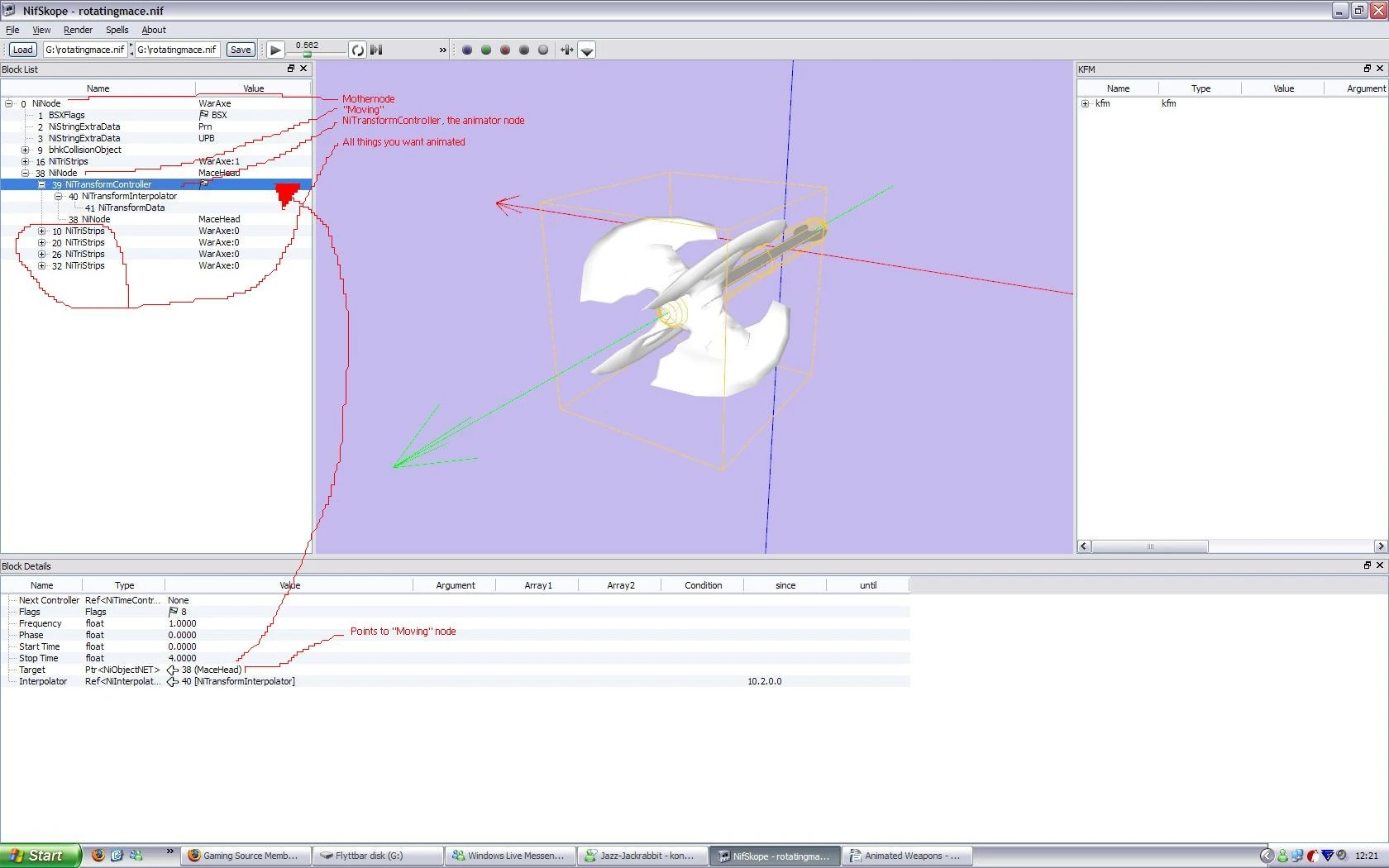
How to make animated weapons tutorial: 1. Download \"The Rotating Mace\" mod from here: http://www.tessource.net/files/file.php?id=11467 2. Open your weapon and the Rotating Mace in Nifskope. 3. Create a new NiNodeand make
How to make animated weapons tutorial: 1. Download \"The Rotating Mace\" mod from here: http://www.tessource.net/files/file.php?id=11467 2. Open your weapon and the Rotating Mace in Nifskope. 3. Create a new NiNodeand make it child to the mother node (0), name it eg. Moving. 4. Place all NiTriStrips you want animated under your newly created node named Moving. 5. Copy the NiTransformController from the Rotating Mace. Paste it in your weapon. 6. Change your NiNode named moving\'s Controller to the number of the NiTransformController (eg 39). 7. Open the NiTransformController, change it\'s target to the moving blocks number (eg. 38). 8. If you want to change the animation change the NiTransformData-block. If you\'re done everything right your weapon should now start to spin! (c) J3X 2007
📊 Mod Details
- Game
- Oblivion Mods
- Author
- J3X
- Version
- 0.1a
- Downloads
- 1,392
- Endorsements
- 56
- Category
- Modders Resources & Tutorials
- Created
- 6/15/2007
- Updated
- 1/7/2008
🔧 How to Install Oblivion Mods
Download from Nexus.
📖 Full step-by-step install guide for Oblivion →
Visit the official mod page for specific installation instructions for this mod.
🎮 Need cheat codes or console commands? Check ur gaming wiki for Oblivion commands, item IDs, and more.
Keep browsing — more Oblivion mods await