Project potato - fps boost by hardcore internal resolution tweaking
⚪ Last updated 2016⚠️ Install Order · 1 step
Install in this order, then this mod last — most mods fail to load without their framework and dependencies in place.
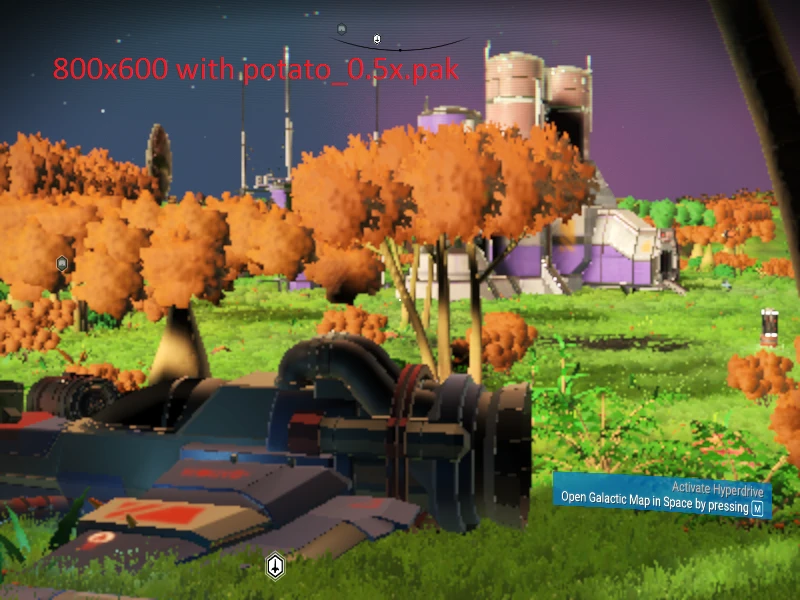
Preview
🔍 Analysis
- 👍 3.1% endorsement rate — high engagement, a strong quality signal
- 🏆 #40 of 48 Environment mods in this game by downloads
📋 About This Mod
v1. 1 News: 0. 75x_hyper_performance file is added. Try it, it may give the best performance out of the bunch.
What this mod does:
- []Removes post processing, volumetric lighting and shadows, and reduces bloom and DOF. []Improves menu performance. []Reduces the quality of some of the remaining effects and visuals. []Lets the game to run at ~30 fps on shit laptops (i5 1. 7ghz, geforce 820m)
How to install: 1. Copy one of the files into the GAMEDATA\PCBANKS folder. 2. Delete the entire shaderchache forder just in case. 3. ???? 4. Profit
Project potato is a performance mod for No Man's Sky that boosts FPS by tweaking internal resolution and removing post-processing, volumetric lighting, and shadows. It offers multiple downscale options, including a hyper-performance file, and is aimed at players on low-end laptops. Last updated in 2016, it has 194 endorsements.
✨ Key Features
📊 Pros & Cons
✅ Pros
- Multiple downscale options let you fine-tune the visual/performance tradeoff to match your rig.
- Targets low-end laptops specifically—if you're on integrated graphics, this is built for you.
- Simple install: just copy a file into PCBANKS and delete the shader cache.
⚠️ Cons
- Last updated in 2016—likely incompatible with current game versions, so expect issues if you're on a modern build.
- Removing shadows and post-processing makes the game look noticeably worse—it's a pure performance tradeoff.
- No detailed documentation on what each downscale variant actually changes, so you'll have to trial-and-error.
For No Man's Sky players on low-end laptops or older PCs who struggle to hit playable framerates. If you're on a decent rig, you don't need this—skip it unless you want a performance boost at the cost of visuals.
💡 Beginner Tips
- Delete the entire shader cache folder after copying the file—otherwise the game may rebuild old shaders and negate the performance gains.
- Start with the 0.75x_hyper_performance file if you're desperate for FPS; if it looks too blurry, step up to 0.75x or 1x.
- Since the mod is old, back up your original files before overwriting, and be prepared for potential incompatibility with the latest game patches.
📊 Mod Details
- Game
- No Mans Sky Mods
- Author
- Ahad
- Version
- 1.0
- Downloads
- 6,216
- Endorsements
- 194
- Category
- Environment
- Created
- 8/21/2016
- Updated
- 8/24/2016
🔧 How to Install No Man\ Mods
Create /MODS/ folder in /GAMEDATA/PCBANKS/. Delete DISABLEMODS.TXT.
📖 Full step-by-step install guide for No Man\ →
Visit the official mod page for specific installation instructions for this mod.
🎮 Need cheat codes or console commands? Check ur gaming wiki for No Man\ commands, item IDs, and more.
Keep browsing — more No Man\ mods await