Male Smooth Body 4K Retexture
⚪ Last updated 2021Preview
🔍 Analysis
- 👍 7.5% endorsement rate — high engagement, a strong quality signal
- 🏆 #71 of 126 Characters mods in this game by downloads
📋 About This Mod
Nioh 2 - Smooth Body Male 4K Retexture Mod by YokaiDude - v1. 1
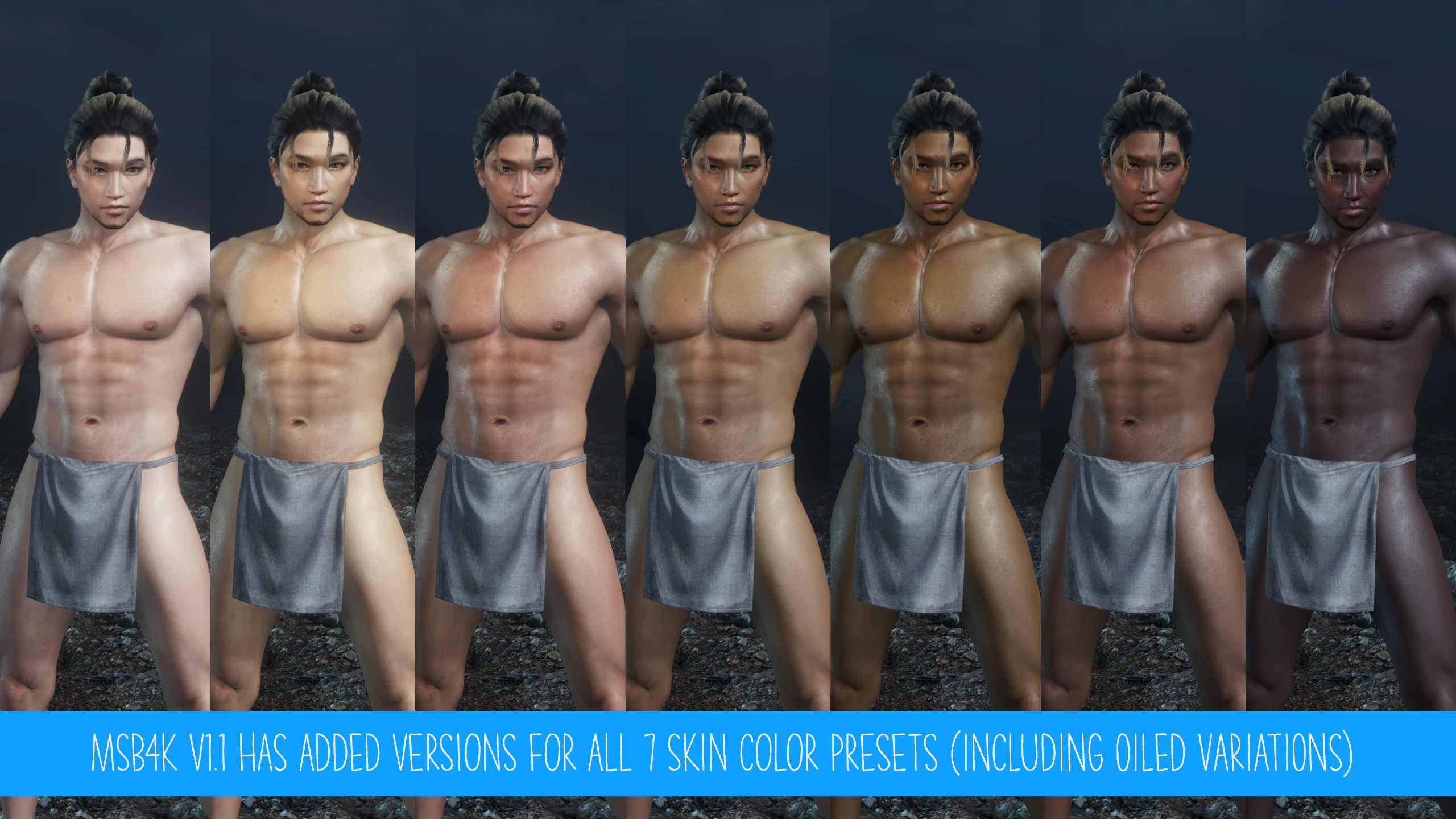
A comprehensive Male Body retexture mod that reduces the excessively veiny look of the vanilla skin texture and massively improves upon its overall fidelity through a mix of AI upscaling and tons of manual editing. Also includes new variations.
Installation:
1.) Download and install Nioh 2 Mod Enabler if you haven't already (https://www.nexusmods.com/nioh2/mods/18)
2.) Copy the SmoothBodyMale4K folder to your "Nioh 2\Mods" directory.
3.) Customizing your appearance further.
Step 1.)
Skin ColorDefault Skin Preset 1 is installed by default. If you want to customize your skintone, pick one of other skin presets in the "Step 1.) Skin Color" folder and copy the file over to the main "Nioh 2\Mods\SmoothBodyMale4K" folder and overwrite "MaleSmoothBody_D.dds" when prompted. Your options here are either Default (4K texture that matches the overall feel of the vanilla Nioh 2 texture) or Oiled (modified 4K texture that works in conjunction with a unique specular map to provide a realistic oiled body effect).
Step 2.) Muscle Definement
Smooth Body look is installed by default. If you want to have more defined muscles, go to the "Step 2.) Muscle Definement" folder and copy "SmoothBodyMale_N.dds" from the "02 - More Defined" folder over to the main "Nioh 2\Mods\SmoothBodyMale4K" folder and overwrite when prompted. If you'd like to revert back to the Smooth look just copy back the file from the "01 - Smooth" folder.
Step 3.)
Skin reflectivenessBy default a specularity map (skin reflectiveness) that matches the vanilla Nioh 2 look is installed. If you picked the Oiled body texture, copy the file from the "Step 3.) Skin Reflectiveness\02 - Oiled" folder over to the main "Nioh 2\Mods\SmoothBodyMale4K" folder and overwrite "SmoothBodyMale_S.dds" when prompted. Finally there is also a Soft look for use with the Default body texture that further reduces the overall skin reflectiveness.
4.) Enable the mod in-game by pressing F2.
5.) Go into character creation and match your face skin color to the preset you selected.
Additional warnings:
- Using this mod will also disable the ability to use body markings or the muscle slider.
- Keep in mind if you have other mods installed that alter either body or face (minus eyes/teeth/hair) textures it will conflict. So disable those first before using this mod.
Future updates:
- General improvements
- More skin variations
- Support for loxoss' Other Nude Male mod (if/once the
📊 Mod Details
- Game
- Nioh2 Mods
- Author
- YokaiDude
- Version
- 1.10
- Downloads
- 1,296
- Endorsements
- 97
- Category
- Characters
- Created
- 3/3/2021
- Updated
- 3/14/2021
🔧 How to Install Nioh2 Mods
Download from Nexus Mods.
📖 Full step-by-step install guide for Nioh2 →
Visit the official mod page for specific installation instructions for this mod.
🎮 Need cheat codes or console commands? Check ur gaming wiki for Nioh2 commands, item IDs, and more.
Keep browsing — more Nioh2 mods await