Graphic TWEAKS V10 -Effects-Fog-Specular-Bloom-
⚪ Last updated 2022Preview
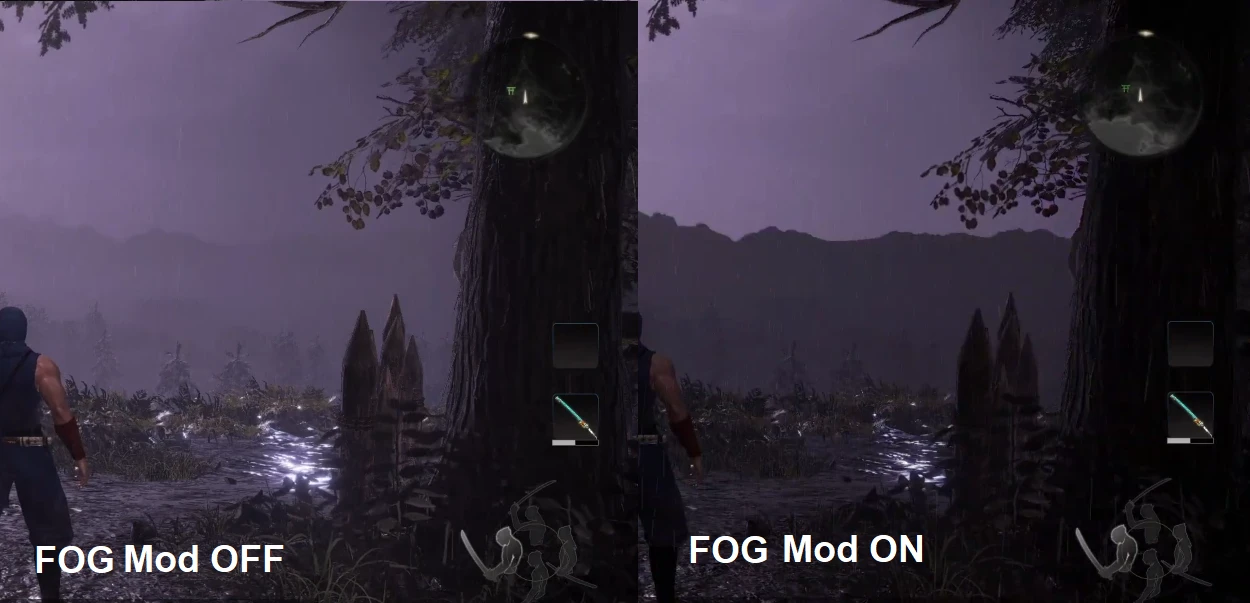
🔍 Analysis
- 👍 3.7% endorsement rate — high engagement, a strong quality signal
- 🏆 #9 of 84 Visuals mods in this game by downloads
📋 About This Mod
NEW IN V10: Reworked ki pulse and weapon trail effects
NEW IN V9: Sharpened some effects
NEW IN V8: Fixed some FPS drops and compatibility
NEW IN V7: Further improved effect cleanup
K7tkIiw9v0g
-Make sure to give 0%Bloom a try (you have to enable it as explained below).
-Setting Shadows to Low-Quality will make them sharper.
-Try setting Textures quality on high if you have no fps drops.
-The ingame Effects quality setting changes the amount of effects.
INSTALLATION AND TOGGLING
MOD OPTIONS
1. Install Nioh2 Mod enabler
2. Download this mod. Drag and drop the whole folder "GraphicTweaksV10" to your MODS folder
3. F2 In game will globally enable-disable mods
4. F10 Reloads mod changes without having to restart the game. TOGGLE the mods by: moving them INSIDE / OUTSIDE the folder called"DISABLED MODS (Drop here to disable)" which is inside GraphicTweaksV10 AND THEN press F10 if you moved them while playing, with no need to restart the game.
Do not disable the folder "_Base"
These 3 mods 50%FogLight, 80%FogLight and 0%FOG
Won't work toghether. Choose only one.
V10 Now has a new Ki Pulse. By default, it is only slightly visible. You can change its color by enabling a KiPulse "Color" of your choice. You can also completely remove it by enabling "No KiPulse"
If you want to disable the HAIR FIX, rename the folder "BetterHair" to "DISABLED BetterHair"
GraphicTweaksV8\_Base\BetterHair
Graphic TWEAKS V10 is a visual overhaul for Nioh that cleans up fog, improves effects, enhances ki pulse visuals, and disables bloom and specular. It's aimed at players who prefer a sharper, less bloomy presentation. With 367 endorsements and nearly 10k downloads, it's a well-tested tweak pack.
✨ Key Features
📊 Pros & Cons
✅ Pros
- Strong community approval with 367 endorsements — players dig the cleaner look.
- Nearly 10k downloads shows the mod has been battle-tested across many setups.
- Disabling bloom and specular can reduce visual noise during intense combat, especially in dark areas.
⚠️ Cons
- Last updated February 2022 — if Nioh has been patched since, this may not work without a rework.
- Disabling bloom and specular may make some surfaces look flat or dull if you like shiny armor effects.
For Nioh players who want a cleaner, less bloomy visual experience and don't mind losing some of the game's glossy shine. If heavy fog, bloom, and specular highlights bother you during combat, this tweak pack is a solid fix. Skip if you like the vanilla lighting and particle effects as they are.
💡 Beginner Tips
- In Nioh, use the mod's bloom/specular removal to reduce glare during dark Yokai realm sections; test on the first mission to see the difference.
- If you're using a mod manager, install the mod and then restart the game fully — Nioh doesn't reload visual mods mid-session.
- Compare before/after by toggling the mod off and watching the fog in the first area; the change should be obvious.
📊 Mod Details
- Game
- Nioh2 Mods
- Author
- mbrox7000
- Version
- 10
- Downloads
- 9,877
- Endorsements
- 367
- Category
- Visuals
- Created
- 9/13/2021
- Updated
- 2/6/2022
🔧 How to Install Nioh2 Mods
Download from Nexus Mods.
📖 Full step-by-step install guide for Nioh2 →
Visit the official mod page for specific installation instructions for this mod.
🎮 Need cheat codes or console commands? Check ur gaming wiki for Nioh2 commands, item IDs, and more.
Keep browsing — more Nioh2 mods await