EZ Auto Backup
🟠 Updated over a year agoPreview
🔍 Analysis
- 🏆 #17 of 20 Utilities mods in this game by downloads
📋 About This Mod
If you have any requests or suggestions or need any help, feel free to leave it in the comments.
For bug reports please use the BUGS section, or join my Discord.
You can also support me through Patreon, if you like my work.
Please download at https://www.nexusmods.com/liesofp/mods/19
New in 3. 2. 9
-Added a Macro Manager to add customizable key sequences to each seperate profile
-A macro will usually run as long as the sequence hasn't ended, so it will keeps running, if you're moving in game, but you will have an option to cancel the sequence if any other key pressed, like when you run in game the sequence will be canceled.
-The Macro Manager is under "Menubar > Profile > Macro Manager-After creating a macro, you have to assign it to 1 of 10 macro functions, which can be bound to a hotkey.
-The hotkey settings has a new "Macro" tab, were all macro functions can be found.
-The tooltips will show which "Macro 1-10" function has been assigned to a macro.
Auto backup & Restore demonstration in Stray
mpSJCrZoDbg
Features
- []Choose between 2 auto backup methods:[/]
-
[]Intervall, set the minutes in which auto backups occurs.[/]
[]Instant, backups will instantly be created each time the game auto saves.[/]
-
[]Seamless Co-Op mod support[/]
[]Support for any game, the reworked game detection is now dynamic and allows you to add your own games to the game profile.[/]
[]Backup your profile with it's backup files.[/]
[]Quick and easy setup[/]
[]Set a number of max auto backups. Onces max count reached the oldest auto backup will be deleted.[/]
[].zip compression with 7z by default for backup files.[/]
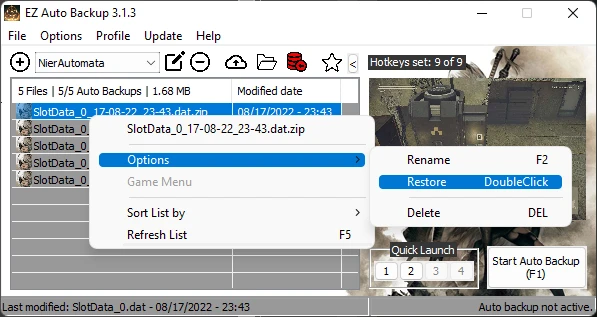
[]Quick Selection feature, allows you to select through your backups in game, with either an overlay which includes a screenshot or by Text To Speech. ERAB will automatically choose the method, depending on the selected game screen mode (windowed or fullscreen)[/]
[]Customizable keyboard and controller hotkeys which allows you the following functions:[/]
[]Start/Stop Auto Backup[/]
[]Quick backup[/]
[*]Restore Q
EZ Auto Backup is a utility mod for Elden Ring and other games that automates save file backups. It offers customizable hotkeys for quick backup/restore, a profile manager, and interval-based or instant auto-backup options. With 18 endorsements and recent updates, it's a niche tool for players who want save security.
✨ Key Features
📊 Pros & Cons
✅ Pros
- Hotkeys for backup/restore are a game-saver when you're mid-boss fight and need to rollback a mistake
- Profile manager is handy for testing different builds without losing your main save
- Recent update (Oct 2024) means it's likely still compatible with current game patches
⚠️ Cons
- Only 18 endorsements — small user base, so you're relying on the author's testing
For Elden Ring players who hate losing progress to crashes or corrupted saves and want a quick way to rollback. Also for modders who experiment with different setups and need to switch profiles easily. Skip if you're fine with manual save backups or don't play games that benefit from frequent auto-backups.
💡 Beginner Tips
- Set up a hotkey for quick backup before you enter a tough boss arena — you'll thank yourself later
- Test the restore function on a throwaway save first to make sure it works with your game version
- If you're using it for Elden Ring, disable EAC or play offline to avoid any anti-cheat conflicts
📊 Mod Details
- Game
- Nierautomata Mods
- Author
- ai8772
- Version
- 3.5.7a
- Downloads
- 282
- Endorsements
- 18
- Category
- Utilities
- Created
- 8/18/2022
- Updated
- 10/8/2024
🔧 How to Install Nierautomata Mods
Download from Nexus Mods.
📖 Full step-by-step install guide for Nierautomata →
Visit the official mod page for specific installation instructions for this mod.
🎮 Need cheat codes or console commands? Check ur gaming wiki for Nierautomata commands, item IDs, and more.
Keep browsing — more Nierautomata mods await