Visor DIY
⚪ Last updated 2018⚠️ Install Order · 5 steps
Install in this order, then this mod last — most mods fail to load without their framework and dependencies in place.
Preview
🔍 Analysis
- 👍 4.2% endorsement rate — high engagement, a strong quality signal
- 🏆 #18 of 70 User Interfaces mods in this game by downloads
📋 About This Mod
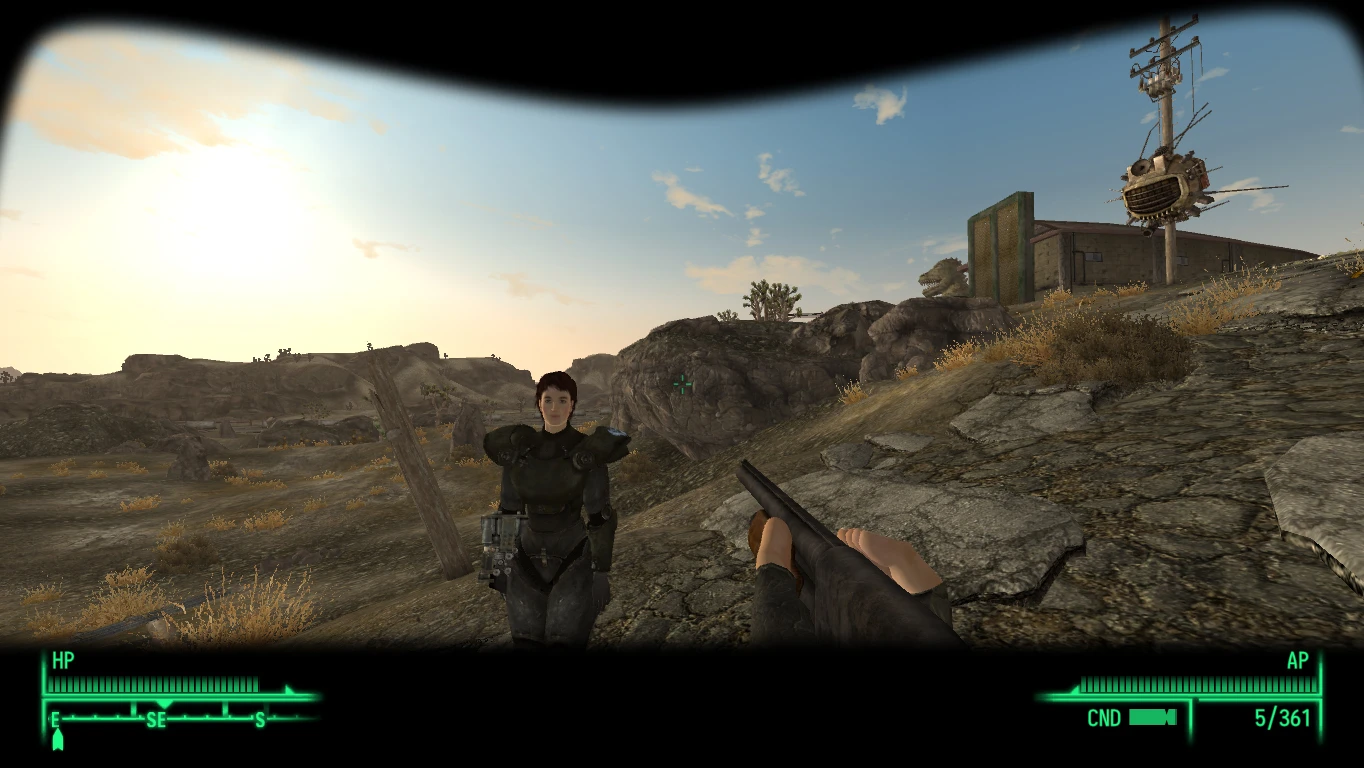
easily customize 1st person visor overlay for every headgear you want
another work from modding study. for people likes 1st person visor but have
performance issue with PN or doesn't want the whole package, this is for you.
this mod only add visor overlay, no other effect, which means if you
want nightvison for example, you have to install other mod to accomplish
the misson,but you can easily add a visor overlay for your new installed nightvison gear.
tmKJ_wYFy8w
forgive me for the ugly visor overlay I made in this demo video,I'm not good at the stuff
and please share with me if you made a cool one
how it works:
it scans several flag/type of equipment you are wearing in this order
glasses, hair, headband, hat, head
search their FormID in the "database"(\Data\Menus\prefabs\visor.xml)
if found a match,then display the corresponding overlay image
if you don't understand the flag,don't worry,headgear always
have at least 1 flag set,so you won't miss anything
how to add visor overlay to a headgear:
1.decide which gear
2.find the FormID of the gear
3.make a image for it,put it into "Data\Textures\interface\visor\" folder
4.use a texteditor to edit the database file, write down the ID and image name.
5.start the game and enjoy
let's use T51-B power armor helmet as example
where can I find FormID of the gear?
fallout wiki (http://fallout.wikia.com/wiki/Fallout:_New_Vegas_armor_and_clothing)
on wiki page, it called "Base ID",for T51-B helmet its "000a6f78"
for gear from other mods,you can use FNVedit to view the ID
you may need change the first 2 numbers correspond to your mod loader order,
make sure you read this (http://fallout.wikia.com/wiki/Help:Form_IDs)
what image format should I use?
DXT5 dds, no mipmap, size 1024px is ok,you don't need 4k texture for overlay,its a waste of memory
and DO NOT use space in filename!
how to edit the database file?
use your favor texteditor open \Data\Menus\prefabs\visor.xml
add a record at the bottom like this,save it and you done
<image name="000a6f78">
<filename>interface\visor\ImageNameYouJustMade.dds</filename>
</image>
--------------------install-------------------------
this mod requires "New Vegas Script Extender(NVSE)"
and "JIP LN NVSE Plugin" to work
copy the Data folder to your game root folder
but DO NOT DO NOT overwrite "hud_main_menu.xml
📊 Mod Details
- Game
- New Vegas Mods
- Author
- bee
- Version
- 0.1
- Downloads
- 2,520
- Endorsements
- 105
- Category
- User Interfaces
- Created
- 4/11/2018
- Updated
- 4/11/2018
🔧 How to Install New Vegas Mods
Download from Nexus.
📖 Full step-by-step install guide for New Vegas →
Visit the official mod page for specific installation instructions for this mod.
🎮 Need cheat codes or console commands? Check ur gaming wiki for New Vegas commands, item IDs, and more.
Keep browsing — more New Vegas mods await