Vendor Radio - ESPless
🟡 Updated this year⚠️ Install Order · 5 steps
Install in this order, then this mod last — most mods fail to load without their framework and dependencies in place.
Preview
🔍 Analysis
- 👍 0.1% endorsement rate
- 🏆 #164 of 441 Gameplay Effects and Changes mods in this game by downloads
📋 About This Mod
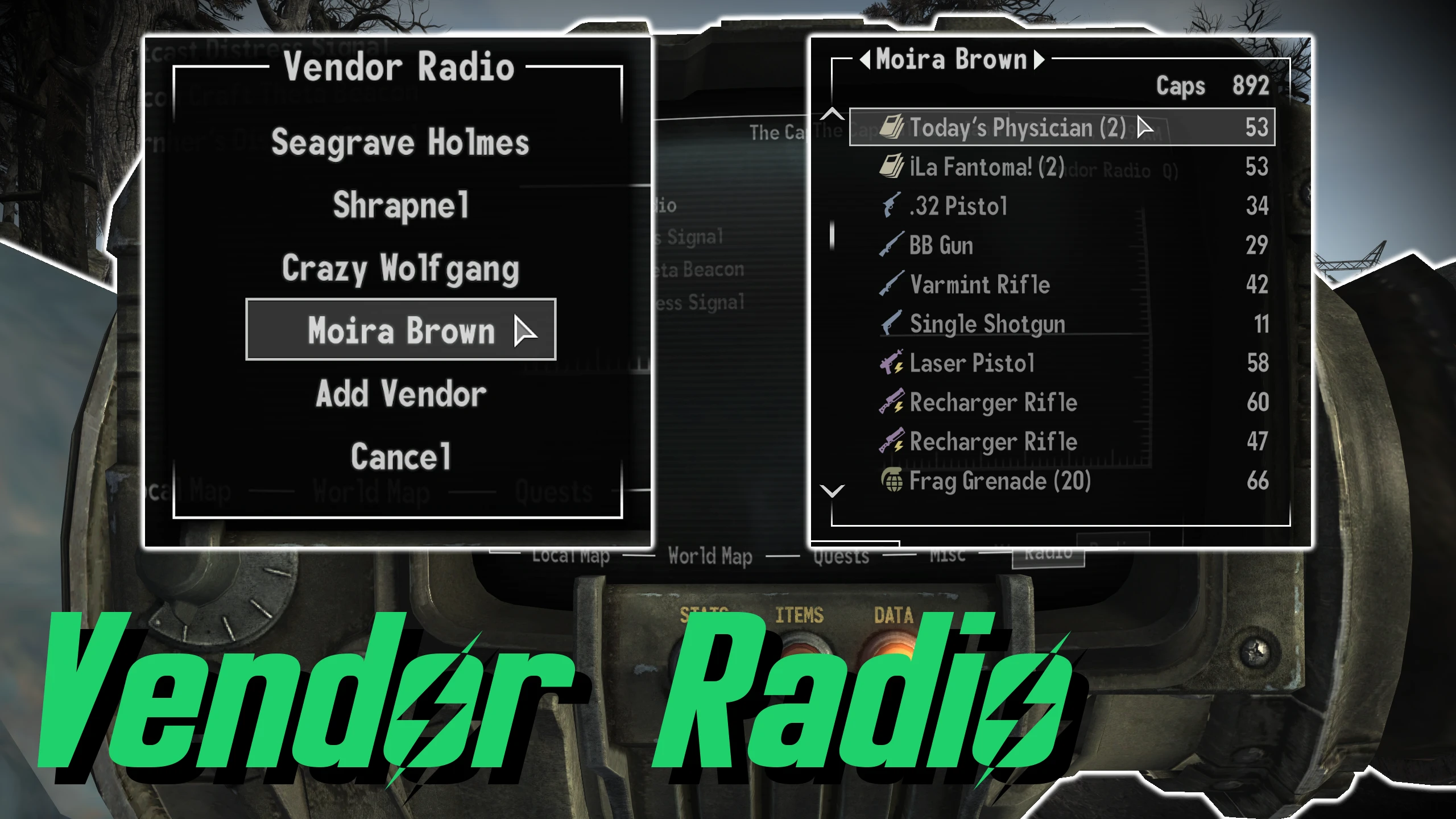
Browse/Purchase items from any vendor directly through the Pip-Boy radio menu.
VENDOR MODES
> Browse Only (Allows the player to browse the vendor's inventory. Buying items is disabled)
> Express Shipping (Purchase/ship items to any unlocked Mojave/Pony Express dropbox)
> Direct Buy (Purchase items directly to the player's inventory)
> Direct Buy & Sell (Purchase/sell items directly to/from the player's inventory)
ACCESS MENU
Click on the "Vendor Radio" button found in the Pip-Boy Data Menu Radio tab.
Open the Vendor Radio menu.
Select the "Settings" option.
Select the "Add Vendor" option.
Any nearby vendors will populate the list.
Select vendor you wish to add to the Vendor Radio.
NOTE: Vendors must be spoken to at least once before they can be added.
REMOVE VENDOR
Open the Vendor Radio menu.
Select the "Settings" option.
Select the "Remove Vendor" option.
Select vendor you wish to remove from the Vendor Radio.
Open the Vendor Radio menu.
Select merchant and shipping location to access the barter menu.
Purchase items as you normally would though the vendor's inventory.
Accept purchase and your order will be shipped to the requested Mojave/Pony Express dropbox.
Configurable via
MCM Extender:
Set vendor mode.
Set price multiplier.
Incompatible with any mod that makes drastic changes
Vendor Radio - ESPless lets Fallout: New Vegas players browse and purchase items from any vendor through the Pip-Boy radio menu, with purchases shipped to any unlocked Mojave or Pony Express dropbox. A popular utility mod with 315 endorsements and nearly 240k downloads, last updated April 2026.
✨ Key Features
📊 Pros & Cons
✅ Pros
- Huge download count (239,762) shows it's a well-loved utility.
- ESPless means no plugin slot usage, which is a big plus for load order management.
- Saves you fast-traveling across the Mojave just to buy a few stimpaks.
⚠️ Cons
- Only 315 endorsements relative to downloads—some users may not have found it essential.
- Requires you to have unlocked dropboxes for shipping, which might be a hassle early game.
- No mention of compatibility with mods that alter vendor inventories or radio menus.
For Fallout: New Vegas players who hate fast-traveling to vendors and want a more convenient shopping experience. Perfect for survival-mode players or those who want to stock up without leaving the wasteland. Skip if you prefer immersive vendor interactions or rarely use the Pip-Boy radio.
💡 Beginner Tips
- Make sure you've unlocked at least one dropbox (Mojave or Pony Express) to receive your purchases.
- Use the radio menu while in a safe area to avoid being interrupted by enemies.
- Check if your other mods modify the Pip-Boy radio menu—this mod might conflict with them.
📊 Mod Details
- Game
- New Vegas Mods
- Author
- Stentorious
- Version
- 2.4.0
- Downloads
- 239,762
- Endorsements
- 315
- Category
- Gameplay Effects and Changes
- Created
- 3/6/2024
- Updated
- 4/23/2026
🔧 How to Install New Vegas Mods
Download from Nexus.
📖 Full step-by-step install guide for New Vegas →
Visit the official mod page for specific installation instructions for this mod.
🎮 Need cheat codes or console commands? Check ur gaming wiki for New Vegas commands, item IDs, and more.
Keep browsing — more New Vegas mods await