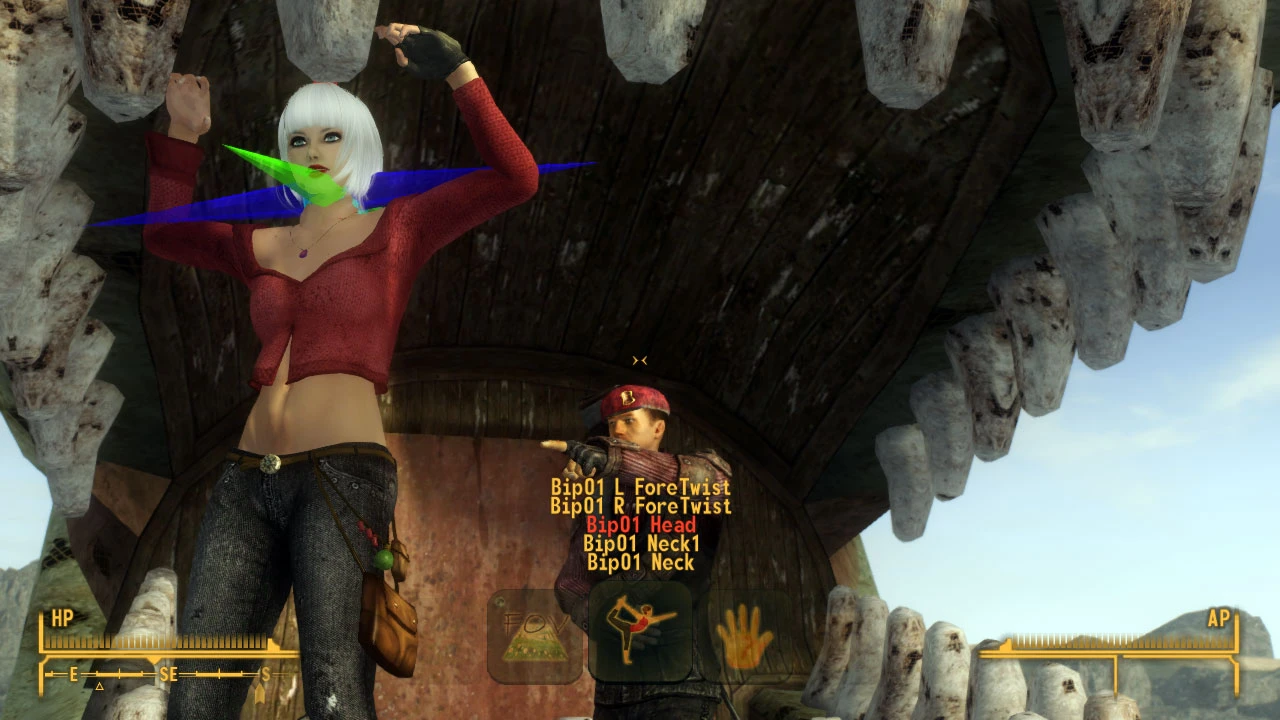
Take a Picture - An ingame small Photo Mode to create your own poses for screenshoots
⚪ Last updated 2020⚠️ Install Order · 5 steps
Install in this order, then this mod last — most mods fail to load without their framework and dependencies in place.
Preview
🔍 Analysis
- 👍 3.4% endorsement rate — high engagement, a strong quality signal
- 🏆 #19 of 22 Utilities mods in this game by downloads
📋 About This Mod
Description
With this mod you can grab, modify and apply a pose to an actor (actually only humans, but potentially creatures too) for screenshot purposes,I uploaded a couple of videos under Video tab to show how it works. You can modify the rotation of every bone in the skeleton and then save the result on a file. Note that the file you generate works only for this mod, it's not a KF file. However, you can easily copy these files out and send them to your friends, and they will have your poses. Or you could still convert them to something else, eventually.
It provides also few helpful tools for screenshoots, like changing the Field of View, colour the screen, apply a picture as frame.
Keys
In general, making poses in a software like Blender is not easy, it takes some time to be accustomed. Doing it in game through this mod maybe can give a better perception of how the pose really appears inside the whole environment, but on the other hand it requires a good amount of hotkeys to use the tools (which, by the way, can all be changed via MCM). I did my best to keep things easy but the subject "poses" is not easy per se.
- Menu Key (default ALT)
If you press it, the main menu with icons will come out on the bottom of the screen. If you press it again, the menu will go away.
- Edit Key (default NumPad Enter)
Even if you can browse through the icons in the menu, you won't be able to select any option nor interact with the mod (with the exception of FEEL, see below) if you're not in EDIT MODE. To go in EDIT MODE, press the Edit Key: the mod will kick you in third person, the game will freeze and the fly cam will be enabled (TFC 1). At this point, you'll be able to move the camera with WASD, and in the meantime you'll be able to interact with all the options in the mod menu. To go out from the EDIT MODE, just press the Edit Key again. CAREFUL: everytime you go out from EDIT MODE, the pose you didn't save will be erased!
- Arrow Keys
They are the main way to browse through the options.
>>> If you are on the icon menu, Left / Right will allow to browse through the various icons.
>>> If you want to select an option, you can press either Up or Down arrow
>>> If the option is a one-time one, then it will be selected. If it has other sub options, then a textual Sub Menu will appear over the icons.
>>> When the Sub Menu is open, you can browse through it using the Up / Down arrows
>>> To select an option on the Sub Menu, you can press Left / Right
>>> To quit the S
Take a Picture is an in-game photo mode tool for Fallout 4 that lets you create custom poses for screenshots. It allows saving poses, grabbing them from NPCs, and modifying them. With 217 endorsements and 6,297 downloads, it's a niche utility for screenshot enthusiasts.
✨ Key Features
📊 Pros & Cons
✅ Pros
- Community-tested with 217 endorsements and over 6k downloads
- Flexible pose system: create, save, grab from NPCs, and modify
- Lightweight utility that doesn't overhaul the game
⚠️ Cons
- Last updated in 2020 — may have compatibility issues with current game versions
- No detailed documentation or install instructions provided
- Limited to screenshot functionality; no gameplay changes
For Fallout 4 players who love taking screenshots and want more control over character poses. Skip if you're looking for gameplay overhauls or if you rarely use photo mode.
💡 Beginner Tips
- Check the mod's forum posts for any compatibility notes with your game version.
- Use a mod manager like Vortex to easily enable/disable the mod when troubleshooting.
- Experiment with grabbing poses from NPCs to quickly get natural-looking stances.
📊 Mod Details
- Game
- New Vegas Mods
- Author
- Fallout2AM
- Version
- 8
- Downloads
- 6,297
- Endorsements
- 217
- Category
- Utilities
- Created
- 1/6/2020
- Updated
- 5/16/2020
🔧 How to Install New Vegas Mods
Download from Nexus.
📖 Full step-by-step install guide for New Vegas →
Visit the official mod page for specific installation instructions for this mod.
🎮 Need cheat codes or console commands? Check ur gaming wiki for New Vegas commands, item IDs, and more.
Keep browsing — more New Vegas mods await