Removeable Pip-Boy Glove
⚪ Last updated 2014⚠️ Install Order · 5 steps
Install in this order, then this mod last — most mods fail to load without their framework and dependencies in place.
Preview
🔍 Analysis
- 👍 5.1% endorsement rate — high engagement, a strong quality signal
- 🏆 #64 of 127 Clothing mods in this game by downloads
📋 About This Mod
UPDATE: Added a script to the Pip-Boy Glove which ensures that the player only ever will have one at a time. If you do pick up another Pip-Boy Glove, say from a dead NPC who was wearing one, the script will remove it automatically. ---------- Okay, not as much explanation on this one, since it's a pretty basic mod.
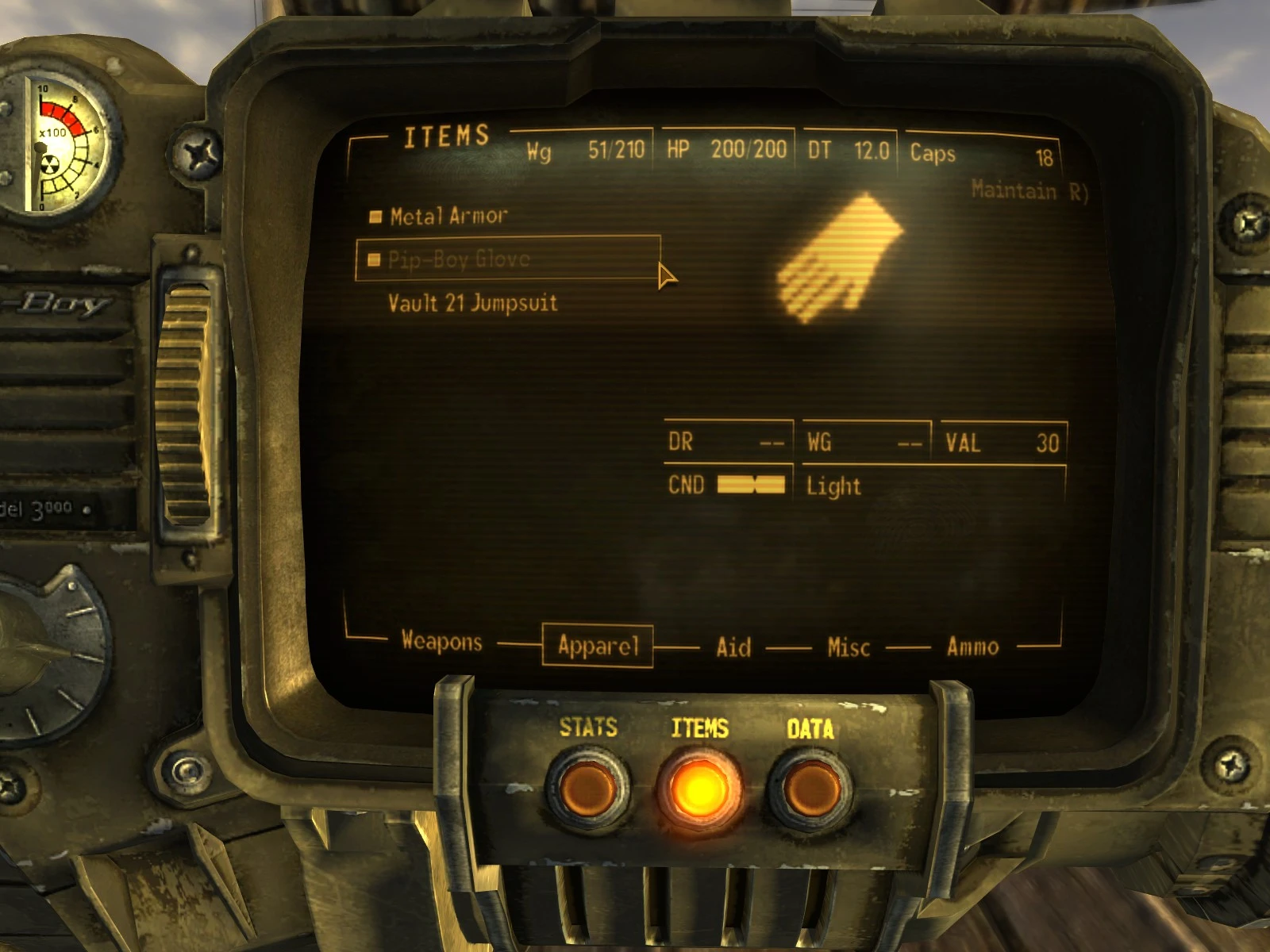
Short version: this removes the tag on the Pip-Boy Glove that makes it not show up in the Apparel screen. This means that you can equip or remove the Pip-Boy Glove whenever you want, just like any other piece of clothing.
So as not to screw up anything dependent on the glove, it has also been marked as a Quest Item. This means you can't drop it, sell it, or transfer it to a container. It also means that nothing can confiscate the Pip-Boy Glove from you, say if you have your equipment confiscated as part of the Dead Money DLC.
That's basically it. You can now take off the glove when it would look better with certain pieces of armor, like the Chinese Stealth Armor or Radiation Suit, and then re-wear it if you later feel the need.
NOTES
Yes, I am quite aware that there are other mods which do this same thing, more or less. However, mine is currently the only one that lets you equip and unequip the glove via the Pip-Boy menu which doesn't also let you drop it or require some extra textures/etc. This is a blood simple mod that ensures nothing will get screwed up in the process, and as such should be very compatible with other mods.
Removeable Pip-Boy Glove lets you equip and remove the Pip-Boy Glove through the inventory screen while preventing accidental loss. A simple quality-of-life mod for Fallout: New Vegas players who want to customize their character's look without losing the Pip-Boy. With 1,293 endorsements and 25,546 downloads, it's a proven community favorite.
✨ Key Features
📊 Pros & Cons
✅ Pros
- Community-approved with 1,293 endorsements and 25,546 downloads
- Solves a real annoyance for players who want to hide the glove for screenshots or roleplay
- Lightweight and focused—does exactly what it says without bloat
⚠️ Cons
- Last updated in 2014—may have compatibility issues with newer mods or game patches
- Only affects the glove; doesn't offer other cosmetic options
For Fallout: New Vegas players who want to remove the Pip-Boy glove for aesthetic screenshots or roleplay without risking losing the Pip-Boy itself. Also great for modders who want a clean look for custom armor. Skip if you're fine with the default glove or want more extensive cosmetic changes.
💡 Beginner Tips
- Install manually by dropping the files into your Data folder, or use a mod manager like Nexus Mod Manager for easier uninstallation.
- After installing, check your inventory to equip/remove the glove—it should appear as a separate item.
- If you're using other mods that alter the Pip-Boy model, test this mod first to ensure no conflicts.
📊 Mod Details
- Game
- New Vegas Mods
- Author
- Yukichigai
- Version
- 2
- Downloads
- 25,546
- Endorsements
- 1,293
- Category
- Clothing
- Created
- 8/2/2014
- Updated
- 8/3/2014
🔧 How to Install New Vegas Mods
Download from Nexus.
📖 Full step-by-step install guide for New Vegas →
Visit the official mod page for specific installation instructions for this mod.
🎮 Need cheat codes or console commands? Check ur gaming wiki for New Vegas commands, item IDs, and more.
Keep browsing — more New Vegas mods await