Pipboy Arm Object Fixed Colors
⚪ Last updated 2010⚠️ Install Order · 5 steps
Install in this order, then this mod last — most mods fail to load without their framework and dependencies in place.
Preview
🔍 Analysis
- 👍 6.0% endorsement rate — high engagement, a strong quality signal
- 🏆 #129 of 208 Models and Textures mods in this game by downloads
📋 About This Mod
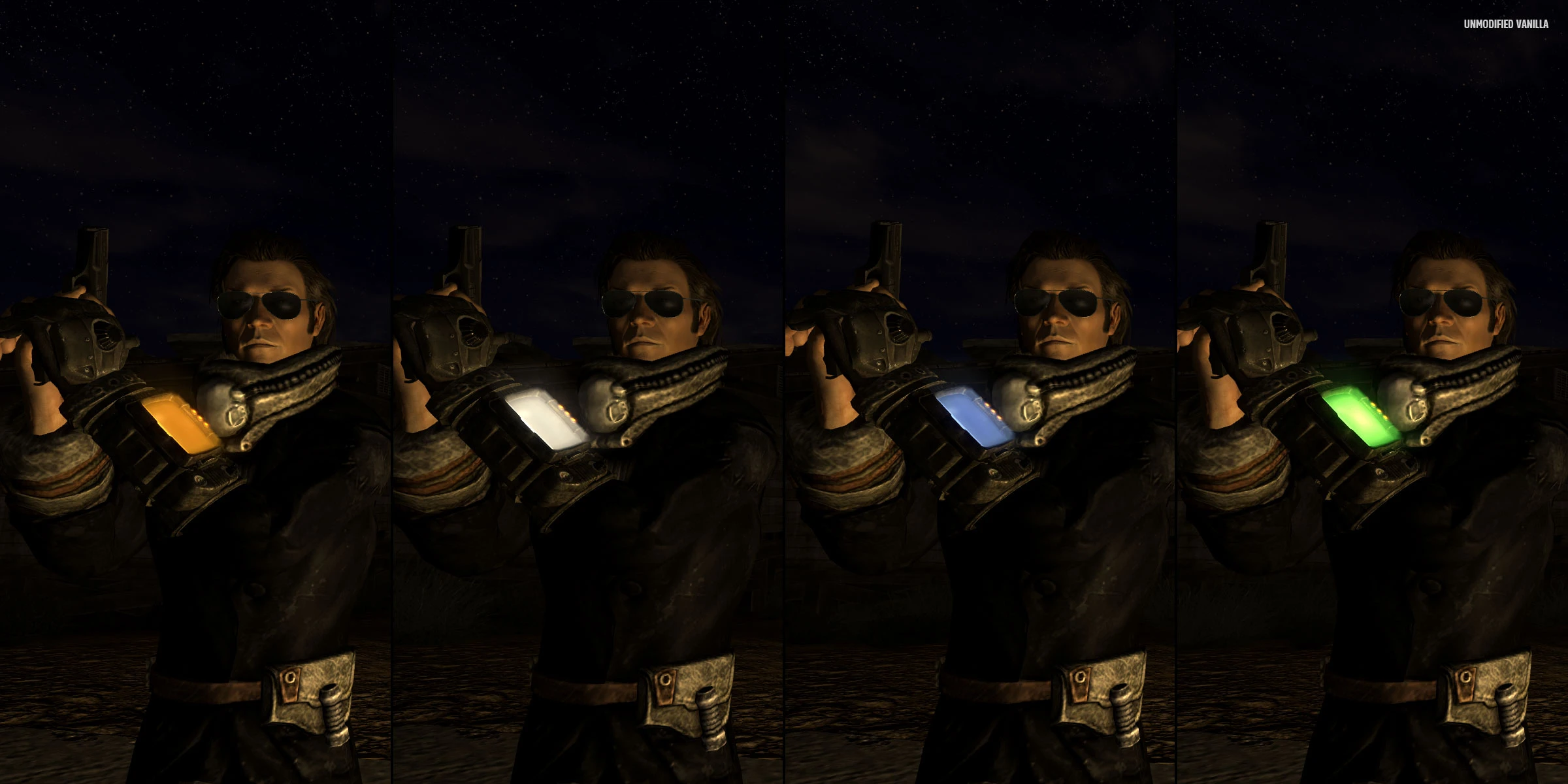
Note that if your UI color preference is green, you don\'t actually need this. Green was default color in Fallout 3 and such are vanilla screen effects in New Vegas, which are not modified by this fix. However, default New Vegas UI color is amber and there are two more colors available from settings menu - white and blue. This fix allows to colorize Pipboy arm object screen effects (stats display on NPCs and glow effect on player\'s Pipboy with light turned on) to fit predefined color schemes. Vanilla mismatch is particularly annoying when reloading a weapon in first person or during Pipboy equip animation - you see a green glow and then amber interface. No idea why player\'s idle screen doesn\'t display same fake stats texture as on NPCs. These are different meshes with different properties. To install, open folder of your color and copy \"Meshes\" (light glow) and \"Textures\" (stats) folders to your \"(Game)\\Data\", overwrite if prompted.
A small Fallout 3 mod that lets you colorize the Pip-Boy arm object screen effects to match predefined color schemes. With 446 endorsements and 7,395 downloads, it's a niche cosmetic tweak for players who want a personalized Pip-Boy look. Last updated in 2010, so it's old but still functional for the base game.
✨ Key Features
📊 Pros & Cons
✅ Pros
- Community-approved with 446 endorsements
- Easy to install and use
- Adds a personal touch to your Pip-Boy
⚠️ Cons
- Last updated in 2010, may not work with mods that alter the Pip-Boy
- Limited to predefined color schemes, no custom color picker
- No screenshots or detailed instructions provided
For Fallout 3 players who want a quick way to change the Pip-Boy's screen color to match their UI or armor. Skip if you're looking for more extensive Pip-Boy customization or play with mods that overhaul the Pip-Boy.
💡 Beginner Tips
- Place the files in your Fallout 3 Data folder and enable the mod via the launcher.
- If you use a mod manager like FOMM, install it through there to keep track of it.
- Test different color schemes to see which one fits your HUD or armor best.
📊 Mod Details
- Game
- New Vegas Mods
- Author
- niedonakofeinowany
- Version
- 1.0
- Downloads
- 7,395
- Endorsements
- 446
- Category
- Models and Textures
- Created
- 11/27/2010
- Updated
- 11/27/2010
🔧 How to Install New Vegas Mods
Download from Nexus.
📖 Full step-by-step install guide for New Vegas →
Visit the official mod page for specific installation instructions for this mod.
🎮 Need cheat codes or console commands? Check ur gaming wiki for New Vegas commands, item IDs, and more.
Keep browsing — more New Vegas mods await