Mojave Tin Pip-Boy
⚪ Last updated 2010⚠️ Install Order · 5 steps
Install in this order, then this mod last — most mods fail to load without their framework and dependencies in place.
Preview
🔍 Analysis
- 👍 6.0% endorsement rate — high engagement, a strong quality signal
- 🏆 #238 of 344 Models and Textures mods in this game by downloads
📋 About This Mod
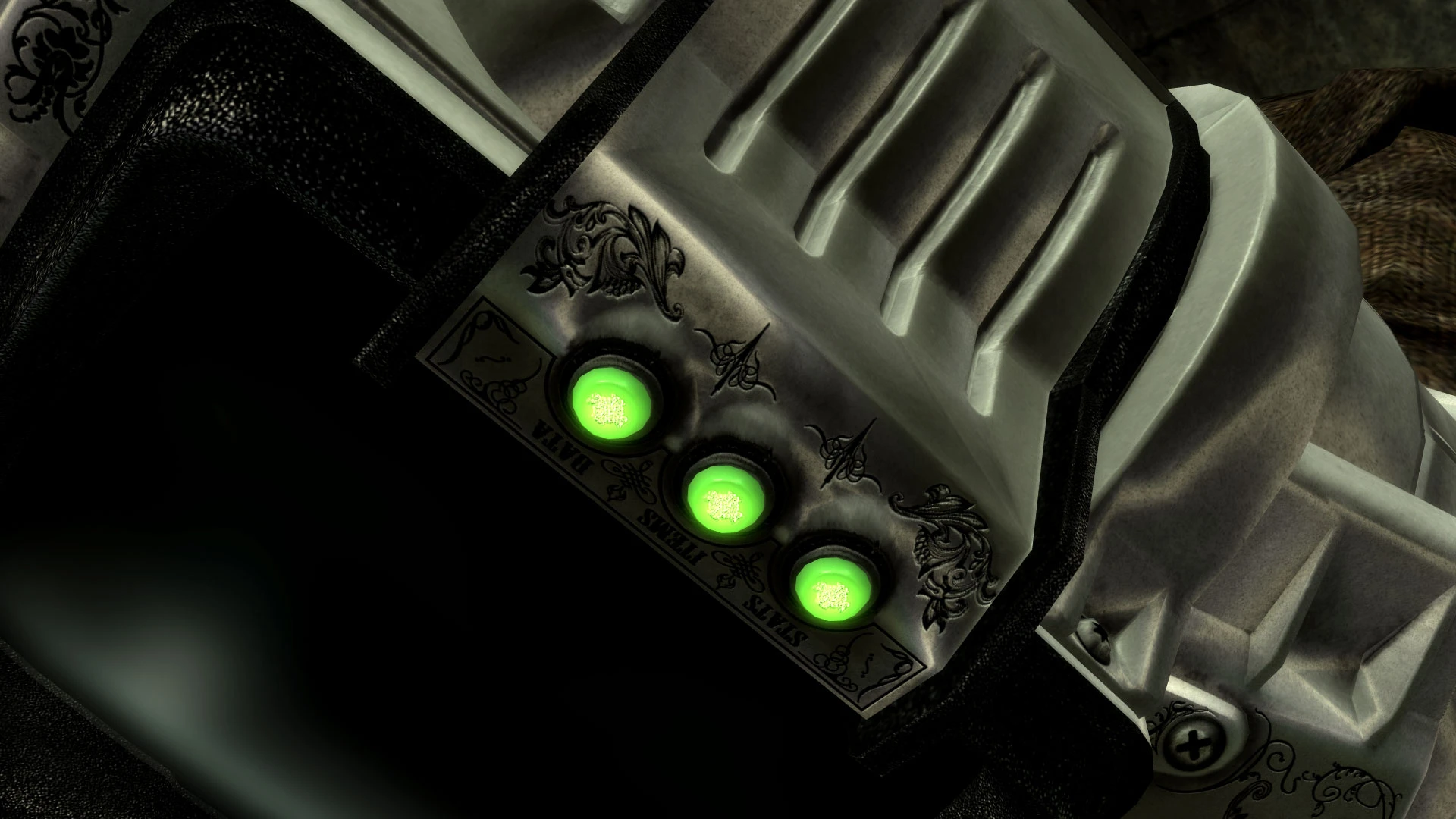
Name: Mojave Tin Pip-Boy Version: 1. 0 Date: 12/4/2010 Category: Models and Textures Author(s): DonKnotts Source: http://www.newvegasnexus.com/downloads/file.php?id=38360 Description =========== A new polished metal Pip-Boy and matching glove texture with a Western theme. Details ======= This new Pip-Boy texture has been made with the ornate engraving and scrollwork on firearms in mind. The look of engraved polished metal fits perfectly into the world of New Vegas. This time around I did the texture in 2048 x 2048 resolution, as this type of texture really wouldn\'t benefit from resolutions any higher. I also won\'t be doing multiple colors this time. I picked the color I thought best fit the theme and stuck with it. Install ======= 1. Extract the files. 2. Cut and paste the folders \"meshes\" and \"textures\" into \\Steam\\steamapps\\common\\Fallout New Vegas\\Data 3. You will need ArchiveInvalidation Invalidated which you can download here: http://www.fallout3nexus.com/downloads/file.php?id=944 4. Tallulahkat has written a brief guide on how to use AI Invalidated here: http://www.newvegasnexus.com/articles/article.php?id=14 Follow those instructions and everything should be fine. If not, then you can do things the old fashioned way by adding these lines to your ArchiveInvalidation.txt meshes/characters/_male/femalelefthandpipboyglove.nif meshes/characters/_male/femalelefthandpipboyglove1st.nif meshes/characters/_male/lefthandpipboyglove.nif meshes/characters/_male/lefthandpipboyglove1st.nif meshes/Pipboy3000/pipboyarm.nif meshes/Pipboy3000/pipboyarmfemale.nif meshes/Pipboy3000/pipboyarmfemalenpc.nif meshes/Pipboy3000/pipboyarmnpc.nif textures/Pipboy3000/pipboyarm01.dds textures/Pipboy3000/pipboyarm01_n.dds textures/Pipboy3000/pipboybtnglow01.dds textures/Pipboy3000/pipboyglove01.dds textures/Pipboy3000/pipboyglove01_n.dds textures/Pipboy3000/screenglare.dds textures/Pipboy3000/PC/pipboyarm01.dds textures/Pipboy3000/PC/pipboyarm01_n.dds textures/Pipboy3000/PC/english/pipboyarm01.dds If you don\'t have an ArchiveInvalidation.txt file, then create a new text file in the games root folder (\\Steam\\steamapps\\common\\Fallout New Vegas) and name it ArchiveInvalidation.txt. Uninstall ========= 1. To uninstall delete the following files: meshes\\characters\\_male\\femalelefthandpipboyglove.nif meshes\\characters\\_male\\femalelefthandpipboyglove1st.nif meshes\\characters\\_male\\lefthandpipboyglove.nif meshes\\characters\\_male\\lefthandpipboyglove1st.nif meshes\\Pipboy3000\\pipboyarm.nif meshes\\Pipboy3000\\pipboyarmfemale.nif meshes\\Pipboy3000\\pipboyarmfemalenpc.nif meshes\\Pipboy3000\\pipboyarmnpc.nif textures\\Pipboy3000\\pipboyarm01.dds textures\\Pipboy3000\\pipboyarm01_n.dds textures\\Pipboy3000\\pipboybtnglow01.dds textures\\Pipboy3000\\pipboyglove01.dds textures\\Pipboy3000\\pipboyglove01_n.dds textures\\Pipboy3000\\screenglare.dds textures\\Pipboy3000\\PC\\pipboyarm01.dds
A polished metal Pip-Boy texture with a Western theme for Fallout: New Vegas. It's a purely cosmetic mod that gives your wrist device a shiny, old-west look. With over 1,300 endorsements and 22,000 downloads, it's a popular choice for players wanting a subtle visual change.
✨ Key Features
📊 Pros & Cons
✅ Pros
- Community favorite – 1,332 endorsements show it's well-liked.
- Easy to install – just drop the texture file in.
- Subtle but noticeable – gives your Pip-Boy a unique look without being over the top.
⚠️ Cons
- Last updated in 2010 – may not be compatible with newer game patches or mods.
- No screenshots or detailed description – you have to install it to see if you like it.
- Purely cosmetic – if you want gameplay changes, this isn't for you.
For Fallout: New Vegas players who want a subtle visual upgrade to their Pip-Boy without changing gameplay. If you're into Western themes or just want something different from the default, this is a quick and easy addition. Skip if you're looking for functional mods or if you prefer modern, high-res textures.
💡 Beginner Tips
- Make sure to place the texture file in the correct folder (usually Data/Textures/interface) – check the mod's readme if included.
- If you're using a mod manager like Nexus Mod Manager, you can install it with one click – just make sure it's activated.
- This mod is old, so if you're playing with the latest patches, test it early to ensure it doesn't conflict with other Pip-Boy mods.
📊 Mod Details
- Game
- New Vegas Mods
- Author
- DonKnotts
- Version
- 1.0
- Downloads
- 22,054
- Endorsements
- 1,332
- Category
- Models and Textures
- Created
- 12/4/2010
- Updated
- 12/4/2010
🔧 How to Install New Vegas Mods
Download from Nexus.
📖 Full step-by-step install guide for New Vegas →
Visit the official mod page for specific installation instructions for this mod.
🎮 Need cheat codes or console commands? Check ur gaming wiki for New Vegas commands, item IDs, and more.
Keep browsing — more New Vegas mods await