Hotkey Scroll Wheel (JIP LN NVSE) (JohnnyGuitar) (yUi-ySI Support)
⚪ Last updated 2022⚠️ Install Order · 8 steps
Install in this order, then this mod last — most mods fail to load without their framework and dependencies in place.
Preview
🔍 Analysis
- 👍 3.3% endorsement rate — high engagement, a strong quality signal
- 🏆 #46 of 435 Gameplay Effects and Changes mods in this game by downloads
📋 About This Mod
Summary
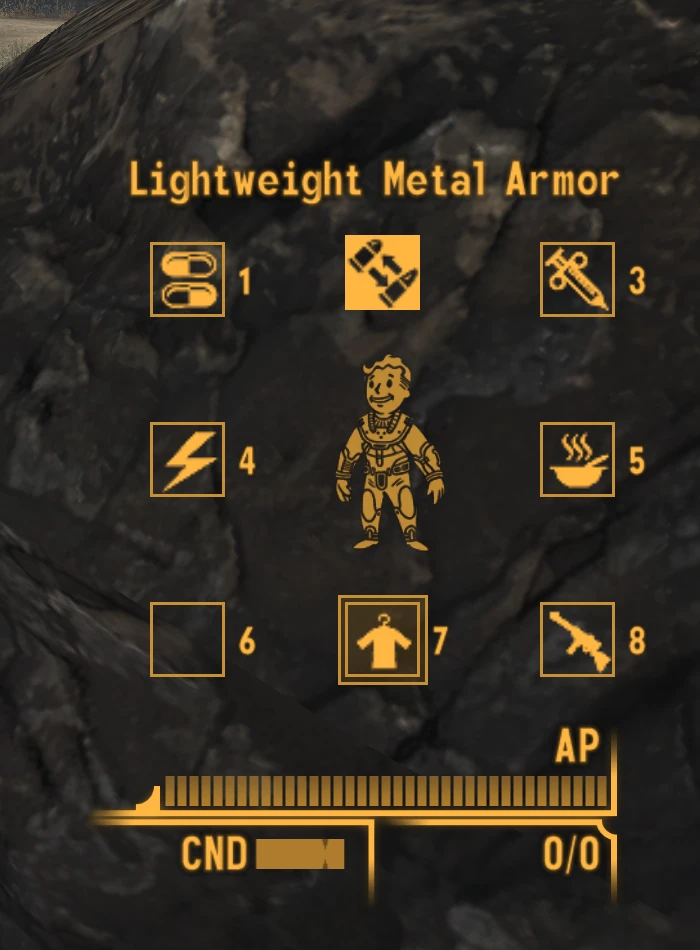
Adds configurable keys to the game that enable the player to cycle through and use their hotkeys. Using the default hotkey interface, which is normally accessed by holding down a hotkey, the player can quickly move through their hotkeys, and select the item they would like to use.
The mod uses 3 hotkeys. The first (the "select" key) makes the hotkey menu appear on the screen, and highlights the hotkey last used by the player. The player can then use their 2 other hotkeys (the "next" and "last" keys) to highlight different items. When the player is on the item that they want to select, pressing the "select" key again will cause that item to equip. If they player decides not to select an item, then the menu will disappear after 2 seconds of inactivity.
The hotkeys by default are assigned to the middle mouse key, mouse wheel up, and mouse wheel down. This can be changed in the config file to another DirectX Scancode (referenced here) if you would like a different hotkey. The "select" key will be permanently disabled for use by this mod, so anything else you bind to it will not work. The "next" and "last" keys will only be disabled while the menu is active. This means that you can still use the mouse wheel to change your view distance, so long as you haven't pressed the select key to open up the hotkey interface.
This mod supports the 2 Hotkey Restored option in lStewieAl's Tweaks. Enable the option in my config file, and you will be able to use all 8 hotkey slots.
If you have yUI installed, and icons for your items (like from ySI), this mod will automatically use them in the hotkey wheel.
Features
-
[]Uses NVSE events for maximum performance and responsiveness. No constantly running game mode scripts
[
]Fully configurable hotkey selection[]Uses Vanilla HUD elements and requires no compatibility patching or new interface files
Requirements & Compatibility
-
[]Requires version 6. 2. 8 (or higher) of xNVSE
[]Requires version 56. 65 (or higher) of JIP LN NVSE
[]Requires version 4. 80 (or higher) of JohnnyGuitar NVSE
[]Compatible with Vanilla UI Plus
[]Compatible with DarNified UI (Updated version only)
[]Compatible with 2 Hotkey Restored from lStewieAl's Tweaks
[]Compatible with yUI and ySI - Sorting Ycons
Recommended Mods
- Stimpak Hotkey
Other Links
If you would like to know what else I am working on, you can follow me on my Twitter. If you want to see more of my mods, you can view all of them on my Nexus profile.
If you would like to see more, you can subscribe to my YouTube channel, or follow me on Twitch, where I play a variety of games and
-
[]Requires version 6. 2. 8 (or higher) of xNVSE
Hotkey Scroll Wheel (JIP LN NVSE) (JohnnyGuitar) (yUi-ySI Support) is a gameplay mod for Fallout: New Vegas that adds configurable keys to cycle through hotkeys using the default hotkey interface. It has 381 endorsements and 11,502 downloads, last updated in July 2022.
✨ Key Features
📊 Pros & Cons
✅ Pros
- Solid community backing with 381 endorsements and over 11k downloads.
- Tight integration with the vanilla hotkey system—no clunky new UI to learn.
- Configurable keys mean you can bind it to whatever feels natural for your playstyle.
⚠️ Cons
- Requires JIP LN NVSE and likely other mods (JohnnyGuitar, yUi-ySI) to work—check your load order.
- Last updated in 2022, so it might not be fully compatible with the latest game patches or other mods.
For Fallout: New Vegas players who use hotkeys heavily and want faster access without pausing. Skip if you prefer controller play or rarely touch the hotkey system.
💡 Beginner Tips
- Make sure you have NVSE and JIP LN NVSE installed first—this mod won't work without them.
- Use a mod manager like Vortex or Mod Organizer 2 to keep track of dependencies and load order.
- Test the hotkeys in a safe area before relying on them in combat to avoid accidental cycling.
📊 Mod Details
- Game
- New Vegas Mods
- Author
- darthbdaman
- Version
- 2.0.0
- Downloads
- 11,502
- Endorsements
- 381
- Category
- Gameplay Effects and Changes
- Created
- 5/3/2018
- Updated
- 7/22/2022
🔧 How to Install New Vegas Mods
Download from Nexus.
📖 Full step-by-step install guide for New Vegas →
Visit the official mod page for specific installation instructions for this mod.
🎮 Need cheat codes or console commands? Check ur gaming wiki for New Vegas commands, item IDs, and more.
Keep browsing — more New Vegas mods await