Classic Centaur Fallout 1 and 2 (MODDERS RESOURCE)
⚪ Last updated 2021⚠️ Install Order · 5 steps
Install in this order, then this mod last — most mods fail to load without their framework and dependencies in place.
Preview
🔍 Analysis
- 👍 3.3% endorsement rate — high engagement, a strong quality signal
- 🏆 #7 of 25 Creatures mods in this game by downloads
📋 About This Mod
Classic Centaur Fallout 1 and 2 (MODDERS RESOURCE)
---DESCRIPTION---
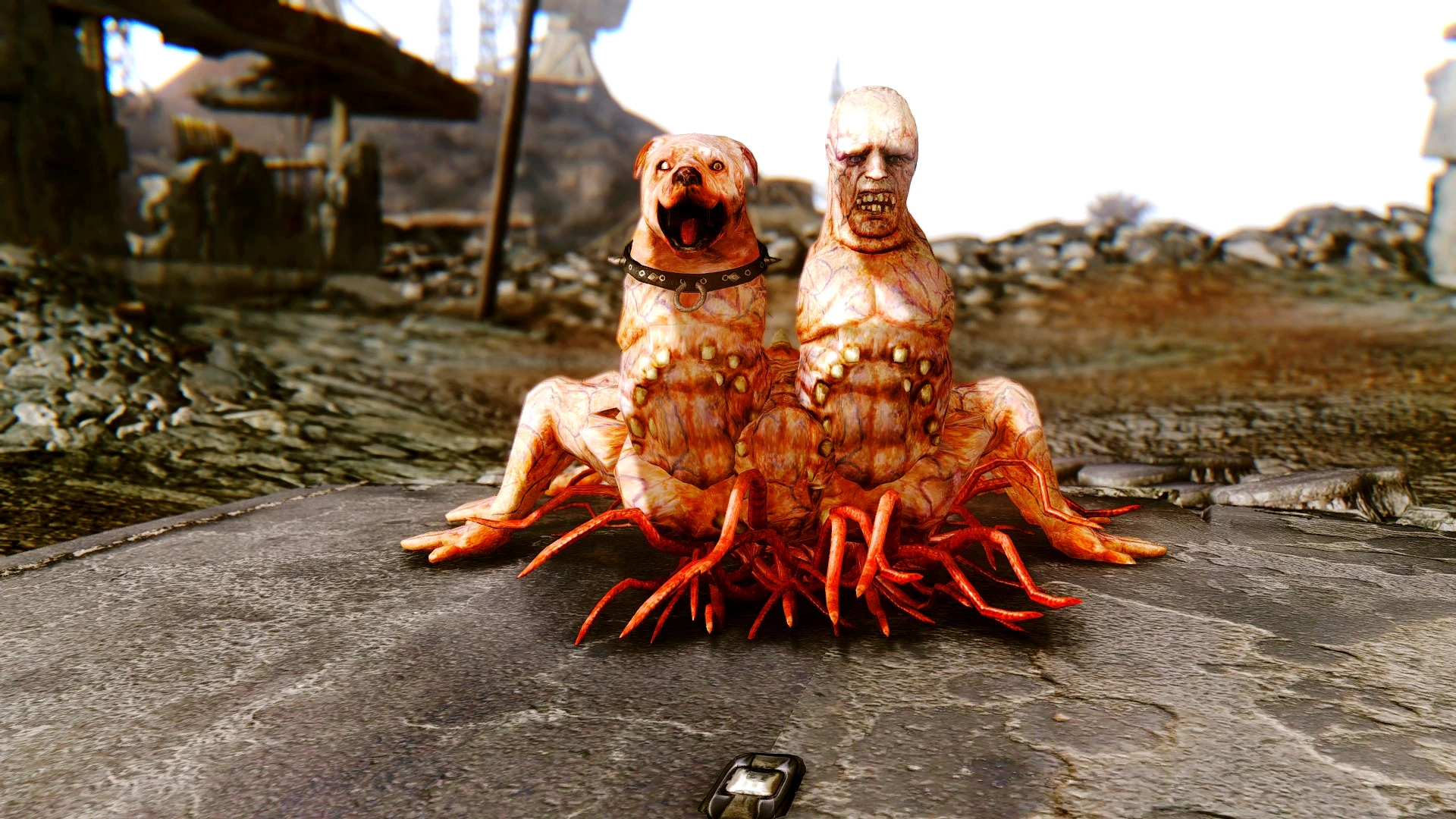
This brings to the game a recreation of the Two-headed Human Dog Classic Centaur from Fallout 1 and 2. A pack of them can be found lurking in Black Mountain area.
According to Wikipedia, Centaurs are the result of combining various kinds of animals and people and infecting them with the Forced Evolutionary Virus. These abominations are horribly disfigured creatures with little intelligence but an affinity for their super mutant masters.
Two-headed centaurs are sizable creatures, with a canine head on the right and a humanoid one on the left, atop a large, misshapen torso and six humanoid arms that serve as legs. The canine head has a thick metal collar around its neck, adorned with spikes. Two-headed centaurs have only been encountered on the West Coast in New California.
---FEATURES---
A recreation of the Two-headed Human Dog Classic Centaur from Fallout 1 and 2. Two types of Classic Centaur were provided: One with melee attacks and one that shoots radioactive spit from both heads.
---LIMITATIONS---
The models lack of Dismembered parts.
The plugin provided only added a pack of those centaurs in Black Mountain area in order to showcase the models. They won't appear anywhere else in the game.
---PLUGINS---
Classic Centaur.esp
--REQUIREMENTS--
Fallout New Vegas.
---INSTALLATION---
1) Download the file called Classic Centaur.zip
2) Unzip the file.
3) Open the folder called Classic Centaur.
4)Grab both Meshes and Textures folders and the plugin called Classic Centaur.esp and drop them into your Data Folder (the one where your FalloutNV.exe and FalloutNVLauncher.exe are located).
5) Open Fallout Mod Manager or any other Mod Manager you're using, find the plugin Classic Centaur.esp you dropped in the Data folder and tick it. Start the game.
---UNINSTALLATION---
1)Go to your Data folder (the one where your FalloutNV.exe and FalloutNVLauncher.exe are located), open your meshes folder, then open your creatures folder, then open your Radscorpion folder and erase the files ClassicCentaur.nif and skeleton- ClassicCentaur.nif; 2)Then go to your Data folder, open your textures folder and erase the one called 1prodlimenbox; 5)Go to your Data folder again and erase the plugin Classic Centaur.esp
---TOOLS USED---
Blender 2. 49 (Reshapping).
GIMP 2. 10. 10 (Retexturing).
---CREDITS---
Prodlimen f
📊 Mod Details
- Game
- New Vegas Mods
- Author
- prodlimen
- Version
- 1
- Downloads
- 2,587
- Endorsements
- 85
- Category
- Creatures
- Created
- 4/10/2021
- Updated
- 4/10/2021
🔧 How to Install New Vegas Mods
Download from Nexus.
📖 Full step-by-step install guide for New Vegas →
Visit the official mod page for specific installation instructions for this mod.
🎮 Need cheat codes or console commands? Check ur gaming wiki for New Vegas commands, item IDs, and more.
Keep browsing — more New Vegas mods await