Brotherhood T45d Armor Distribution Fix
⚪ Last updated 2011⚠️ Install Order · 5 steps
Install in this order, then this mod last — most mods fail to load without their framework and dependencies in place.
Preview
🔍 Analysis
- 👍 4.0% endorsement rate — high engagement, a strong quality signal
- 🏆 #13 of 88 Bug Fixes mods in this game by downloads
📋 About This Mod
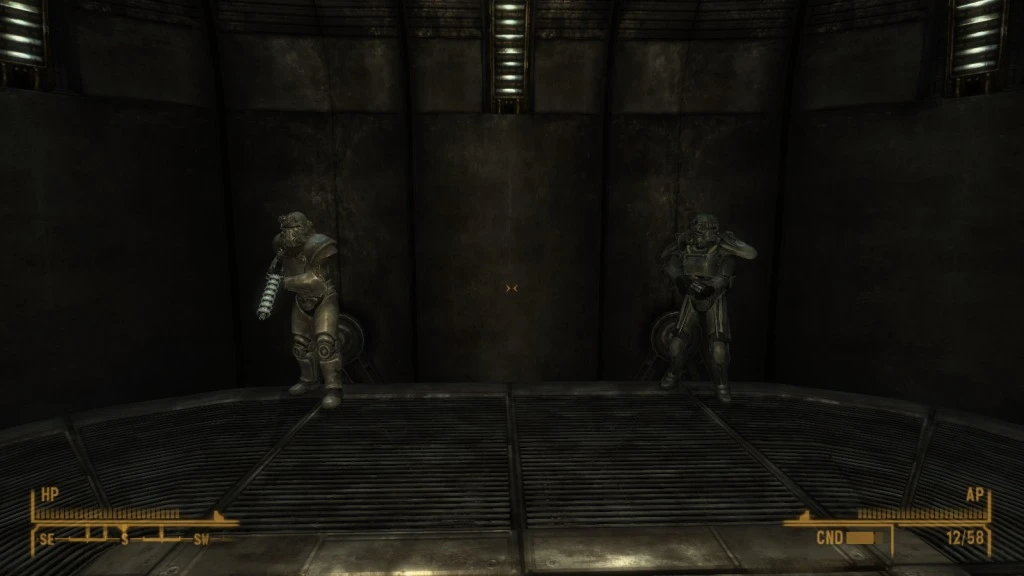
This bug fix is included in Yukichigai\'s Unofficial Patch (YUP) If you\'re looking for a single file that fixes all your bugs, why not give YUP a shot? ---------- The lists which control the distribution of Brotherhood Power Armor are not set up properly. Although the game is set up with two lists for the two variants of Brotherhood Power Armor - T-45d and T-51b - The list used by the T-45d list is filled with the WRONG type of armor. This results in the odd T-45d helmet/T-51b armor combination seen semi-frequently in Hidden Valley and elsewhere. This mod corrects the issue by filling the list in question (CondPowerArmorBrotherhood) with Brotherhood T-45d Power Armor. This small change means that any Brotherhood of Steel Paladin or Patrol member you would normally see with a T-45d helmet will also be wearing the armor to match. IMPACT ON THE GAME Aside from Brotherhood of Steel members actually being seen in T-45d Power Armor, the most obvious change is that the dead Brotherhood members you find as part of the quest Still in the Dark will be wearing T-45d Power Armor. Brotherhood Paladins will still be attired in T-51b armor, almost without exception. IMPORTANT NOTE An earlier bugfix by Zenball (\'\'Power Armor Helmet Fix\'\') corrected this issue by simply making every armored Brotherhood member wear the full compliment of T-51b armor. I believe this was not the correct way to fix this problem. More importantly, the nature of Zenball\'s earlier fix will stop THIS fix from working correctly. Please DO NOT use Zenball\'s earlier fix with this bugfix.
This bug fix mod ensures Brotherhood T-45d Power Armor is actually worn by Brotherhood of Steel members in Fallout 3. With 443 endorsements and over 11,000 downloads, it's a community-approved fix for a common immersion-breaking issue. Last updated in 2011, it remains a simple, effective solution for players who want accurate armor distribution.
✨ Key Features
📊 Pros & Cons
✅ Pros
- Community-approved fix (443 endorsements) that addresses a real immersion issue.
- Lightweight and focused—does exactly what it says without extra bloat.
- Over 11,000 downloads show it's a go-to fix for many players.
⚠️ Cons
- Last updated in 2011—may not be compatible with newer mod setups or the GOG version without testing.
- Only addresses armor distribution; doesn't fix other potential Brotherhood armor issues.
For Fallout 3 players who notice Brotherhood members running around in non-standard armor and want lore-friendly consistency. Also for modders building load orders who need a reliable fix. Skip if you don't care about NPC armor accuracy or if you're playing with overhaul mods that already handle this.
💡 Beginner Tips
- If you're using a mod manager like FOMM or Vortex, just download and activate—it's a simple plugin.
- Place this mod early in your load order to ensure other armor mods don't overwrite the fix.
- Check if your other mods alter Brotherhood armor distribution; if so, test in-game to see which takes priority.
📊 Mod Details
- Game
- New Vegas Mods
- Author
- Yukichigai
- Version
- 0.1
- Downloads
- 11,009
- Endorsements
- 443
- Category
- Bug Fixes
- Created
- 3/8/2011
- Updated
- 3/8/2011
🔧 How to Install New Vegas Mods
Download from Nexus.
📖 Full step-by-step install guide for New Vegas →
Visit the official mod page for specific installation instructions for this mod.
🎮 Need cheat codes or console commands? Check ur gaming wiki for New Vegas commands, item IDs, and more.
Keep browsing — more New Vegas mods await