Bleak and Grim ENB
⚪ Last updated 2014⚠️ Install Order · 6 steps
1🛠️ NVSE — New Vegas Script Extender Download ↗
2🛠️ 4GB Patcher — FNV 4GB Patcher Download ↗
3🔧 NVAC — New Vegas Anti Crash Download ↗
4🧩 JIP LN — JIP LN NVSE Plugin Download ↗
5🔧 YUP — Yukichigai Unofficial Patch Download ↗
6📦 Project Nevada Find it →
Install in this order, then this mod last — most mods fail to load without their framework and dependencies in place.
Preview
🔍 Analysis
- 👍 4.1% endorsement rate — high engagement, a strong quality signal
- 🏆 #9 of 22 ENB presets mods in this game by downloads
📋 About This Mod
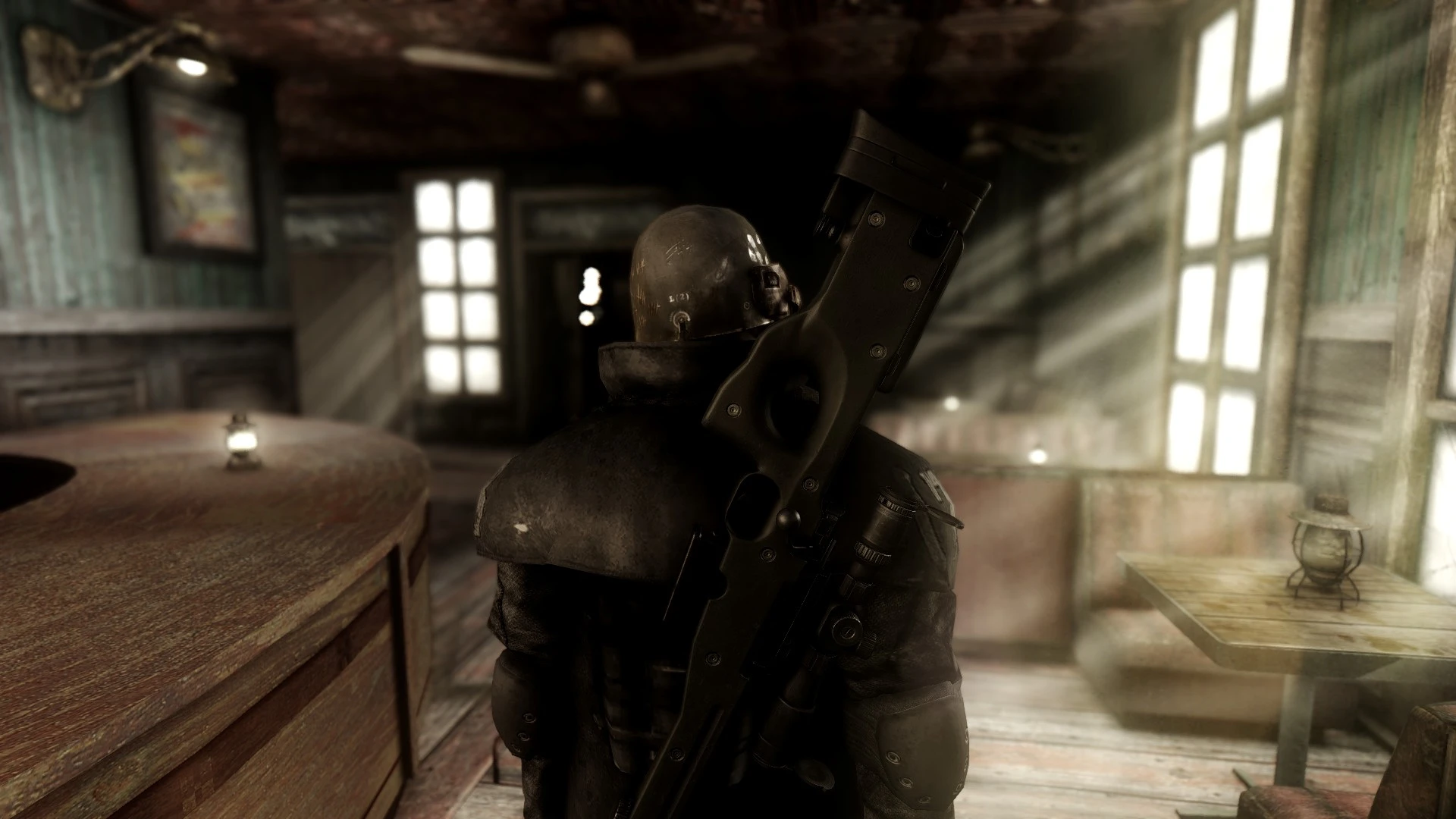
----- Bleak and Grim ENB - An ONIX 2. 00 Edit -----
Original ENB by: xCamoLegend
Edits by: Beren
Credits:
- xCamoLegend for the original Onix ENB, off of which this is based. Thank you xCamoLegend!
- Sal203 for the lighting mod that made this possible
- Kyokushinoyama for his files that were used in the creation of this preset
- Boris Vorontsov for the ENB binary that made everything possible
_________________________________________________________________________________________________________________
----- Features: -----
_________________________________________________________________________________________________________________
- Enhanced Vision support for Project Nevada -- Highly recommended!!
- Dramatic Lighting, very heavy shadows in certain places -- this is why I recommend Project Nevada - NIGHT VISION MAY BE NECESSARY AT TIMES
NOTE: THIS IS NOT REALISTIC. I use this preset because I love the look and feel of the wasteland, the challenge of requiring night vision, and simply the eye candy of the screenshots with deep shadows.
_________________________________________________________________________________________________________________
----- Installation: -----
_________________________________________________________________________________________________________________
1. Download ENB v0. 263 for FONV - download link is at the bottom
2. Extract only the d3d9.dll and enbhost.exe from the WRAPPER VERSION and place them into your Fallout New Vegas directory
--- By default, your fallout directory is located at C:>>Program Files (x86)>>Steam>>SteamApps>>common>>Fallout New Vegas, (where FalloutNVLauncher is located)
** NOTE: If you use the 4GB patch, you need to place the d3d9.dll in the exes folder.
--- This is located at C:>>Program Files (x86)>>Steam>>SteamApps>>common>>Fallout New Vegas>>exes
3. Download my files and place it in the same location
4. Open enblocal.ini and edit the following two lines ACCORDING TO YOUR SPECS!!! - Google it if you need help
ReservedMemorySizeMb=xxx
VideoMemorySizeMb=xxxx
5. Disable Anti-Aliasing and Anisotropic Filtering in your Fallout Launcher
_________________________________________________________________________________________________________________
----- Required Mods: -----
_________________________________________________________________________________________________________________
1. FNV Realistic Wasteland Lighting
2. Interior Lighting Overhaul
3. Project Nevada - HIGHLY RECOMMENDED FOR NIGHT VISION! -- This also adds the visor overlay that you see in some screenshots. I love it.
__________________________________🤖 AI-enhanced — based on mod data
Bleak and Grim ENB offers two gritty, cinematic ENB presets for Fallout: New Vegas, based on Onix ENB 2.00 and designed to pair with Project Nevada Night Vision. With 355 endorsements and 8,577 downloads, it's a niche but appreciated visual overhaul for players seeking a darker, more dramatic atmosphere.
✨ Key Features
Two ENB presets included, both aiming for a gritty, dramatic, and cinematic feel
Based on Onix ENB 2.00 by xCamoLegend, posted with permission
Designed for use with Project Nevada Night Vision
Last updated in October 2014, indicating a long-standing preset
📊 Pros & Cons
✅ Pros
- Solid community backing with 355 endorsements and over 8.5k downloads
- Two presets in one download give you options without extra downloads
- Built on a proven base (Onix ENB) and tailored for a specific gameplay mod, so it's a thoughtful combo
⚠️ Cons
- Last updated in 2014 — may not be fully compatible with current game patches or newer ENB versions
- Requires Project Nevada Night Vision to get the intended effect, so it's not a standalone visual overhaul
🎯 Is This For You?
For Fallout: New Vegas players who want a darker, more cinematic look and already use Project Nevada. If you're into gritty atmospheres and don't mind tweaking ENB settings, this is worth a shot. Skip if you prefer a vanilla-friendly or performance-light preset.
For Fallout: New Vegas players who want a darker, more cinematic look and already use Project Nevada. If you're into gritty atmospheres and don't mind tweaking ENB settings, this is worth a shot. Skip if you prefer a vanilla-friendly or performance-light preset.
📦 Install:Medium· 10-15 minutes
💡 Beginner Tips
- Make sure you have ENB Series installed and know how to toggle it in-game (Shift+Enter) to adjust settings live.
- Since it's designed for Project Nevada Night Vision, enable that mod's night vision and test in dark areas to see the full effect.
- Back up your current ENB files before overwriting, so you can revert if you don't like the look.
📊 Mod Details
- Game
- New Vegas Mods
- Author
- Beren for editing - xCamoLegend for the original
- Version
- 1.0
- Downloads
- 8,577
- Endorsements
- 355
- Category
- ENB presets
- Created
- 9/30/2014
- Updated
- 10/4/2014
🔧 How to Install New Vegas Mods
Download from Nexus.
📖 Full step-by-step install guide for New Vegas →
Visit the official mod page for specific installation instructions for this mod.
🎮 Need cheat codes or console commands? Check ur gaming wiki for New Vegas commands, item IDs, and more.
Keep browsing — more New Vegas mods await