Sound The Alarm
⚪ Last updated 2020Preview
🔍 Analysis
- 👍 2.9% endorsement rate — high engagement, a strong quality signal
- 🏆 #7 of 32 User Interface mods in this game by downloads
📋 About This Mod
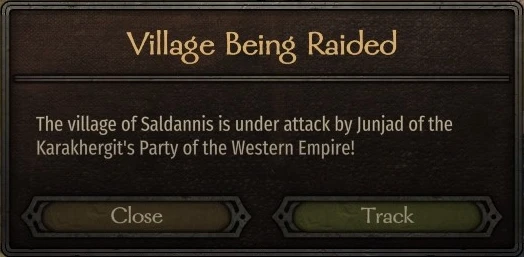
Functional alert system featuring popups for when the players fiefs (village, town, castle) are attacked and when any empire signs declarations of war or peace.
Sound The Alarm
Bannerlord Alert System
Sound The Alarm aims to bring the important information to the player by displaying a popup automatically if one of their fiefs are under attack (either directly owned by the player, or if the player is the leader of the kingdom whose fiefs are under attack) and when a war/peace declaration is signed, either by the AI, or by the faction that the player is currently in.
Helpful for those who might miss the small banner that appears when one of the fiefs are raided/under siege, or the message that appears as text in the bottom left when war/peace is declared.
By default, when the popup appears the game is paused automatically. This functionality however can be toggled on/off via the config file, or by using ModLib or Mod Configuration Menu v4 (depending on the version).
As of Version 1. 0. 6, Sound The Alarm now contains a version that fully integrates ModLib for easily changing mod values in-game.
As of Version 1. 5. 1a, the ModLib integration is replaced with Mod Configuration Menu v4 as a dependency to reduce issues with Mod updates breaking the mod/game.
If you enjoy the mod, leaving a comment or endorsement is the best way to show your support.
How to use
At any time, if one of your fiefs are attacked either under siege or being raided, an alert will show up informing you that this is the case and you can respond either by closing the window, or by selecting the 'Track' option to track where that fief is located. Likewise, whenever a war is declared or when peace is signed between empires.
Installation
Install via Vortex mod manager or by dragging and dropping the SoundTheAlarm folder into the Mount & Blade II Bannerlord/Modules folder.For those using the ModLib Integrated version, you will need to have ModLib installed and loaded before Sound The Alarm.
For those using the Mod Configuration Menu v4 dependent versions, you will need to have MCMv4 and it's dependencies (Harmony, ButterLib, and UIExtender) installed and loaded before Sound the Alarm. ModLib is no longer required for this version.
Translations
For those wishing to create translations for this mod, you are free to do so, however you must list Sound The Alarm as a requirement and the files you wish to upload to nexus must only be the sta_strings.xml file located in the SoundTheAlarm\ModuleData folder.
Thus your folder structure should look like the following:
- SoundTheAlarm
- ModuleData
- Languages
- <your_language_code> (for example: "DE", "PL", "TR")
- sta_strings.xml
Compatibility
If you are experiencing crashes on startup, please read and act on all the information below. If the problem still persists, please let me know by leaving a post with as much information as possible.Unblock .dll files for each of your mods
Sometimes, Windows will automatically block downloaded .dll files from the internet for security reasons. As Bannerlord uses .dll files for modding, it is worth checking to see if this issue is happening with you.
-
[]Go to Mount & Blade II Bannerlord\Modules folder.
[
]For each mod you have installed, enter into it's folder, then into the bin folder, then into the Win64_Shipping_Client folder.[]In this folder contains the mods .dll files, right-click the .dll (for multiple .dll files do them one at a time) and click Properties
[]If the .dll file is blocked, there will be a a section at the bottom of the Properties window that looks like this.
- Click unblock and repeat for each mod.
Check the SubModule.xml file for each of your mods
When creating mods, they must each contain a SubModule.xml file that is listed in the first directory, for e
📊 Mod Details
- Game
- Mountandblade2bannerlord Mods
- Author
- Alpine Softworks
- Version
- 1.5.1
- Downloads
- 250,302
- Endorsements
- 7,229
- Category
- User Interface
- Created
- 4/8/2020
- Updated
- 9/14/2020
🔧 How to Install Mountandblade2bannerlord Mods
Download from Nexus Mods.
📖 Full step-by-step install guide for Mountandblade2bannerlord →
Visit the official mod page for specific installation instructions for this mod.
🎮 Need cheat codes or console commands? Check ur gaming wiki for Mountandblade2bannerlord commands, item IDs, and more.
Keep browsing — more Mountandblade2bannerlord mods await