BannerLord Mod Launcher
⚪ Last updated 2020Preview
🔍 Analysis
- 👍 3.0% endorsement rate — high engagement, a strong quality signal
- 🏆 #10 of 28 Utilities mods in this game by downloads
📋 About This Mod
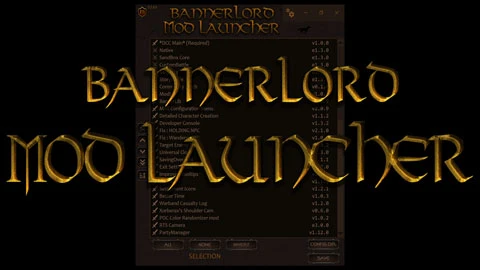
A Mod-Friendly standalone game launcher
-
[]Can read/write your LauncherData.xml, without breaking compatibility with the standard launcher.
[
]Supports only single player for now.[]Does some basic validation: official mods cannot be deselected, non single player mods cannot be selected, indicators when you place a mod before its dependencies.
[]Will try to unblock any files referenced in the DLLName or Assemblies section of SubModule.xml for enabled modules (when you run the game).
-
[]Extract to your main folder Steamapps\Common\Mount and blade II Bannerlord\ (Note: Not the main .exe folder)
[
]Create a shortcut on your desktop to the new launcher.[]Upon first load, if it asks for your Bannerlord folder, point it your install directory: Steamapps\Common\Mount and blade II Bannerlord\
[]Without touching the original five modules, adjust your mod sorting using this guide as a guideline for proper mod sorting.
Sorting incorrectly WILL result in crashes and instability so don't blindly hit the sort button and play.
[]Hit "Save" and then "Play" to launch the game. Hitting Save will automatically backup your current and previous mod load-out
[]As long as your mods have no issues, the game should launch
Adding New Mods
-
[]When you install a new mod, it will show up unchecked on the bottom of the Mod List.
[
]Choose its order (or leave it), then hit Save and Run. The launcher will remember your settings for next time so you need to just hit Run.Starting Mod Launcher via Steam
-
[]See this guide: https://www.nexusmods.com/mountandblade2bannerlord/articles/104
Troubleshooting
First, follow the official Steam Guide for fixing the game if it does not run correctly:
https://steamcommunity.com/app/261550/discussions/0/2149847049318759493/
- [
[]If your order ever messes up really bad, just click "Config Dir", delete the "LauncherData.xml", then replace it with the highest numbered one in the "BannerLordLauncher Backups" folder to restore your last load-out.
-
[]When moving things around in the list (which had ordering issues due to dependencies), the issues might still appear even after the order has been fixed. I believe this is a timing issue, but have not been able to pinpoint the exact cause. Moving the offending row up+down in the list should hide the validation icon.
How Sorting works
-
[]All the sorting steps that you defined in configuration are applied in order.
[
]The application check through all mods and their dependencies and moves any dependencies that are in the wrong spot, while trying to maintain the above order.[]All assemblies referenced in the SubModule.xml file are checked for references to assemblies in other modules and applies the above for them.
Sorting configuration
-
[]Drag stuff between the two lists.
[]The list on the left is for the available fields to sort by and the list on the right is for the actual fields that will be used.
[]Click on the sword icons to switch between ascending and descending sorting.
[]The sorting algorithm will go through the list on the right and will stop at the first field that succeeds.
[]If a tie-breaker is needed, it will go to the next field in the list and so on.
data:image/png;base64,iVBORw0KGgoAAAANSUhEUgAAAyIAAAH8CAYAAAAt5hsoAAAgAElEQVR4Aezd29M3WXUfdt/YZjhIzDAz75ze8zsnZmAQkhAwIEtCB8yAJCRjwSBAdpgpVWLHCiPHsRFOkYucywjJSSmpyo1QVSqpyk0gqVQucsX/1anPWuvbvX+/53mZkYQISZ6Lru7ee+21vuuw916ru3/P87f+p3/2q9vVcWWDqxi4ioGrGLiKgasYuIqBqxi4ioGrGLiKgR9lDPytH6WwK1lXwX0VA1cxcBUDVzFwFQNXMXAVA1cxcBUDVzEgBvZC5LkbT245nr/51Pb0U49v7711fXvp3q3t2RtPbDevPbLdeuzR7dnrT2wv3L5eB7oXbl3f3nvrqe3F2ze6ve7P2oYezYt35hj6tL3vrD0ywh821+j0GQdfjcP37ND+/rs3t/ffvVXn9925Wfqh046X8/tc3+5r
-
[]Drag stuff between the two lists.
-
[]All the sorting steps that you defined in configuration are applied in order.
-
[]See this guide: https://www.nexusmods.com/mountandblade2bannerlord/articles/104
-
[]When you install a new mod, it will show up unchecked on the bottom of the Mod List.
-
[]Extract to your main folder Steamapps\Common\Mount and blade II Bannerlord\ (Note: Not the main .exe folder)
📊 Mod Details
- Game
- Mountandblade2bannerlord Mods
- Author
- d2allgr
- Version
- 0.2.4
- Downloads
- 360,379
- Endorsements
- 10,643
- Category
- Utilities
- Created
- 4/7/2020
- Updated
- 4/29/2020
🔧 How to Install Mountandblade2bannerlord Mods
Download from Nexus Mods.
📖 Full step-by-step install guide for Mountandblade2bannerlord →
Visit the official mod page for specific installation instructions for this mod.
🎮 Need cheat codes or console commands? Check ur gaming wiki for Mountandblade2bannerlord commands, item IDs, and more.
Keep browsing — more Mountandblade2bannerlord mods await