UI Tweaks
🟠 Updated over a year ago⚠️ Install Order · 2 steps
Install in this order, then this mod last — most mods fail to load without their framework and dependencies in place.
Preview
🔍 Analysis
- 👍 2.1% endorsement rate — high engagement, a strong quality signal
- 🏆 #8 of 95 User Interface mods in this game by downloads
📋 About This Mod
1. 5 Update:
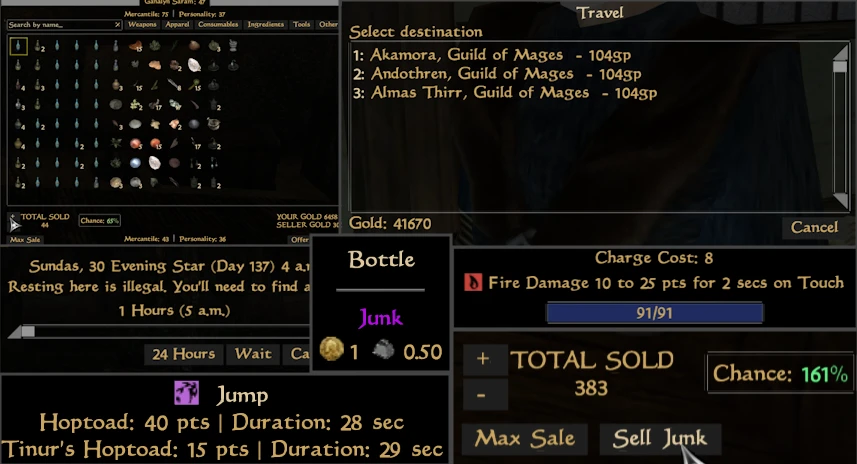
New Embedded Menus: Open Persuasion/Spell Barter/Travel/Training/Repair Menus within the Dialogue Menu
Improved Spell Barter Menu
Improved Repair Menu: Can now select new hammer without closing menu
New Spell Barter Menu: Can filter by effect schools
Embedded Spells Menu:
1. 4. 5 Update:
New Menu: Active Effects: Will show active effects as fill bars, can be Pinned same as vanilla menus Disabled by Default
A Collection of UI Tweaks and Features
Tooltips:
- []Display Charge Cost of Enchantment in the tooltip.
- []Show Remaining Duration of Active Magic Effects (similar to OpenMW).
- []Mark items as Junk.
Barter Menu:
-
[]Sell Junk Button: Automatically offers all items tagged as junk.
[]Barter Success Chance:
[]View % chance of the merchant accepting the offer (disabled by default).
[]Toggleable color-coded % chance.
[]Trader Info:
-
[]Display trader’s disposition in the title bar (updates in real-time).
[
]Option to show trader’s Mercantile/Personality stats (disabled by default).[]Option to show player's Mercantile/Personality stats (disabled by default).
[]Hotkeys for Bartering:
-
[]Offer: Enter
[
]Barter Increase: Up Arrow[]Barter Decrease: Down Arrow
[]Barter +/- 100: Hold Shift
Dialogue Menu:
[]Display hotkeys next to dialogue buttons for easier access.
[]NPC Info: View NPC class in the dialogue title bar (disabled by default).
[]Hotkeys:
[]Barter: B
[]Companion: C
[]Enchanting: E
[]Persuasion: P
[]Repair: R
[]Spellmaking: V
[]Spells: S[/c
-
[]Offer: Enter
-
[]Display trader’s disposition in the title bar (updates in real-time).
UI Tweaks by BeefStranger is a collection of user interface enhancements for Skyrim, including active effect fillbars, separating enchantments and scrolls from spells, auto-selling marked junk, viewing barter success chance, and using ESC to close menus. With 67 endorsements and 3,129 downloads, it's a modestly popular quality-of-life mod for players seeking a cleaner, more efficient UI.
✨ Key Features
📊 Pros & Cons
✅ Pros
- Packs a bunch of handy UI improvements into one mod—no need to hunt down separate patches.
- Auto-sell junk and barter success chance are genuinely useful for hoarders and traders.
- ESC-to-close and hotkey navigation make menu navigation feel snappier.
⚠️ Cons
- Only 67 endorsements—might be under-tested or overlooked by the community.
- Last updated in November 2024—could be outdated if the game has since updated.
For Skyrim players who want a more streamlined UI without overhauling the whole interface. If you're tired of digging through menus and want quick access to key info, this is for you. Skip if you prefer a full UI overhaul like SkyUI—this is a collection of tweaks, not a total replacement.
💡 Beginner Tips
- Since this mod uses hotkeys, check the mod's in-game settings or readme to see which keys are bound—you might need to rebind them to avoid conflicts.
- If you use a mod manager like Vortex or MO2, install this mod through it to keep your load order clean and easily disable it if needed.
- Test the auto-sell junk feature on a few items first to make sure it only sells what you intend—you don't want to accidentally sell something valuable.
📊 Mod Details
- Game
- Morrowind Mods
- Author
- BeefStranger
- Version
- 1.5.2
- Downloads
- 3,129
- Endorsements
- 67
- Category
- User Interface
- Created
- 8/11/2024
- Updated
- 11/24/2024
🔧 How to Install Morrowind Mods
Download from Nexus.
📖 Full step-by-step install guide for Morrowind →
Visit the official mod page for specific installation instructions for this mod.
🎮 Need cheat codes or console commands? Check ur gaming wiki for Morrowind commands, item IDs, and more.
Keep browsing — more Morrowind mods await