TESAME Mod Editor and Merger
⚪ Last updated 2022⚠️ Install Order · 2 steps
Install in this order, then this mod last — most mods fail to load without their framework and dependencies in place.
Preview
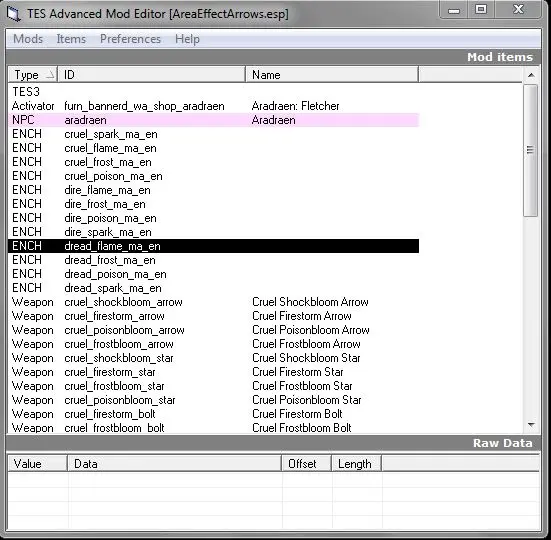
🔍 Analysis
- 👍 5.9% endorsement rate — high engagement, a strong quality signal
- 🏆 #17 of 48 Utilities mods in this game by downloads
📋 About This Mod
I am NOT the author of this application. That honor belongs to Erik Benerdal (Searabus).
This is simply a Nexus mirror for the TESAME.exe program, used to do minor edits/merge mods.
If all you are looking to do is pull the evil GMSTs out of your mods, then tes3cmd is a better option.
Installation:
Run a virus check on it (trust no one, not even Nexus, not even me ;) ).
Unzip the thing (I'd just unzip it to my desktop, but put it where you please).
0. Better to read the author's readme than go by my instructions, but here's what I know....
1. If you're editing a mod of uncertain hygiene, I VERY HIGHLY RECOMMEND you clean the mod with tes3cmd first, then use the generated Clean_modname.esp/esm file instead.
2. Put a copy of the esp/esm you wanna mess with into the same directory as this exe, then double click the exe and choose to open that file.
Read the author's readme, but basically you select whatever it is you want to delete, then gasp press the delete key.
You will then need to save-as the file (this application doesn't have an option for a regular save/overwrite) under a new name like EDITED_modname.esp
That new mod file will be the one you plunk into your "data files" directory or your mod manager, etc. Remember that plugins need to be enabled from the game launcher.
3. This app also lets you insert stuff into the esp, but if you know enough to do that sort of thing, why aren't you just making mods in the Construction Set? Doing that with this app means you know all the info to type into each cell of data for the mod....and seriously, that's more than most people using the wanna-be wiziwig editor in the Construction Set usually know....mess with that at yer own risk, ya been warned.
4. To merge mods, put both files that you want to combine into the same directory as the app, then pick merge and choose your secondary and primary. You can only merge two mods at a time. I'm pretty sure the primary will be loaded "first" and win any conflicts as the merge is created, but I've not messed with this (I use Wrye Bash for mod merging, not this program).
5. WHATEVER YOU DO WITH THIS....don't just enable your new plugin and load up a beloved save file without backing. up. the. save. file. FIRST. If you think a mod can't fry a file even if you "don't save anything and just exit," you're wrong. As soon as you load the save file, some things within it can be irrevocably (barring all the steps to repair save files, and sometimes not even then) changed just by a plugin's presence in your load order. So...play safe. ;)
6. I will not be monitoring this page or doing any sort of tech support for any problems because I'm not the application's author, and quite frankly not properly qualified to provide such support. As long as you backup yo
TESAME Mod Editor and Merger is a utility for editing and merging mods, hosted as a mirror download. It helps clean mods and verify they are free of Evil GMSTs. With 122 endorsements and 2,068 downloads, it's a niche tool for Morrowind modders.
✨ Key Features
📊 Pros & Cons
✅ Pros
- Trusted by the community (122 endorsements) for a niche utility
- Essential for mod hygiene—cleaning Evil GMSTs is a must for stable Morrowind
- Lightweight and focused—does one job well
⚠️ Cons
- Last updated in 2022—may not support the latest modding tools
- No detailed documentation or instructions provided in the description
- Requires manual file placement—no installer or mod manager integration
For Morrowind modders who want to clean their mods or merge small edits. If you're a mod author or a heavy user of modded Morrowind, this is a handy tool. Skip if you're a casual player who just installs mods—this is a technical utility.
💡 Beginner Tips
- Place TESAME.exe in a dedicated folder, not in your Morrowind directory, to avoid clutter.
- Use TESAME to clean mods before installing them—this prevents Evil GMSTs from corrupting your save.
- Always back up your mod files before merging—TESAME can overwrite them.
📊 Mod Details
- Game
- Morrowind Mods
- Author
- Erik Benerdal aka Searabus
- Version
- 1.0
- Downloads
- 2,068
- Endorsements
- 122
- Category
- Utilities
- Created
- 2/23/2022
- Updated
- 2/23/2022
🔧 How to Install Morrowind Mods
Download from Nexus.
📖 Full step-by-step install guide for Morrowind →
Visit the official mod page for specific installation instructions for this mod.
🎮 Need cheat codes or console commands? Check ur gaming wiki for Morrowind commands, item IDs, and more.
Keep browsing — more Morrowind mods await