Quick Select Menu
🟠 Updated over a year ago⚠️ Install Order · 2 steps
Install in this order, then this mod last — most mods fail to load without their framework and dependencies in place.
Preview
🔍 Analysis
- 🏆 #70 of 103 User Interface mods in this game by downloads
📋 About This Mod
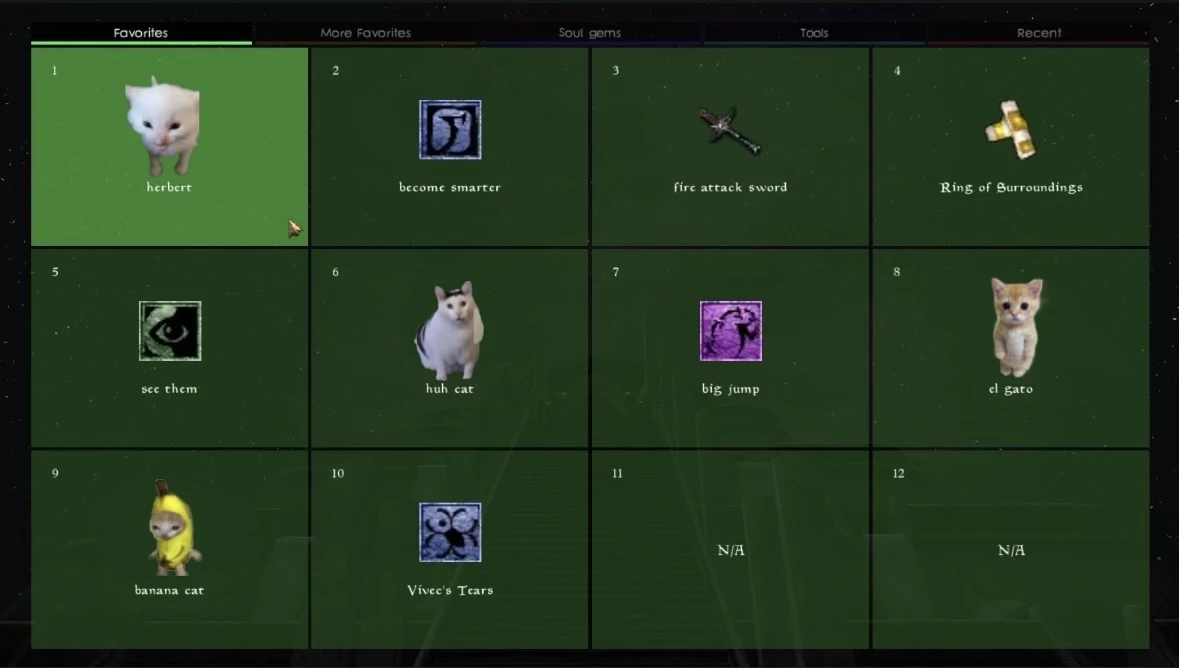
Morrowind has lots of fun items and spells, but switching between them can be a bit tedious. Hotkeys help, but there are only so many of them, and it can be easy to forget which key is bound to which item. This mod tries to solve this problem using quick select menus. These menus present several items in a neatly arranged grid. The menu comes with multiple different color-coded tabs, and is highly customizable. Some of the tabs are even generated automatically based on your current inventory.
Features
You can get the general idea by just looking at the pictures. Here's a summary of the features.
Multiple tabs.
The menu has different tabs.
-
[]You can switch between them using the arrow keys, scroll wheel, or just clicking on the tab. You can also use the A/D keys
[
]Tabs are named and color-coded. You can rename and recolor them in the MCM as you see fit.[]I tried to make the default palette colorblind accessible. Let me know if I did a good job, or how it could be improved.
There are two types of tabs: "custom tabs" and "auto-generated" tabs.
- [] Custom tabs work like the standard "hotkey" system: you organize them yourself by picking which item goes in which slot. You can have up to 10 of these. (Only 2 are enabled by default.)
- []To add items to a custom tab, hold down ALT while pressing the quick select key.
-
[] Auto-generated tabs have their contents generated automatically, based on your inventory. Here are some examples:
[] A "tools" tab that lists various tools you have. It gives a curated list of the various tools you have. It'll show your best and worst versions of each tool, along with a few in-between. Your equipped "on use" enchanted items are also shown here, along with a few useful spells.
[] A "soul gems" tab, that lists all your filled soul gems.
[] A "recent" tab, that lists all your recently used weapons/spells, in the order they were used.
Select items using the number keys
-
[]Every item in each tab is given a number (in the top-left corner).
[]You can select items by simply typing the corresponding number.
[]This also works for multi-digit numbers: you can select item "17" by typing "17".
Tooltips are shown in every tab.
Including things like item charge and item durability.
Improved item selection screen.
[]When binding an item to a custom tab, you'll be able to filter the options based on what you're looking for.
[]When picking from the "weapons", "clothing & armor", and "tools
-
[]Every item in each tab is given a number (in the top-left corner).
Quick Select Menu is a UI mod for Skyrim that adds a quick select menu with tabs, filling the gap between quick key items and the rest of your inventory. It automatically generates tabs based on your inventory, making it easier to access items without opening the full inventory. With 31 endorsements and 439 downloads, it's a niche but functional addition for players who want faster item access.
✨ Key Features
📊 Pros & Cons
✅ Pros
- Fills a real gap between quick keys and full inventory
- Auto-generated tabs save time sorting manually
- Lightweight UI mod with 31 endorsements from a small but active user base
⚠️ Cons
- Low endorsement count (31) suggests limited community testing
- Last updated August 2025 — may not be compatible with future Skyrim updates
For Skyrim players who find the vanilla quick menu too limited and want faster access to potions, scrolls, or other items without opening the full inventory. Skip if you prefer minimal UI changes or rely on hotkey mods.
💡 Beginner Tips
- Make sure to assign a hotkey in the mod's MCM or config file to open the menu quickly.
- Check if the mod requires SKSE or SkyUI — if so, install those first.
- Test the menu with a few inventory items to see how tabs are generated before relying on it in combat.
📊 Mod Details
- Game
- Morrowind Mods
- Author
- herbert1000
- Version
- 1.2.1
- Downloads
- 439
- Endorsements
- 31
- Category
- User Interface
- Created
- 3/2/2024
- Updated
- 8/4/2025
🔧 How to Install Morrowind Mods
Download from Nexus.
📖 Full step-by-step install guide for Morrowind →
Visit the official mod page for specific installation instructions for this mod.
🎮 Need cheat codes or console commands? Check ur gaming wiki for Morrowind commands, item IDs, and more.
Keep browsing — more Morrowind mods await