Quick Action for OpenMW
⚪ Last updated 2024⚠️ Install Order · 2 steps
Install in this order, then this mod last — most mods fail to load without their framework and dependencies in place.
Preview
🔍 Analysis
- 👍 2.8% endorsement rate — high engagement, a strong quality signal
- 🏆 #35 of 95 User Interface mods in this game by downloads
📋 About This Mod
Quick Action Mod for OpenMW
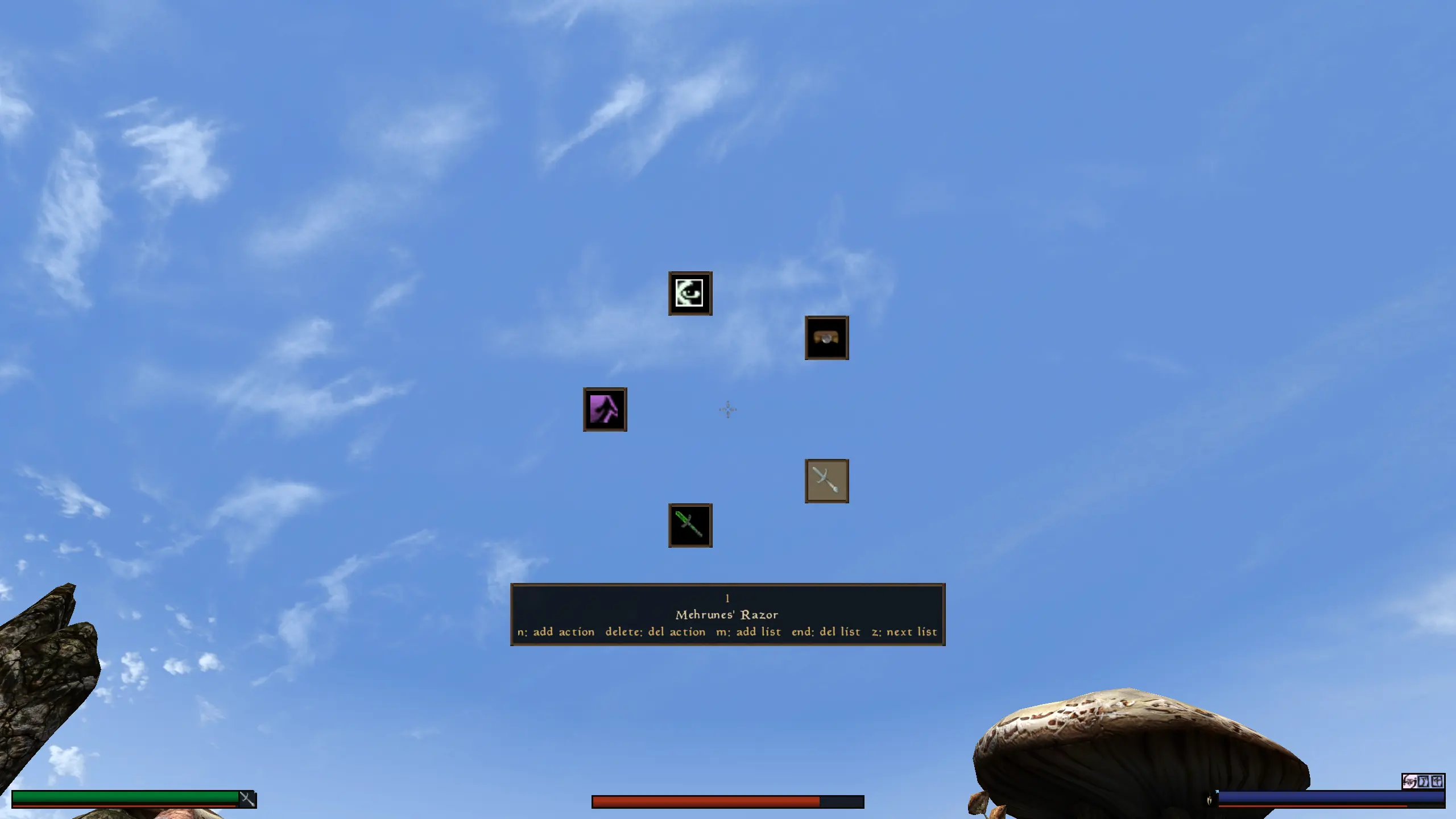
The Quick Action Mod adds a togglable HUD widget to perform actions. It currently supports equipping spells, enchants and weapons. It is fully configurable and customizable.
Requires OpenMW 0. 49+.
Install
-
[]Download the mod
[
]Unzip the mod[]Append the directory where you unzipped the mod to the OpenMW's Data Directories (OpenMW -> Data Files -> Data Directories -> right top button labelled
[]Enable the mod (OpenMW -> Data Files -> Content Files -> tick the checkbox of quick_action.omwscripts)
[]Enjoy!
How to use it
Quick Action is a HUD Widget that can be toggled and configured via the widget itself. You can toggle the widget by using X/DPadUp. This will open the first list of actions.
You can then select an action using mouse look/mouse wheel/DPadUp&DPadDown and then press the left mouse button/A to activate the action. You can also add a new action using N/Y, delete the selected action using delete/X, and change the position of the selected action using ]/BackSlash/RightStick.
When the Widget is visibile you can switch to the next list by using Z/DPadRight, add a new list by using M/LeftStick and delete the current list by using End/Back.
Known issues
The HUD stays active in dialogs and menus.* Equipping enchanted items can sometimes not work.
Source Code
https://github.com/elsky42/OpenMW_Quick_Action
Quick Action for OpenMW adds a togglable HUD widget that lets players perform actions quickly. It's a UI utility for Morrowind players using OpenMW, with 56 endorsements and over 2,000 downloads. Last updated in July 2024, it remains a niche but functional addition.
✨ Key Features
📊 Pros & Cons
✅ Pros
- Simple and functional—does exactly what it says without bloat.
- Decent download count (2,013) shows real interest from the OpenMW community.
- Recently updated (July 2024), so it's likely compatible with current OpenMW builds.
⚠️ Cons
- Low endorsement count (56) suggests it's a niche tool that may not appeal to everyone.
- No screenshots or videos provided, so you're going in blind visually.
For OpenMW players who want quicker access to common actions without digging through menus. If you're a UI tinkerer or speedrunner, this could streamline your gameplay. Skip if you prefer vanilla UI or need more comprehensive interface overhauls.
💡 Beginner Tips
- Since it's for OpenMW, make sure you're running the OpenMW engine, not the original Morrowind executable.
- Check the mod's forum or comments for any configuration options—the description doesn't mention them, but users might have shared tips.
- If the widget doesn't appear, verify that the mod is placed in the correct OpenMW data directory (e.g., `Data Files` folder).
📊 Mod Details
- Game
- Morrowind Mods
- Author
- Elsky42
- Version
- 0.1
- Downloads
- 2,013
- Endorsements
- 56
- Category
- User Interface
- Created
- 7/13/2024
- Updated
- 7/19/2024
🔧 How to Install Morrowind Mods
Download from Nexus.
📖 Full step-by-step install guide for Morrowind →
Visit the official mod page for specific installation instructions for this mod.
🎮 Need cheat codes or console commands? Check ur gaming wiki for Morrowind commands, item IDs, and more.
Keep browsing — more Morrowind mods await