Morrowind Xpadder Controller Profile
⚪ Last updated 2015⚠️ Install Order · 2 steps
Install in this order, then this mod last — most mods fail to load without their framework and dependencies in place.
Preview
🔍 Analysis
- 👍 3.7% endorsement rate — high engagement, a strong quality signal
- 🏆 #18 of 402 Gameplay mods in this game by downloads
📋 About This Mod
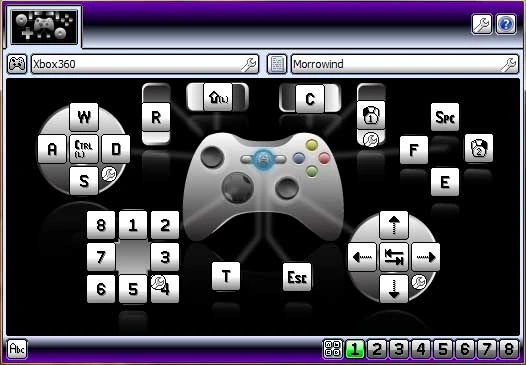
A Morrowind Xpadder profile
With the minor success of my Oblivion Xpadder Profile I decided to take a stab at Morrowind Controls. I know this isn't 100% the same as Xbox controls, but it is close. If you have any ideas on how I can make them better or any form of feedback feel free to leave a comment.
The only Morrowind option you need to change is turn "Use Joystick" off, and switch E and SPACE so that you jump with SPACE and activate with E.
L-Stick = movement (half push walk, and full push for run) L-Stick pressed = Sneak R-Stick = Mouse emulation R-Stick Pressed = Change View D-Pad = 1-8 (Quick change) LB = Switch Weapons RB = Switch Spell LT = Ready Spell RT = Attack Back = Wait Start = Menu A = Activate B = Journal X = Draw Weapons Y = Jump.
📊 Mod Details
- Game
- Morrowind Mods
- Author
- BryceLovesGaming
- Version
- 1
- Downloads
- 3,754
- Endorsements
- 139
- Category
- Gameplay
- Created
- 2/12/2015
- Updated
- 2/12/2015
🔧 How to Install Morrowind Mods
Download from Nexus.
📖 Full step-by-step install guide for Morrowind →
Visit the official mod page for specific installation instructions for this mod.
🎮 Need cheat codes or console commands? Check ur gaming wiki for Morrowind commands, item IDs, and more.
Keep browsing — more Morrowind mods await