Morrowind Textures Compress and Reorder
⚪ Last updated 2011⚠️ Install Order · 2 steps
Install in this order, then this mod last — most mods fail to load without their framework and dependencies in place.
Preview
🔍 Analysis
- 👍 4.6% endorsement rate — high engagement, a strong quality signal
- 🏆 #11 of 48 Utilities mods in this game by downloads
📋 About This Mod
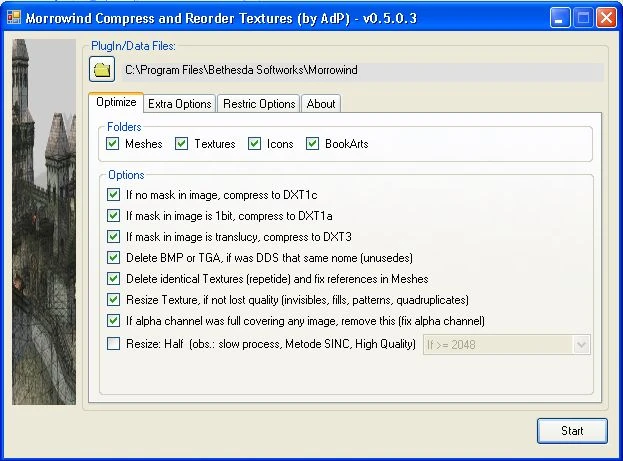
ORDENADOR - Textures Compress & Reorder ===================================================== - Compress to DXT1c/DXT3/DXT5 image without mask. - Compress to DXT1a/DXT3/DXT5 image with 1bit alpha. - Compress to DXT3/DXT5 image with transparency. (no compress if image/TGA is smaller) (no compress for DXT3 if image is DXT5) (no mipmaps for icons and bookarts) - Resize 4x4, if image is pattern (not lost quality) - Make Textures whit mipmaps (only when compressing) (no mipmaps for icons, menu_*, bookart) - Delete BMP or TGA if exist DDS with same name. - Delete Thumbs.db and others unecessaries files - Remove alpha channel, when full covering a image. - Find Lost Textures (see tips). (search in textures, textures\\\"author\", default_folders (see TIPS), morrowind.bsa, bloodmoon.bsa, tribunal.bsa) - Fix bugs in Meshes (crash game/overflow). (bad parameters, b001, b013, b513) - Organize/Move/Rename textures using \"Reorder MORROWIND.ren\" (dont move if texture is overlap of morrowind.bsa, tribunal.bsa or bloodmoon.bsa) ===================================================== Requeriments: ----------------------------------------------------- - . NET Framework 4. 0 - NVCompress64 for Windows64bits users. ===================================================== Using: ----------------------------------------------------- CAUTION!!! Take backup of your MOD before of user. Use in a folder with a copy of your plugin. Edit \"rename.ren\" for your preference. TIPS: After the first execution, use WINDOWS EXPLORER: - Get all files of Heads textures and put in \"Textures\\(Heads)\\\" - Get all files of Bodies textures and put in \"Textures\\(Bodies)\\\" - Get all files of Animals textures and put in \"Textures\\(Animals)\\\" - Get all files no_found textures and put in \"Textures\\(Misc)\\\" - Delete repeted with same name but who have (1), (2), ... (ex; head01b_ZUL.dds, head01b_ZUL(1).dds, head01b_ZUL(2).dds) ... and execute this software again. This fix Meshes with new location of files. OBS.: no rename the files and no move if is overlap of morrowind.bsa, trib, bloodm ... Possiblities of user in Oblivion and Fallout (not tested) if found bugs, send me details. (apipino@gmail_com) ===================================================== Performace/Test: ----------------------------------------------------- Undergroun_2 (Qarl) \"C:\\tmp\\The_Underground_2\\\" Before = 1. 319 MB in 8118 Files After = 864 Mb in 8112 Files (455 Mb less) FPS = not measured ----------------------------------------------------- Compressed: TGA => DXT3 = balls01.tga (256Kb => 85Kb) Compressed: RGB => DXT1c = Lumiere001.dds (1365Kb => 170Kb) Compressed: DXT3 => DXT1a = bb_dre17.dds (341Kb => 170Kb) Compressed: DXT3 => DXT1c = a
A utility mod for Morrowind that compresses textures to DXT1c/DXT3, fixes texture and mesh errors, and checks plugins for missing icons/sounds. With 117 endorsements and last updated in 2011, it's an old but functional tool for modders and players wanting to optimize their game.
✨ Key Features
📊 Pros & Cons
✅ Pros
- Community-tested with 117 endorsements and over 2,500 downloads.
- All-in-one utility: handles textures, meshes, and plugins.
- Fixes game-crashing mesh errors—a lifesaver for stability.
⚠️ Cons
- Last updated in 2011—may not be compatible with modern Morrowind setups.
- Utility mods like this can be risky if used incorrectly—no safety net.
For Morrowind modders who want to optimize textures and fix common errors without manual editing. Also for players experiencing crashes due to bad meshes or plugins. Skip if you're not comfortable with technical tools or if you play with a mod manager that handles these tasks automatically.
💡 Beginner Tips
- Before running the tool, back up your Data Files folder—this utility modifies files directly.
- Use it on a clean install or after removing other mods to avoid conflicts.
- If you're using a mod manager, let it handle texture compression instead—this tool is for manual setups.
📊 Mod Details
- Game
- Morrowind Mods
- Author
- AdP
- Version
- 0.6
- Downloads
- 2,536
- Endorsements
- 117
- Category
- Utilities
- Created
- 6/30/2010
- Updated
- 8/31/2011
🔧 How to Install Morrowind Mods
Download from Nexus.
📖 Full step-by-step install guide for Morrowind →
Visit the official mod page for specific installation instructions for this mod.
🎮 Need cheat codes or console commands? Check ur gaming wiki for Morrowind commands, item IDs, and more.
Keep browsing — more Morrowind mods await