Morrowind Script Definitions for NotepadPlusPlus
⚪ Last updated 2013⚠️ Install Order · 2 steps
1🛠️ MWSE — Morrowind Script Extender Download ↗
2🔧 MCP — Morrowind Code Patch Download ↗
Install in this order, then this mod last — most mods fail to load without their framework and dependencies in place.
Preview
🔍 Analysis
- 👍 13.0% endorsement rate — high engagement, a strong quality signal
- 🏆 #21 of 42 Utilities mods in this game by downloads
📋 About This Mod
✅ ------------------------------------------------
✅ Morrowind Script Definitions for Notepad++
✅ ------------------------------------------------
✅ by Spirithawke
✅ Created: December 2012
✅ Latest: December 2012
- ------------------------------------------------
- Morrowind Script Definitions for Notepad++
- ------------------------------------------------
- by Spirithawke
- Created: December 2012
- Latest: December 2012
- Latest Version: v1. 0
- ------------------------------------------------
- Requirements:
- ------------------------------------------------
- Notepad++ v6. 2. 2 or higher
- ------------------------------------------------
- Description:
- ------------------------------------------------
- This tool is simply a script highlighting definitions file for Notepad++ for TES3: Morrowind scripts. I couldn\'t find one, so I made one. The definitions include the following:
- Construction Set v1. 6. 1820 functions
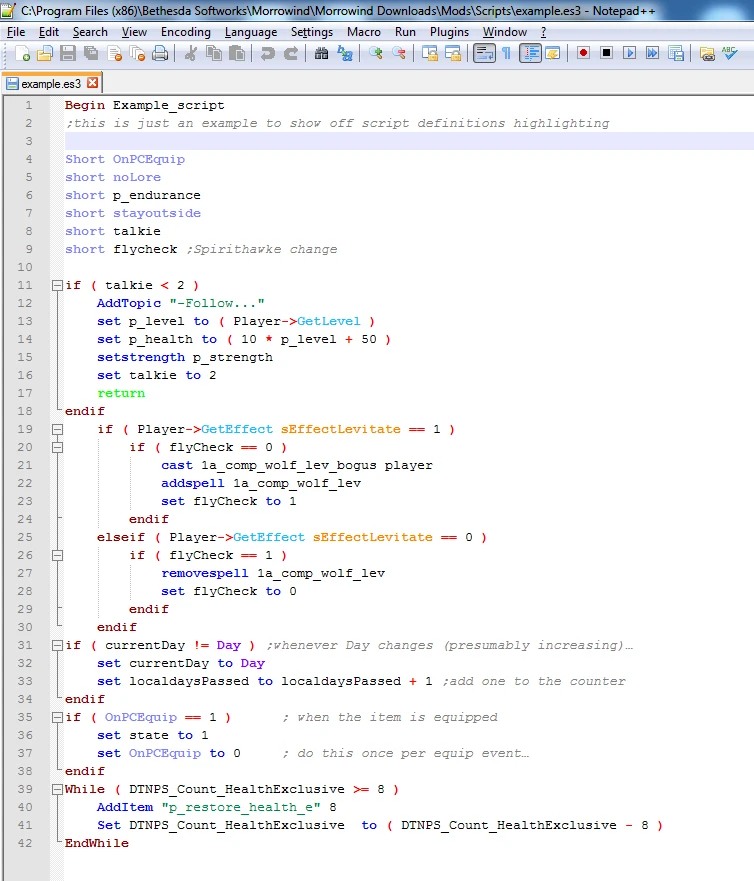
- The syntax highlighting is for Construction Set v1. 6. 1820 and is as follows:
- command words such as Set are in blue
- functions such as GetItemCount are in light blue
- Begin/End and If/ElseIf/Else/EndIf/While/Endwhile words are in burgundy
- the words Long/Short/Float plus a few specials that need to be declared, like companion, are in light purple
- global variables like Day are in dark purple
- Return is neon green
- sEffect words are in orange
- Comments are in grey
- Numbers are in normal black
- Operators \"- ! $ % ( ) / + < = >\" are in red
- Text delimited by double quote marks is in green
- I have left the comma out of the operators list on purpose. This is so that if one of the keywords do not highlight, it will remind you to get rid of that comma. I did it that way because of recommendations in Morrowind Scripting for Dummies. Also, if a word that should highlight do not, make sure that you spelled it correctly, and that it has spaces on either side of it (note that operators do not need this, so the \"fix\" -> will allow keywords to highlight correctly)
- I have set this up so that you can collapse entire If and/or While blocks. ElseIf and Else do not collapse separately. Due to changes in Notepad++ the idea used by misterMcCoonie of ;snip ;snipend no longer functions the same, you would have to use a different character such as # instead of the ;. Since I am sure someone would forget to take those out before trying to compile the script, better to not have them and not get blamed. Collapsing entire IF blocks serves the same purpose.
- **********************
- USAGE:
- ***********************
- Select \'Morrowind Script\' from the \'Language\' menu in Notepad++ to have the highlighting take effect. To have Notepad++ automatically recognize Morrowind scripts, save your scripts with a .es3 extension. You can also configure integration with Windows to open .es3 files with Notepad++ when double clicked. I recommend saving your scripts as scriptname.txt.es3 to make
🤖 AI-enhanced — based on mod data
A Notepad++ syntax highlighting definition file for Morrowind script editing. Created by Spirithawke in 2013, it fills a gap for modders who want code highlighting in the popular text editor. With 73 endorsements and 562 downloads, it's a niche utility for Morrowind mod developers.
✨ Key Features
Provides script highlighting definitions for Morrowind scripts in Notepad++.
Fills a gap for Morrowind modders who couldn't find existing highlighting definitions.
Simple utility tool, likely a single XML file for easy installation.
📊 Pros & Cons
✅ Pros
- Fills a real need for Morrowind modders using Notepad++ (73 endorsements).
- Lightweight and focused—does exactly one thing without bloat.
- Still relevant for classic Morrowind modding, even if old (2013).
⚠️ Cons
- Last updated in 2013—may not support newer Notepad++ versions or script syntax changes.
- Only works with Notepad++—if you use a different editor, this is useless.
🎯 Is This For You?
For Morrowind modders who write scripts in Notepad++ and want syntax highlighting to catch errors faster. Skip if you use a different editor or don't mod Morrowind.
For Morrowind modders who write scripts in Notepad++ and want syntax highlighting to catch errors faster. Skip if you use a different editor or don't mod Morrowind.
📦 Install:Easy· Under 1 minute
💡 Beginner Tips
- Place the XML file in Notepad++'s 'userDefineLangs' folder (usually in %APPDATA%\Notepad++).
- After placing the file, restart Notepad++ and select 'Morrowind' from the Language menu to apply highlighting.
- If the highlighting doesn't appear, check that the file is named correctly and matches the language name in the menu.
📊 Mod Details
- Game
- Morrowind Mods
- Author
- Spirithawke
- Version
- 1.0
- Downloads
- 562
- Endorsements
- 73
- Category
- Utilities
- Created
- 12/14/2012
- Updated
- 1/16/2013
🔧 How to Install Morrowind Mods
Download from Nexus.
📖 Full step-by-step install guide for Morrowind →
Visit the official mod page for specific installation instructions for this mod.
🎮 Need cheat codes or console commands? Check ur gaming wiki for Morrowind commands, item IDs, and more.
Keep browsing — more Morrowind mods await