Modern Clean Reshade
⚪ Last updated 2022⚠️ Install Order · 2 steps
Install in this order, then this mod last — most mods fail to load without their framework and dependencies in place.
Preview
🔍 Analysis
- 👍 2.9% endorsement rate — high engagement, a strong quality signal
- 🏆 #9 of 10 ENB Preset mods in this game by downloads
📋 About This Mod
What is this mod?
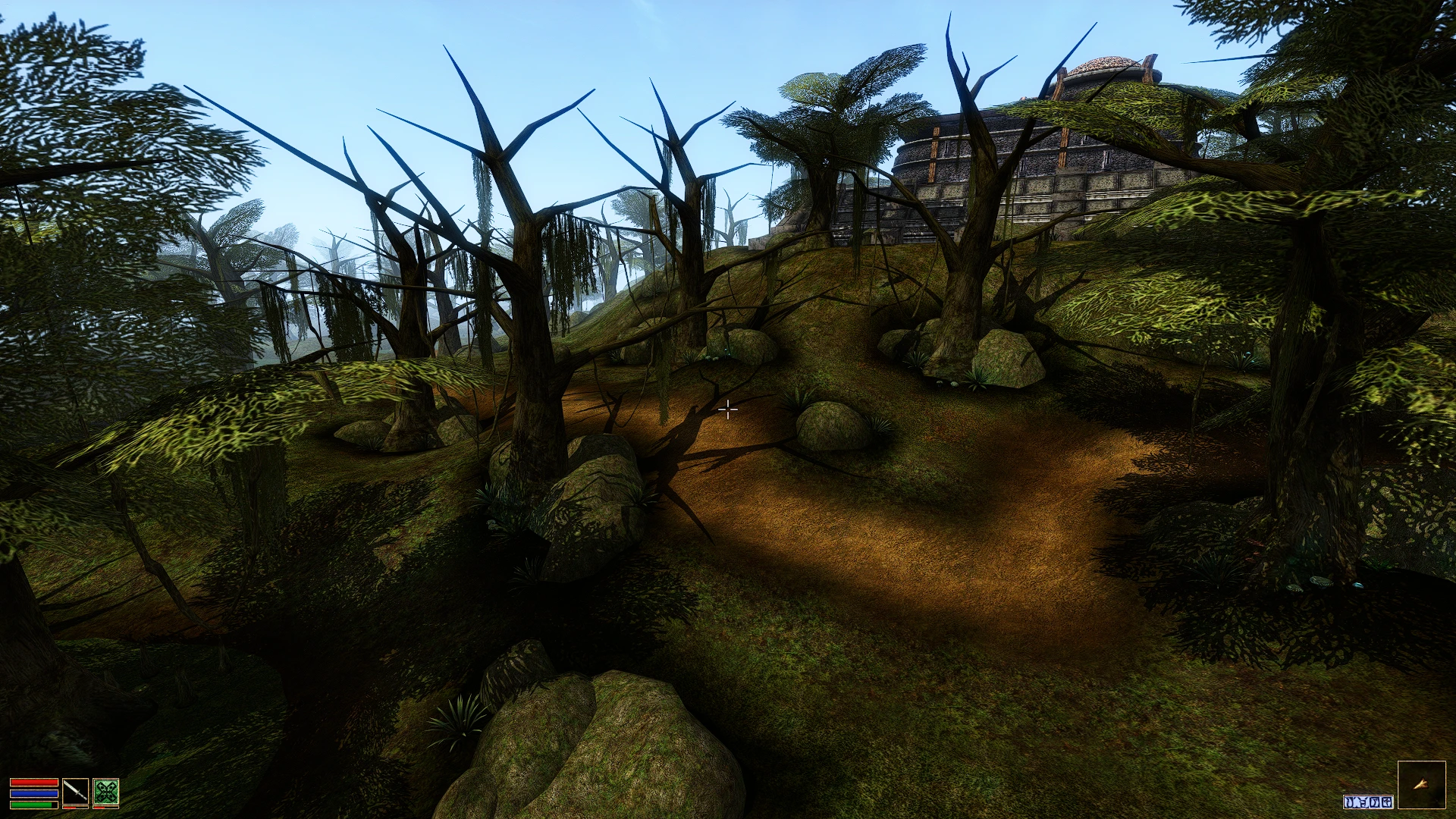
This Reshade aims to give the game a more modern and lush appearance while having a minimal performance impact. Morrowind by default can have a washed-out and drab appearance so this Reshade gives the game more vibrance, clarity, and contrast in order to bolster the game's sense of wonder and otherworldliness. This Reshade preset is balanced to work well indoors or outdoors- in any environment.
How do I install this mod? Is it hard?
It is not hard to install this mod. : ) Follow these steps:
-
[]Download this mod (modern_clean_reshade.ini)
[
]Go to https://reshade.me/ and download the Reshade program. Get the latest version from the website for this preset. At the time of writing, version 5. 1. 0 is the latest and works correctly.[]Run the downloaded "ReShade_Setup_5. 1. 0.exe" and click "Browse" and find your OpenMW install path and select your OpenMW.exe or TES3MP.exe executable. (Alternatively, you can just select your normal Morrowind executable if not using OpenMW). Click next.
[]Select the default OpenGL renderer and click next.
[]Next, for "Select a preset to install", select the file you downloaded for this mod, "modern_clean_reshade.ini".
[]Click Next again at the "Select affects packages to install" step and it'll download the shaders.
[]You're done! Run your game normally to play nice-looking Morrowind! (Hit the Home key on your keyboard while in-game to bring up the Reshade settings if you care to).
Can I remove this if I change my mind?
Yes, just run "ReShade_Setup_5. 1. 0.exe" again and select your game path, then choose Uninstall to remove all the Reshade effects.
What is a Reshade?
A "Reshade" is a collection of screen-space fragment shader effects that modify a game's appearance using post-processing via the Reshade program. This mod itself is a "preset" for the Reshade program, containing specific shaders and parameters. The terms "preset" and "Reshade" are often used synonymously, though technically "preset" is more correct as "Reshade" is the name of the 3rd party software itself.
What specific shaders does this preset add?
-
[]Vibrance - increase color saturation
[]Tonemapper / HDR - increases contrast, adaptive HDR effects, ACES colorspace emulation
[]Sharpening - uses AMD FidelityFX to add sharpening for a more crisp HD look
- Bloom - adds a glow around light sources and bright spots
Does this have a performance impact?
All Reshades will have some performance impact but this preset has been optimized to have as minimal of a GPU footprint as possible.
🤖 AI-enhanced — based on mod dataA Reshade preset for Morrowind that boosts vibrance, clarity, and depth for a more modern, lush look. With 31 endorsements and 1,071 downloads, it's a niche but appreciated option for players seeking visual upgrades without overhauling the game.
✨ Key Features
Increases vibrance, clarity, and depth in Morrowind's visualsAims for a modern and lush aestheticCompatible with Reshade for Morrowind📊 Pros & Cons
✅ Pros
- Simple preset that delivers a noticeable visual punch
- Lightweight option for players who want a fresh look without heavy mods
- Decent download count (1,071) shows it's been tried by the community
⚠️ Cons
- Only 31 endorsements — a small following, so support is limited
- Last updated in May 2022 — may not be optimized for the latest Morrowind patches or Reshade versions
🎯 Is This For You?
For Morrowind players who want a quick visual boost with more vibrant colors and clarity, without diving into complex mod setups. If you're a purist who prefers the original look, this isn't for you. Skip if you're looking for gameplay changes — this is purely cosmetic.📦 Install:Easy· Under 5 minutes💡 Beginner Tips
- Make sure you have Reshade installed and set to the Morrowind executable (Morrowind.exe) before adding this preset.
- After installing, use the in-game Reshade overlay (default key: Home) to tweak the preset's intensity to your liking.
- If you're using a mod manager like MO2, place the preset files in the correct directory (e.g., Morrowind root folder) to avoid conflicts.
-
[]Vibrance - increase color saturation
📊 Mod Details
- Game
- Morrowind Mods
- Author
- Mike Burns
- Version
- 1.0
- Downloads
- 1,071
- Endorsements
- 31
- Category
- ENB Preset
- Created
- 5/7/2022
- Updated
- 5/7/2022
🔧 How to Install Morrowind Mods
Download from Nexus.
📖 Full step-by-step install guide for Morrowind →
Visit the official mod page for specific installation instructions for this mod.
🎮 Need cheat codes or console commands? Check ur gaming wiki for Morrowind commands, item IDs, and more.
Keep browsing — more Morrowind mods await