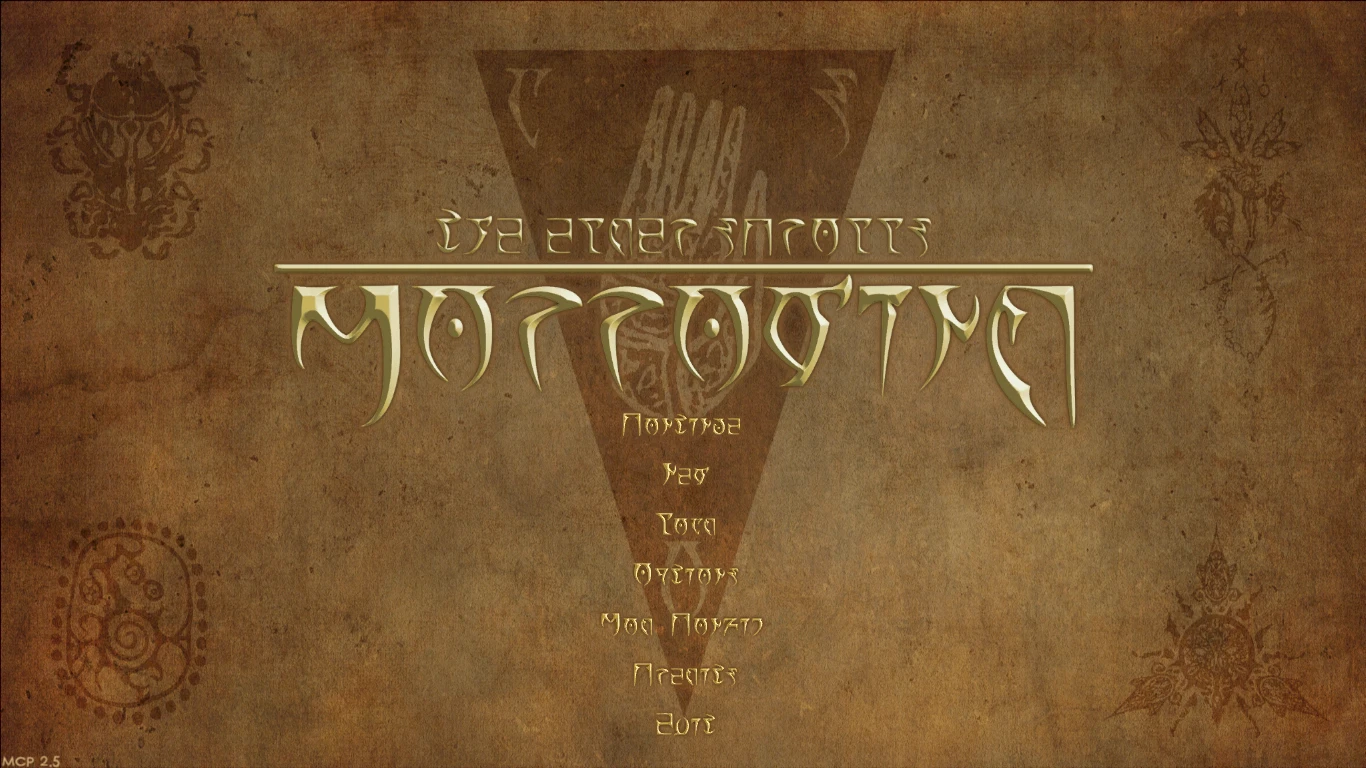
De-outlandered main menu and Daedric UI textures
⚪ Last updated 2019⚠️ Install Order · 2 steps
Install in this order, then this mod last — most mods fail to load without their framework and dependencies in place.
Preview
🔍 Analysis
- 👍 5.0% endorsement rate — high engagement, a strong quality signal
- 🏆 #7 of 95 User Interface mods in this game by downloads
📋 About This Mod
Part of the Morrowind May Modathon 2019
I've tried out quite a few menu replacers, but none of them addressed both issues with the original menu. First, there is this unsightly outlander writing, which may be easy for the n'wah to read, but isn't quite what a Dunmer would prefer. Second, constantly seeing the sign of the invader as our coat of arms annoyed me to no end... And if a part of the game bugs me so badly, I mod it until it's no longer a problem.
Features
- widescreen (16:9) main menu replacer: three backgrounds to choose from (old paper, dirt+scratches+fire, OgreOgre's background) and two themes (Great Houses and the Temple, or Ashlander-style)
- main menu buttons (Load, Save, etc.) in Daedric, compatible with MWSE Mod Config and Continue
- included replacers for MWSE and MCP splashes (in Daedric!)
- alternate version of main menu buttons with higher contrast, which may look better on some backgrounds (edit by Stiffkittin)
- book/journal navigation buttons (Prev, Next, Close, etc.) in Daedric (who would have guessed?)
- modular installation, pick what you want
- source files included (.psd, can be edited also with GIMP 2. 8 or Paint Tool SAI)
Installation
Copy the files into your Morrowind/Data Files folder. Or use Wrye Mash - it should be compatible.
Removal
Delete everything listed under Preview file contents on the Files tab of this mod from your Morrowind/Data Files directory.
Compatibility
Journal navigation is compatible with MCP option "Interface changes->Better typography", although it is not required (see the screenshots).
However, the menu buttons won't work well with MCP "International->Main menu wider textures" (off by default).
For obvious reasons, this mod is incompatible with anything that replaces the same textures.
QTMGFA (questions that might get frequently asked)
Could you make a 4:3 version?
Could you make a version in different colors or with a different background?
Could you make a version with the text positioned lower, in case someone doesn't use Mod Config or Continue?
Could you make a version with "Morrowind" text on the Moon and Star background, or the other way around?
Source files were included for a reason. All you need is GIMP with a .dds plugin. If you make a decent combination, I'll happily host it on this mod's page.
Will you also make an intro video replacer?
If the sharp transition bothers you too much, just use Yacoby's No Video.
Where are the crests of Dagoth and Hlaalu?
This question has been answered here.
A modular UI texture replacer for Morrowind that swaps out the main menu, menu buttons, and journal buttons with a Daedric-themed look. Compatible with MWSE Mod Config and Continue, this mod offers a simple way to customize the game's interface. With 162 endorsements and 3,218 downloads, it's a niche but appreciated choice for players seeking a darker aesthetic.
✨ Key Features
📊 Pros & Cons
✅ Pros
- Community-tested with 162 endorsements and over 3,200 downloads.
- Modular installation means you can pick and choose which UI parts to change.
- Works with popular MWSE mods like Mod Config and Continue, so no conflicts there.
⚠️ Cons
- Last updated in 2019 — might not be compatible with the latest Morrowind patches or MWSE versions.
- No screenshots or detailed previews in the description, so you're flying blind on the look.
- Only covers menu and journal buttons — if you wanted a full UI overhaul, this won't do it.
For Morrowind players who want a quick, lore-friendly Daedric reskin of the main menu and journal without overhauling the entire UI. Skip if you're after a complete interface replacement or need modern updates for the latest game version.
💡 Beginner Tips
- Since it's modular, install only the parts you want — start with the main menu to test the look.
- Make sure you have MWSE installed if you use Mod Config or Continue, as compatibility depends on it.
- Check the mod's file structure and manually place textures in your Data Files folder if you're not using a mod manager.
📊 Mod Details
- Game
- Morrowind Mods
- Author
- Red Furry Demon
- Version
- 1.1
- Downloads
- 3,218
- Endorsements
- 162
- Category
- User Interface
- Created
- 5/25/2019
- Updated
- 12/17/2019
🔧 How to Install Morrowind Mods
Download from Nexus.
📖 Full step-by-step install guide for Morrowind →
Visit the official mod page for specific installation instructions for this mod.
🎮 Need cheat codes or console commands? Check ur gaming wiki for Morrowind commands, item IDs, and more.
Keep browsing — more Morrowind mods await