Antiscamp's Cursor
⚪ Last updated 2020⚠️ Install Order · 2 steps
Install in this order, then this mod last — most mods fail to load without their framework and dependencies in place.
Preview
🔍 Analysis
- 👍 4.9% endorsement rate — high engagement, a strong quality signal
- 🏆 #23 of 103 User Interface mods in this game by downloads
📋 About This Mod
ANTISCAMP'S CURSOR
By Antiscamp
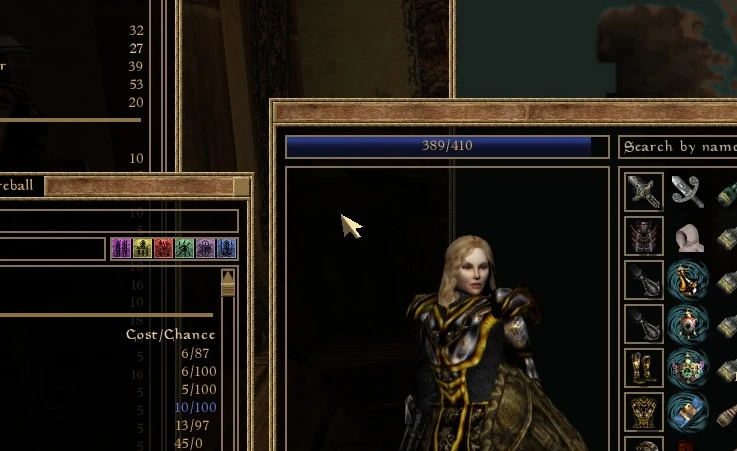
This mod simply introduces a larger, clearer mouse cursor used in the menus. This only changes the pointer, all the other symbols like drop item and resize window are left untouched. Simple and clear.
The small vanilla mouse cursor has annoyed me for years and now, when I have a lot of time to do things like this (because of the 2020 Corona Virus Isolation/Quarantine madness), I've actually made one to suit my needs. Might as well share it too.
INSTALLATION
Drop the files Cursor_drop.dds and Tx_CURSOR.dds in your Data Files/textures folder. To uninstall, delete those files and you're back to normal.
VERSIONS
1. 0 April 4 2020, Initial Release
Antiscamp, 2020
A simple UI mod that replaces Morrowind's default cursor with a larger, clearer pointer for better visibility. With 35 endorsements and last updated in 2020, it's a niche quality-of-life tweak for players who find the original cursor hard to see.
✨ Key Features
📊 Pros & Cons
✅ Pros
- Improves visibility for those struggling with the tiny default cursor
- Lightweight and simple—no complex setup required
- Community-tested with 35 endorsements from fellow players
⚠️ Cons
- Last updated in 2020—may not be compatible with newer Morrowind versions or mod setups
- Only affects menus, not the in-game world cursor
- Limited visual customization—just a single cursor replacement
For Morrowind players who squint at the tiny default cursor and want a clearer pointer in menus. Skip if you're looking for a full UI overhaul or gameplay changes—this is purely a cosmetic tweak.
💡 Beginner Tips
- Place the mod files directly into your Morrowind Data Files folder, then enable the .esp in the Morrowind Launcher.
- If you use a mod manager like Wrye Mash or Mod Organizer 2, install it through that to keep your setup organized.
- Test the cursor in the main menu first to ensure it appears correctly before diving into gameplay.
📊 Mod Details
- Game
- Morrowind Mods
- Author
- Antiscamp
- Version
- 1.0
- Downloads
- 715
- Endorsements
- 35
- Category
- User Interface
- Created
- 4/3/2020
- Updated
- 4/3/2020
🔧 How to Install Morrowind Mods
Download from Nexus.
📖 Full step-by-step install guide for Morrowind →
Visit the official mod page for specific installation instructions for this mod.
🎮 Need cheat codes or console commands? Check ur gaming wiki for Morrowind commands, item IDs, and more.
Keep browsing — more Morrowind mods await