Wild Kitsune (Fox) - Neko (Cat) - Okami (Wolf)
⚪ Last updated 2022Preview
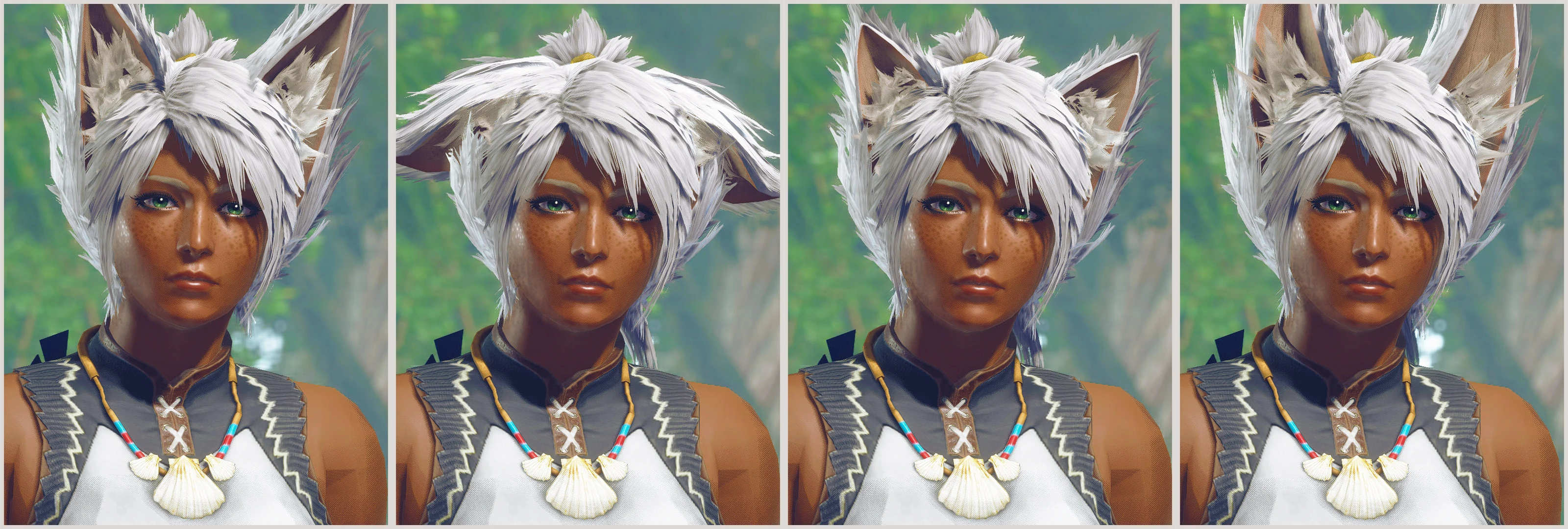
🔍 Analysis
- 👍 2.5% endorsement rate — high engagement, a strong quality signal
- 🏆 #51 of 1335 Apparel mods in this game by downloads
📋 About This Mod
Fluffy fox, cat, and wolf ears + tail for men and women. Features tail wag and ear flicks!
Replaces various waist armors with fluffy fox, cat, or wolf ears. The tail wags and ears flick randomly thanks to the new engine's chain physics system (can be disabled if you prefer no secondary motion)! Material file can also be renamed to allow darkened tips of ears and tail, which can be enabled on fox, cat, or wolf.
Download comes with Male and Female files for convenience. Each variation uses a different armor by default for max customization and matching with friends. If you intend on changing the armor, I HIGHLY recommend downloading Dytser's Physics Enabler mod before installing this one so it doesn't potentially lose its physics.
INSTALLATION
FLUFFY MOD MANAGER:
-
[]Open the Fluffy Mod Manager mod folder (Options > Open mods folder) and extract the .zip folder into there. The natives folder, modinfo.ini, and thumbnail .jpg should be contained within an unzipped folder in Fluffy's Mods folder!
[
]Enable the mod in the application's main menu (may need to refresh the list).[]Restart the game.
[]Equip the waist armor that the mod uses.
FIRST NATIVES:
-
[]Install REFramework and install FirstNatives.dll into its plugin folder.
[
]Open the mod's .zip folder and drop natives into the MHRise install folder (where the .exe is located).[]Reload the armor in game.
DISABLE TAIL WAG + EAR FLICK:
(you monster)
-
[]Install the mod normally and ensure it's showing properly in game.
[]Navigate to the folder the mod uses (in this case I will use female Kitsune). It will look like "...\steamapps\common\MonsterHunterRise\natives\STM\player\mod\f\pl009".
[]Rename "f_wst009.chain. 48" to something else like "f_wst009_WAG.chain. 48" to disable the physics.
[]Rename "_f_wst009_NOWAG.chain. 48" to the original name "f_wst009.chain. 48" to enable physics without wag or flicking.
[]Reload the armor in game.
ENABLE DARKENED FUR TIPS:
[]Install the mod normally and ensure it's showing properly in game.
[]Navigate to the folder the mod uses (in this case I will use female Kitsune). It will look like "...\steamapps\common\MonsterHunterRise\natives\STM\player\mod\f\pl009".
[]Rename "f_wst009.mdf2. 23" to something else like "f_wst009_SOLID.mdf2. 23" to disable solid coloring.
[]Rename "_f_wst009_TIP.mdf2. 23" to the original name "f
-
[]Install the mod normally and ensure it's showing properly in game.
📊 Mod Details
- Game
- Monsterhunterrise Mods
- Author
- zStatykz
- Version
- 1.2
- Downloads
- 47,539
- Endorsements
- 1,204
- Category
- Apparel
- Created
- 8/6/2022
- Updated
- 9/30/2022
🔧 How to Install Monster Hunter Rise Mods
Download from Nexus Mods.
📖 Full step-by-step install guide for Monster Hunter Rise →
Visit the official mod page for specific installation instructions for this mod.
🎮 Need cheat codes or console commands? Check ur gaming wiki for Monster Hunter Rise commands, item IDs, and more.
Keep browsing — more Monster Hunter Rise mods await