Raff's Script Modding Starter Pack and Utilities
⚪ Last updated 2022Preview
🔍 Analysis
- 🏆 #201 of 243 Miscellaneous mods in this game by downloads
📋 About This Mod
Creating your first REFramework script? Want to easily add configurations that persist between restarts to your mod? Or change how your mod behaves when players are in fights or in multiplayer? Look no further!
Intro
This is a template I've made to speed up the process of creating my mods. It contains the mod_utils.lua file, which has:
-
[]Alias methods so your main mod file has less code
[
]getEnumMap - Helps getting an enum name from its value[]checkIfInBattle - Returns true when the player is fighting (the same I use on my other mods, like Wirebug Flight and Blast off)
[]checkIfInMultiplayer - Returns true when a second hunter joins your quest (doesn't work on the lobby), and returns false again if they leave
[]getPlayerCount - Returns how many players are in your quest
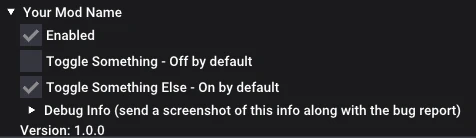
[]printDebugInfo - prints the same info as shown inside "Debug Info" in my mods (example)
[]getCurrentPlayer - Returns the player's object, which has all sorts of things in it for you to look/manipulate through your mod
[]getConfigHandler - Implements saving settings to disk, and handles default setting values for your mod (see how in the example mod)
[] getConfigHandler returns a settings object that has:
[] settings.handleChange(changed, value, property) - Takes changed and value from an imgui input function (like imgui.checkbox), and then 'property' is the name of the property the setting will be saved as in the JSON.
[] settings.imgui(property, imguiFunc, ...) - (NEW!) makes placing and managing an input's state an one-liner! Works with any imgui input function.
[] Using:
[] settings.imgui("enabled", imgui.checkbox, "Enabled")
[] Is equivalent to using
[] local changedEnabled, userenabled = imgui.checkbox("Enabled", settings.data.enabled)
[] settings.handleChange(changedEnabled, userenabled, "enabled")
[] It still returns the original changed, value so you can place an "if changed then ... end"
[]And a example mod that hides/shows your weapon every time you use a wirebug while on the lobby, if the mod is enabled.
Everything still works in Sunbreak!
Installation
- []Install REFramework, if you already have it, it's very important that it is updated to the latest version (at least v1. 1. 1 required) because the mod uses a new feature to save your configuration. If not, the changes are not saved between restarts.
[
]Download the mod's zip, place it on the game's .exe folder;[]Extract it (use Extract Here, overwrite if needed);
[]Rename your-mod-name (both folder and .lua);
[]Change the folderName and modName variables in the your-mod-name.lua file;
[]That's it!
About battle detection
If you find a situation where modUtils.checkIfInBattle() detects you're in battle when you are not, feel free to create a bug report! I am still at ⭐4
- []Install REFramework, if you already have it, it's very important that it is updated to the latest version (at least v1. 1. 1 required) because the mod uses a new feature to save your configuration. If not, the changes are not saved between restarts.
📊 Mod Details
- Game
- Monsterhunterrise Mods
- Author
- raff_run
- Version
- 1.1.0
- Downloads
- 469
- Endorsements
- 27
- Category
- Miscellaneous
- Created
- 2/19/2022
- Updated
- 8/2/2022
🔧 How to Install Monster Hunter Rise Mods
Download from Nexus Mods.
📖 Full step-by-step install guide for Monster Hunter Rise →
Visit the official mod page for specific installation instructions for this mod.
🎮 Need cheat codes or console commands? Check ur gaming wiki for Monster Hunter Rise commands, item IDs, and more.
Keep browsing — more Monster Hunter Rise mods await