MHR-Editor - User File Editor
🟠 Updated over a year agoPreview
🔍 Analysis
- 👍 3.1% endorsement rate — high engagement, a strong quality signal
- 🏆 #12 of 54 Utilities mods in this game by downloads
📋 About This Mod
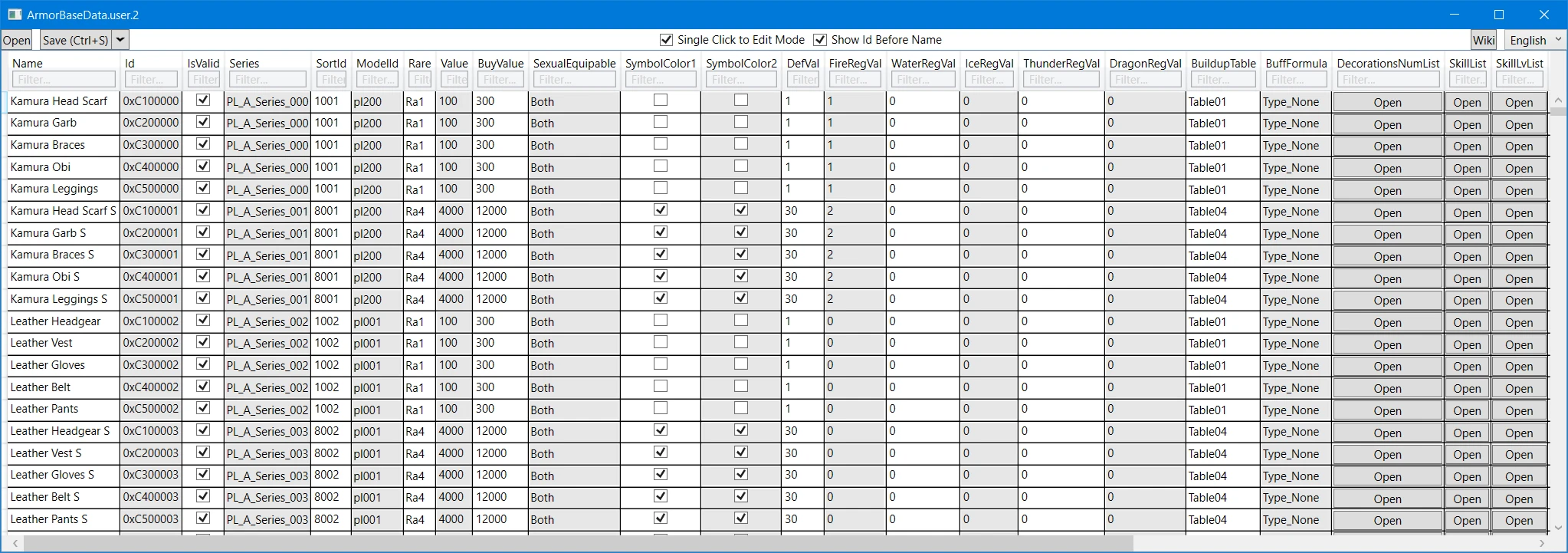
A tool to edit various user data files in the game assets.
THIS IS NOT A SAVE EDITOR
(I wish I could make that bigger.)
This is a tool to edit the user files you extract from the game's assets (pak files).
Google "RE Engine" and "RETool" and any other RE Engine tutorials if you need more help because I'm only going into a basic overview of how to extract and use files.
I'll explain the principles behind how modded files and such work in this game, but it's on you to use your brain, think critically, google, and fill in the rest.
DO NOT RUN THIS FROM WITHIN THE ZIP! EXTRACT THE CONTENTS FIRST!
If something doesn't work PROVIDE AS MUCH INFORMATION AS YOU CAN!
-
[]File path & name.
[
]Error info.[]What you did to cause it.
[]Anything else you can think of. I don't have a crystal ball; I cannot read your mind or see your screen. Explain your process/error as if you were explaining it to a blind person.
[]Please don't make me have to ask because I'll probably just ignore you if all you say is "x doesn't work".
Current features:
-
[]Can read/write about 40% of the MHR user files.
[]Press `Ctrl+I` to add a row to the bottom of grid views and scroll to it.
[]Row should have default/empty data so don't forget to change what you need.
[]Just because you can add a row doesn't mean you should add a row. Sometimes the game has a hard-coded array size.
[]If you open a file from within the proper `natives` structure, the editor will warn you if the opened files is not supported.
[]The `Index` column on the far right of the data grids are the object index you can see with RE_RSZ. It is not something you can edit so just ignore it unless you're using RSE_RSZ as well.
[]The 'Name' column in many files is for reference only! Names are not in 99% of the files. This is pre-extracted data from the `msg` files.
Known issues:
-
[]There's no batch edit or paste. There probably won't be.
[]Enum flag (bit flag) fields only show and allow selection of singular enum entries. If you want multiple flags active, edit the files with RE_RSZ.
[]This means issues changing enum fields in the swap database files.
Extracting:
- [
[]Download the file list for MHR.
[]Edit `extract-pak.bat` and pay attention to the list file argument. Either:
[]Change the name of the list file you downloaded to match.
[]Or change the argument to match the list file.
-
[]Can read/write about 40% of the MHR user files.
📊 Mod Details
- Game
- Monsterhunterrise Mods
- Author
- LordGregory
- Version
- 1.5.1.0
- Downloads
- 34,384
- Endorsements
- 1,059
- Category
- Utilities
- Created
- 1/28/2022
- Updated
- 10/2/2024
🔧 How to Install Monster Hunter Rise Mods
Download from Nexus Mods.
📖 Full step-by-step install guide for Monster Hunter Rise →
Visit the official mod page for specific installation instructions for this mod.
🎮 Need cheat codes or console commands? Check ur gaming wiki for Monster Hunter Rise commands, item IDs, and more.
Keep browsing — more Monster Hunter Rise mods await