Carve Timer Skip and Fast Return
⚪ Last updated 2022Preview
🔍 Analysis
- 👍 3.3% endorsement rate — high engagement, a strong quality signal
- 🏆 #9 of 423 Gameplay mods in this game by downloads
📋 About This Mod
#Works with Sunbreak/TU1 (Aug 11)# Skip carve timer and quest ending animation! Customizable buttons and settings!Autodetects d2d plugin for extra functionality!
### Carve Timer Skip & Fast Return ###
(Formerly Better Than Hanging)
Works with Sunbreak Demo! Make sure to get latest REFramework for it to work!
RE Framework script to skip the end of quest return timer and/or the animation after the timer.
You can now return to your wyverian waifus in SECONDS.
I also bundled a bunch of Lua tables for keybinds, feel free to use them in your mods!
Also make sure to check out Bolt's killcam skip and slow-mo mod based on my code!
Remove Monster Kill-Cam Plus Stylish Slowmo Finishers
Please consider buying me a coffee to sip while I cook up some more mods:
https://ko-fi.com/godoakos
### Installation ###
0.a. Download and Install RE Framework
https://www.nexusmods.com/monsterhunterrise/mods/26
0.b Download and Install the d2d plugin for RE Framework
https://www.nexusmods.com/monsterhunterrise/mods/134
1. Extract the .zip into your MH Rise root directory
e.g. C:\Program Files (x86)\Steam\steamapps\common\Monster Hunter Rise
- You should have both bth.lua and the bth folder in <MH RISE ROOT>\reframework\autorun
### Usage ###
If the script is loaded properly, the RE Framework GUI (Insert to open by default) will show
"Fast Return Settings" to open the mod's settings under Script Generated UI
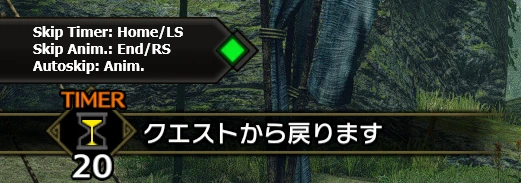
A chat message will show during the carve timer to tell you which buttons you can use to skip the carve timer and/or the animation that follows.
If enabled in the settings, using the default keys HOME/L3 (countdown) or END/R3 (animation) will also skip them.
You can also setup keybinds and autoskip in the settings.
Key/Button combos are also supported: just hold the desired combination for a few seconds.
If you have the d2d plugin installed, a d2d window will pop up during the carve timer. You can tweak its position, size, etc. in the settings!
Your settings are autosaved, enjoy!
### FAQ ###
Q: Does this work with Sunbreak?
A: Yes, it works! Make sure to get the latest REFramework and d2d plugins.
Q: I'm getting a WIC error, what do?
A: You probably have the d2d functionality enabled, but didn't extract the images folder properly.
Q: Vortex doesn't work?
A: Unfortunately vortex unpacks the archive in a weird way. I'd recommend manual install over mod managers.
Q: The reframework 1. 1. 1 update broke this plugin, wat do?
A: Make sure you update your paths to work with the new reframework paths.
Old path: <MH RISE ROOT>/autorun
New path: <MH RISE ROOT>/reframework/autorun
Q: I'm getting a black screen when skipping the timer
📊 Mod Details
- Game
- Monsterhunterrise Mods
- Author
- godoakos
- Version
- 1.5.1hotfix2
- Downloads
- 178,471
- Endorsements
- 5,855
- Category
- Gameplay
- Created
- 1/20/2022
- Updated
- 8/7/2022
🔧 How to Install Monster Hunter Rise Mods
Download from Nexus Mods.
📖 Full step-by-step install guide for Monster Hunter Rise →
Visit the official mod page for specific installation instructions for this mod.
🎮 Need cheat codes or console commands? Check ur gaming wiki for Monster Hunter Rise commands, item IDs, and more.
Keep browsing — more Monster Hunter Rise mods await