Buff Timers Overlay
🟠 Updated over a year agoPreview
🔍 Analysis
- 👍 3.8% endorsement rate — high engagement, a strong quality signal
- 🏆 #26 of 75 User Interface mods in this game by downloads
📋 About This Mod
Hood Buff Timers Overlay
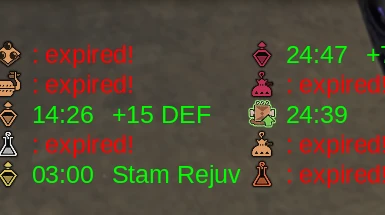
Tired of the small buff icons above your health bar? (yep they're there).
This mod gives you a more traditional buff tracking interface full with buff names and timers.
- pick and choose which buffs to track
- move the overlay wherever you want
- resize all the elements
- choose colors for expired (or remove them) and active timers
- among other options (I might have overdone the options)
- I've added a few presets, you can see them in the screenshots provided (you can remove the backdrop)
Installation
This mod installs the same as all the reframework based mods. Unzip the downloaded file and place the reframework folder into your game's main folder.
MonsterHunterWilds (main folder in your Steam library (right click MHWilds > manage > browse local files))
├── dinput8.dll <- main reframework file
├── MonsterHunterWilds.exe
├── reframework (folder)
│ ├── autorun (folder) <- all my mod files go in here
│ │ ├── hood_buffs_overlay.lua <- lua files go here
│ │ ├── hood_stuff (folder) <- this folder has the supporting files for my mod
│ plugins (folder)
│ ├── reframework-d2d.dll <- d2d framework here
│ data (folder)
│ ├── hood-timers-preset-bottom.json <- I included some presets
Dependencies (the 2 other mods required)
- REFramework Direct2D = https://www.nexusmods.com/monsterhunterrise/mods/134?tab=files (you only need the plugins folder)
- Reframework = https://www.nexusmods.com/monsterhunterwilds/mods/93
tl;dr: If you have both reframework and d2d. Just unzip the file into your Monster Hunter Wilds folder
Open the REFramework menu by press the Insert key.
Open "Script Generated UI > Hood Overlay Settings > Overlay Settings button (for way more settings)"
- there are a few presets for those that don't want to mess around (specifically for 1920x1080 resolutions)
- I plan on adding a proper preset system at some point and a lot more buffs to track
If the timers are paused it's because you are in town. The game does this
- Any issues post here or open a ticket on the mod's github page: https://github.com/Hoodstrats/mhwilds-hood-overlay
📊 Mod Details
- Game
- Monster Hunter Wilds Mods
- Author
- hoodstrats
- Version
- 1.1.1
- Downloads
- 3,371
- Endorsements
- 127
- Category
- User Interface
- Created
- 3/27/2025
- Updated
- 4/1/2025
🔧 How to Install MH Wilds Mods
Use Fluffy Mod Manager.
📖 Full step-by-step install guide for MH Wilds →
Visit the official mod page for specific installation instructions for this mod.
🎮 Need cheat codes or console commands? Check ur gaming wiki for MH Wilds commands, item IDs, and more.
Keep browsing — more MH Wilds mods await