Frozen
🟠 Updated over a year agoPreview
🔍 Analysis
- 🏆 #181 of 227 Resource/Texture pack mods in this game by downloads
📋 About This Mod
FROZEN🧊
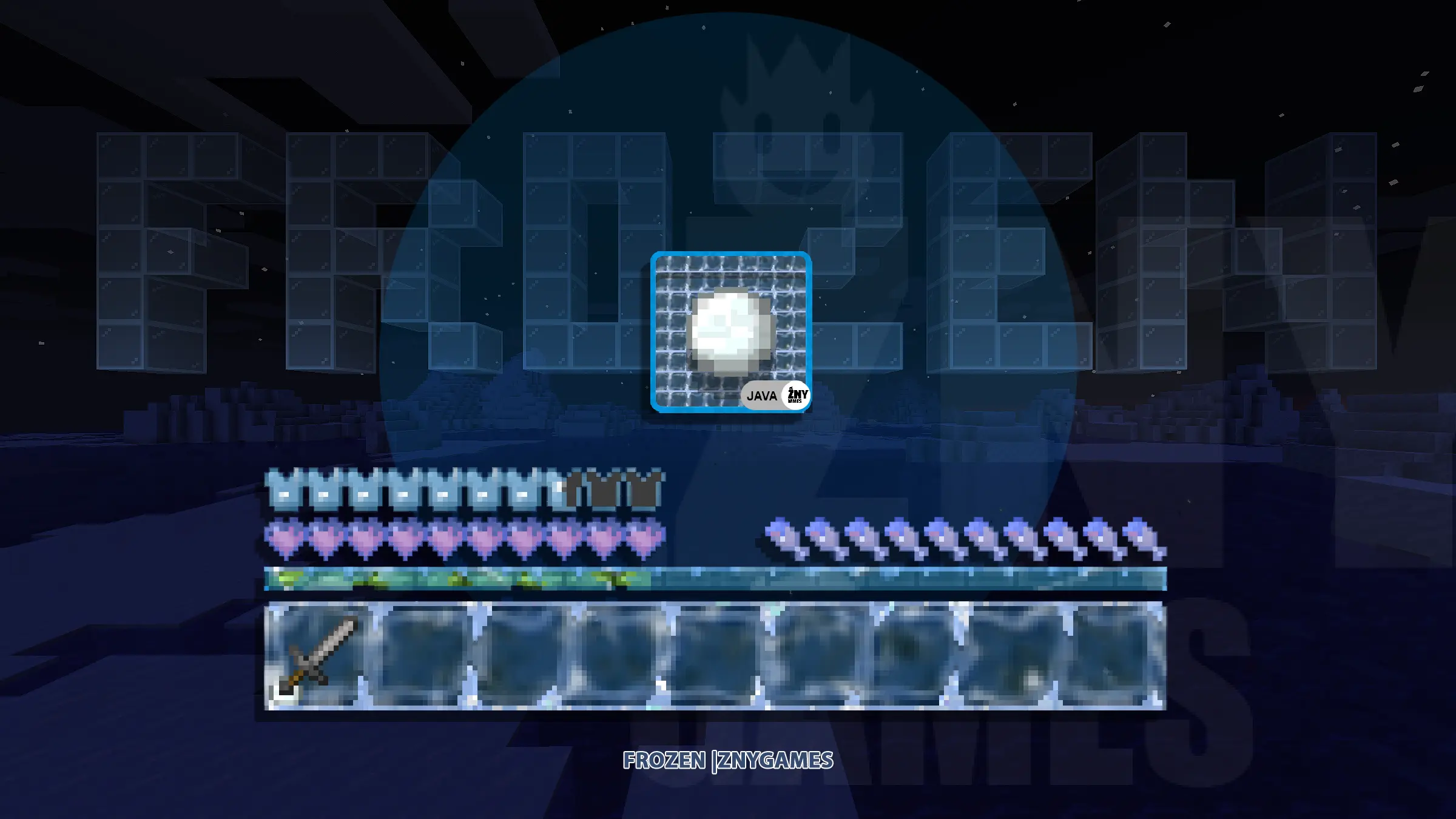
Experience the chill with the Frozen Java Texture Pack for Minecraft! This texture pack transforms your game with an icy theme, giving all graphics a frosty appearance.
🎞| TRAILER
i-jKgrSUW8M
🖼| EXAMPLE
Joysick and Aim Crosshair
D-Pad and Tap
Joystick and Tap
more examples in the picture gallery above ⬆️
🗒| DESCRIPTION
The pack includes a range of user interface modifications, such as a redesigned action bar, inventory, creative mode, and title screen. Each element has been meticulously crafted to create a cold and frosty environment, immersing you in an enchanting, icy world.
This texture pack brings an icy atmosphere to Minecraft, enhancing the player experience with its beautifully chilled design.
New! with this pack:
- This Java Minecraft texture pack is now also available for Fabric.
- The pack is playable with Fabric Loader versions 0. 15. 11 - 1. 21.
- start screen
- settings screen
💬| COMMUNITY (っ^▿^)۶🍸🌟🍺٩(˘◡˘ )
We invite you to join our Discord community where you can connect with fellow players, share your ideas, and report any bugs you encounter. Whether you have suggestions for improving the hotbar or need support with any issues, our community is here to help. Let’s build, explore, and create together!
🛈 |INSTALL
🛈 Install JAVA
[]Open Minecraft: Launch Minecraft and click on the "Options" button.
[]Go to the "Resource Packs" section: In the options menu, select "Resource Packs" to open the resource packs screen.
[]Move the texture pack to the correct location: Locate the folder where your Minecraft resource packs are stored. The default location is usually in the "resourcepacks" folder under your Minecraft game directory. Move the downloaded .zip file to this folder.
[]Select the texture pack in Minecraft: Back in the resource packs screen, select the texture pack that you just moved to the resource packs folder. The texture pack should now be listed in the "Selected Resource Packs" section.
[*]Apply the changes: Click on the "Done" button to apply the changes and enable the texture pack.
Frozen is a Minecraft Java Edition GUI texture pack that replaces the default interface with a new look. Simply download the .zip file and apply it to enhance your Minecraft experience. With only 2 endorsements and 14 downloads, it's a niche pack for players seeking a fresh GUI.
✨ Key Features
📊 Pros & Cons
✅ Pros
- Easy install—just drop the zip into your resourcepacks folder
- Gives your game a fresh look without changing gameplay
- Works with Java Edition, so most PC players can use it
⚠️ Cons
- Very low adoption (2 endorsements, 14 downloads) — might be rough around the edges
- No screenshots or detailed previews in the description, so you're flying blind
- Last updated November 2024 — could be outdated if you're on a newer Minecraft version
For Minecraft players who want a quick GUI reskin without messing with gameplay. If you're tired of the vanilla interface and want something different, this is a low-commitment try. Skip if you're looking for a full overhaul or need compatibility with modded clients.
💡 Beginner Tips
- After downloading, place the .zip file directly into your .minecraft/resourcepacks folder (no need to unzip).
- In-game, go to Options > Resource Packs, move the pack to the 'Selected' list, and it will apply immediately.
- If the pack doesn't show up, make sure you're on Java Edition and that the zip file isn't corrupted.
📊 Mod Details
- Game
- Minecraft Mods
- Author
- znygames
- Version
- 1.21
- Downloads
- 14
- Endorsements
- 2
- Category
- Resource/Texture pack
- Created
- 12/2/2023
- Updated
- 11/5/2024
🔧 How to Install Minecraft Mods
Download from Nexus Mods.
📖 Full step-by-step install guide for Minecraft →
Visit the official mod page for specific installation instructions for this mod.
🎮 Need cheat codes or console commands? Check ur gaming wiki for Minecraft commands, item IDs, and more.
Keep browsing — more Minecraft mods await