WireSight
🟡 Updated this year🖼️ Gallery (2 images)
🔍 Analysis
- 🏆 #43 of 49 cartoon mods in this game by downloads
📋 About This Mod
> **(README.md)** > **(README.zh-cn.md)** !(https://socialify.git.ci/VincentZyuApps/WireSight/image?custom_language=Shell&description=1&font=JetBrains+Mono&forks=1&issues=1&language=1&logo=https%3A%2F%2Fupload.wikimedia.org%2Fwikipedia%2Fcommons%2Fthumb%2F6%2F6a%2FGLSL_Logo_%2528Unofficial%2529.svg%2F960px-GLSL_Logo_%2528Unofficial%2529.svg.png%3F_%3D20250822083621&name=1&owner=1&pulls=1&stargazers=1&theme=Auto) # 🟢 WireSight 🧱 WireSight is an experimental, low-overhead Minecraft Java shaderpack that renders the world like a solid modeling view: dark green faces with bright green block edges. ⚙️ The pack targets the OptiFine shaderpack format shared by Iris, Oculus, and OptiFine. Its core path uses GLSL 1.20, a single terrain pass, normal depth writes, and no shadows or full-screen post-processing. (https://img.shields.io/badge/Modrinth-1BD96A?style=for-the-badge&logo=modrinth&logoColor=white)](https://modrinth.com/shader/wiresight) (https://img.shields.io/badge/CurseForge-F16436?style=for-the-badge&logo=curseforge&logoColor=white)](https://www.curseforge.com/minecraft/shaders/wiresight) (https://img.shields.io/badge/QQ_Group-1085190201-12B7F5?style=flat-square&logo=qq&logoColor=white)](https://qm.qq.com/q/4vjto4V7Di) <p><del>💬 Shaderpack usage / 🐛 Bug reports / 👨💻 Development discussion — Join our QQ Group: <b>259248174</b> 🎉 (This group is gone)</del></p> <p>💬 Shaderpack usage / 🐛 Bug reports / 👨💻 Development discussion — Join our QQ Group: <b>1085190201</b> 🎉</p> <p>💡 Mention me in the group for faster replies ~ ✨</p> --- ## 🖼️ Preview !(docs/images/preview/preview.png) !(https://cdn.modrinth.com/data/cached_images/3a09049f2841623a3a0fc909e24519d21c89d85d.png) ## 🎨 Default theme colors 🎯 WireSight uses the following base colors by default (RGB and hex denote the same color): | 🎯 Render target | RGB | Hex | Appearance | |---|---|---|---| | 🧱 Regular block faces | `RGB(6, 17, 11)` | `#06110B` | Dark green | | 🌊 Water and translucent terrain | `RGB(5, 21, 19)` | `#051513` | Dark cyan-green | | ✨ Block edges | `RGB(53, 255, 120)` | `#35FF78` | Fluorescent green | | 👤 Entities, held items, particles, and weather | `RGB(14, 61, 34)` | `#0E3D22` | Flat green | | 🌌 Sky, sun, moon, and clouds | `RGB(0, 0, 0)` | `#000000` | Black | 💡 These values are base colors; directional face shading further darkens terrain and entity sides and undersides. ## 🎛️ Shader settings ⚙️ WireSight uses the common OptiFine ShaderPack option format supported by Iris, Oculus, and OptiFine. The loader skin may differ, but the controls and order remain the same. ### 🧭 Main screen ```text +--------------------------------+--------------------------------+ | Theme Preset: WireSight Green | Custom Theme Colors... | | Directional Face Shading: On | Edge Width: 1.5 | | Edge Fade Start: 96 blocks | Edge Fade Length: 64 blocks | +--------------------------------+--------------------------------+ ``` - 🌓 `Directional Face Shading` uses fixed brightness levels for top, side, and underside faces; it is not dynamic lighting. - 📏 `Edge Width` controls the approximate on-screen pixel width of block edges. - 🌫️ `Edge Fade Start` is the distance where edges begin fading. - 📐 `Edge Fade Length` is the distance used to complete that fade, so the defaults end at `96 + 64 = 160` blocks. ### 🌈 Custom theme colors ```text +----------------------+----------------------+----------------------+ | Theme Preset: Custom | +----------------------+----------------------+----------------------+ | Block Face R: 6 | Block Face G: 17 | Block Face B: 11 | | Water R: 5 | Water G: 21 | Water B: 19 | | Block Edge R: 53 | Block Edge G: 255 | Block Edge B: 120 | | Entity R: 14 | Entity G: 61 | Entity B: 34 | | Sky R: 0 | Sky G: 0 | Sky B: 0 | +----------------------+----------------------+----------------------+ ``` > **⚠️ Important:** Custom RGB values are applied only when `Theme Preset` is set to `Custom`. 🔢 Each channel has full integer precision from `0` to `255`. Custom values remain saved when another preset is selected and return unchanged when switching back to `Custom`. ### 🧩 Built-in presets | 🎨 Surface | WireSight Green | Cyan | Amber | Monochrome | |---|---|---|---|---| | 🧱 Block faces | `#06110B` | `#061116` | `#171006` | `#111111` | | 🌊 Water | `#051513` | `#051522` | `#071417` | `#151515` | | ✨ Block edges | `#35FF78` | `#35E7FF` | `#FFC247` | `#F2F2F2` | | 👤 Entities | `#0E3D22` | `#0E3540` | `#5E3D10` | `#3D3D3D` | | 🌌 Sky and celestials | `#000000` | `#000000` | `#000000` | `#000000` | 🟠 The Amber preset
> [📖 English](README.md) > [📖 简体中文(大陆)](README.zh-cn.md)
!(https://socialify.git.ci/VincentZyuApps/WireSight/image?custom_language=Shell&description=1&font=JetBrains+Mono&forks=1&issues=1&language=1&logo=https%3A%2F%2Fupload.wikimedia.org%2Fwikipedia%2Fcommons%2Fthumb%2F6%2F6a%2FGLSL_Logo_%2528Unofficial%2529.svg%2F960px-GLSL_Logo_%2528Unofficial%2529.svg.png%3F_%3D20250822083621&name=1&owner=1&pulls=1&stargazers=1&theme=Auto)
# 🟢 WireSight
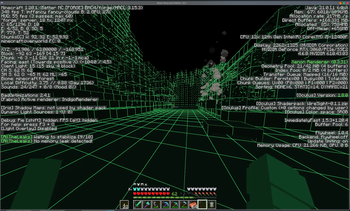
🧱 WireSight is an experimental, low-overhead Minecraft Java shaderpack that renders the world like a solid modeling view: dark green faces with bright green block edges.
⚙️ The pack targets the OptiFine shaderpack format shared by Iris, Oculus, and OptiFine. Its core path uses GLSL 1. 20, a single terrain pass, normal depth writes, and no shadows or full-screen post-processing.
[!(https://img.shields.io/badge/Modrinth-1BD96A?style=for-the-badge&logo=modrinth&logoColor=white)](https://modrinth.com/shader/wiresight) [!(https://img.shields.io/badge/CurseForge-F16436?style=for-the-badge&logo=curseforge&logoColor=white)](https://www.curseforge.com/minecraft/shaders/wiresight)
[!(https://img.shields.io/badge/QQ_Group-1085190201-12B7F5?style=flat-square&logo=qq&logoColor=white)](https://qm.qq.com/q/4vjto4V7Di)
💬 Shaderpack usage / 🐛 Bug reports / 👨💻 Development discussion — Join our QQ Group: 259248174 🎉 (This group is gone)
💬 Shaderpack usage / 🐛 Bug reports / 👨💻 Development discussion — Join our QQ Group: 1085190201 🎉
💡 Mention me in the group for faster replies ~ ✨
## 🖼️ Preview
!(docs/images/preview/preview.png) !(https://cdn.modrinth.com/data/cached_images/3a09049f2841623a3a0fc909e24519d21c89d85d.png)
## 🎨 Default theme colors
🎯 WireSight uses the following base colors by default (RGB and hex denote the same color):
| 🎯 Render target | RGB | Hex | Appearance | |---|---|---|---| | 🧱 Regular block faces | `RGB(6, 17, 11)` | `#06110B` | Dark green | | 🌊 Water and translucent terrain | `RGB(5, 21, 19)` | `#051513` | Dark cyan-green | | ✨ Block edges | `RGB(53, 255, 120)` | `#35FF78` | Fluorescent green | | 👤 Entities, held items, particles, and weather | `RGB(14, 61, 34)` | `#0E3D22` | Flat green | | 🌌 Sky, sun, moon, and clouds | `RGB(0, 0, 0)` | `#000000` | Black |
💡 These values are base colors; directional face shading further darkens terrain and entity sides and undersides.
## 🎛️ Shader settings
⚙️ WireSight uses the common OptiFine ShaderPack option format supported by Iris, Oculus, and OptiFine. The loader skin may differ, but the controls and order remain the same.
### 🧭 Main screen
```text +--------------------------------+--------------------------------+ | Theme Preset: WireSight Green | Custom Theme Colors... | | Directional Face Shading: On | Edge Width: 1. 5 | | Edge Fade Start: 96 blocks | Edge Fade Length: 64 blocks | +--------------------------------+--------------------------------+ ```
- 🌓 `Directional Face Shading` uses fixed brightness levels for top, side, and underside faces; it is not dynamic lighting.
- 📏 `Edge Width` controls the approximate on-screen pixel width of block edges.
- 🌫️ `Edge Fade Start` is the distance where edges begin fading.
- 📐 `Edge Fade Length` is the distance used to complete that fade, so the defaults end at `96 + 64 = 160` blocks.
### 🌈 Custom theme colors
```text +----------------------+----------------------+----------------------+ | Theme Preset: Custom | +----------------------+----------------------+----------------------+ | Block Face R: 6 | Block Face G: 17 | Block Face B: 11 | | Water R: 5 | Water G: 21 | Water B: 19 | | Block Edge R: 53 | Block Edge G: 255 | Block Edge B: 120 | | Entity R: 14 | Entity G: 61 | Entity B: 34 | | Sky R: 0 | Sky G: 0 | Sky B: 0 | +----------------------+----------------------+----------------------+ ```
> ⚠️ Important: Custom RGB values are applied only when `Theme Preset` is set to `Custom`.
🔢 Each channel has full integer precision from `0` to `255`. Custom values remain saved when another preset is selected and return unchanged when switching back to `Custom`.
### 🧩 Built-in presets
| 🎨 Surface | WireSight Green | Cyan | Amber | Monochrome | |---|---|---|---|---| | 🧱 Block faces | `#06110B` | `#061116` | `#171006` | `#111111` | | 🌊 Water | `#051513` | `#051522` | `#071417` | `#151515` | | ✨ Block edges | `#35FF78` | `#35E7FF` | `#FFC247` | `#F2F2F2` | | 👤 Entities | `#0E3D22` | `#0E3540` | `#5E3D10` | `#3D3D3D` | | 🌌 Sky and celestials | `#000000` | `#000000` | `#000000` | `#000000` |
🟠 The Amber preset
📊 Mod Details
- Game
- Minecraft Shaders
- Author
- VincentZyu233
- Version
- 0.2.3-optifine
- Downloads
- 265
- Endorsements
- 3
- Category
- cartoon
- Created
- 7/25/2026
- Updated
- 7/26/2026
- Game Versions
- 1.8, 1.8.1, 1.8.2, 1.8.3, 1.8.4
- Tags
- cartoon, potato
🔧 How to Install Minecraft Shaders Mods
Download from Modrinth. Use Prism Launcher or drop into your mods folder.
📖 Full step-by-step install guide for Minecraft Shaders →
Visit the official mod page for specific installation instructions for this mod.
🎮 Need cheat codes or console commands? Check ur gaming wiki for Minecraft Shaders commands, item IDs, and more.
❓ Frequently Asked Questions
Which Minecraft Shaders versions does WireSight support?
The author lists 1.8, 1.8.1, 1.8.2, 1.8.3, 1.8.4, 1.8.5. Other versions may work but are untested by the author.
What is the latest version of WireSight?
Version 0.2.3-optifine, published 2026-07-26 with 265 downloads recorded at the source.
Keep browsing — more Minecraft Shaders mods await