Stracciatella Shaders
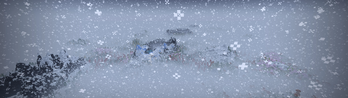
🟡 Updated this year🖼️ Gallery (9 images)
🔍 Analysis
- 👍 0.1% endorsement rate
- 🏆 #14 of 72 colored-lighting mods in this game by downloads
📋 About This Mod
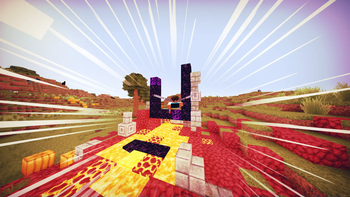
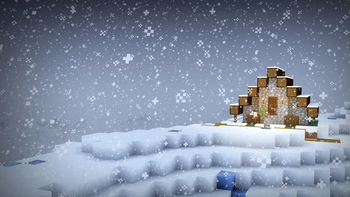
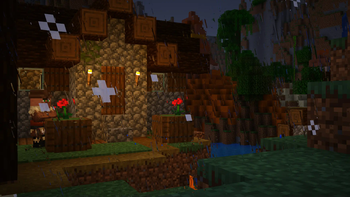
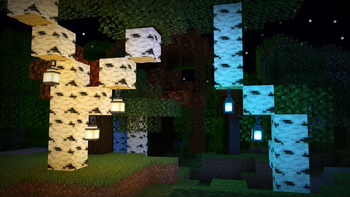
# Stracciatella A very lightweight vanilla style shader with colored lights. Focuses on adding some nice features that go hand in hand with vanilla. It is highly configurable and lets you craft your own personal vanilla experience. <iframe width="560" height="315" src="https://www.youtube-nocookie.com/embed/5PAsFDCkk_I" title="YouTube video player" frameborder="0" allow="accelerometer; autoplay; clipboard-write; encrypted-media; gyroscope; picture-in-picture; web-share" allowfullscreen></iframe> ## Feature Highlights ### Colored Lighting Stracciatella adds multi-lightsource colored lighting to Minecraft with excellent performance. Light emitting blocks glow bright and tint and shade the environment. ### Beautiful Distance Fog The Overworld and the Nether have highly optimized volumetric-like fog effects that look especially beautiful with Distant Horizons, such as dynamic fog based on height aswell as patches of dense fog that sweep the landscape. ### Many Bells and Whistles Stracciatella is packed with many subtle but important visual improvements and quality of life features that improve Minecraft's look, such as rain refraction, puddles, shooting stars and much, *much* more! ### Configurable Make it yours! Stracciatella puts you in the driver's seat. All of Stracciatellas effects are highly customisable, so you can dial in the look exactly as you like it. ## Full Feature List ### Fog and Sky - Fog - *OFF, Border, Auto, Advanced*  Border:  Simple, comparable to vanilla  Auto:  Enables "Advanced" fog when Distant Horizons is present  Advanced:  Border fog aswell as configurable exponential distance and height based fog - **Advanced Fog** - Global Fog Density  Constant fog density applied to exponential fog  Overworld, Nether and End densities are relative to this value - Overworld Fog Density  Density of constant Overworld fog  Relative to "Global Density" - Overworld Noise Fog - **Overworld** - Height Scale Multiplier  Multiplier applied to the scale factor used to calculate height fog  Higher values correspond to a harsher density falloff - Height Density Multiplier  Multiplier applied to the density calculated from world height - Dynamic Density Start Height  Fog density starts to increase with player height after the selected world height  Set to the default value, this acts as a correctional factor to keep the fog density (visually) constant - Dynamic Density Multiplier  Controls how much player height influences fog density - Anisotropic Sunset Fog  Fog density at sunset and sunrise increases more in direction of the sun - Sunset Fog Anisotropy  Amount of Anisotropy - Sunset Fog Multiplier  Controls how much the fog changes during sunset and sunrise - Wind Speed - Noise Fog Scale - Noise Fog Fade - Noise Fog Density Multiplier - Nether Fog Density  Density of constant Nether fog  Relative to "Global Density" - Nether Noise Fog - **Nether** - Wind Speed - Noise Fog Scale - Noise Fog Fade - Near Fog Density Multiplier - End Fog Density  Density of constant End fog  Relative to "Global Density" - **End** - Fog Start  Sets where the fog starts appearing  Relative to render distance - Fog End  Sets where the fog reaches its maximum  Relative to render distance - **Cave Fog and Sky** - Cave Fog  Fog changes to a different color when you are underground - Cave Sky  Sky changes to a different color when you are underground - Cave Sky Height Threshold  Controls which world height is necessary for the sky color to change - Cave Fog *(RGB Color Picker)*  Color of fog inside of caves - **Sun and Moon** - Change Sun and Moon Size - Sun and Moon Size  Changes the size of sun and moon - Sun Angle  Tilts the rotation axis of sun and moon  Vanilla is 0 - Hide under Horizon  Sun and moon start disappearing under the horizon - Transition Height  Lower: sun and moon appear lower  Higher: sun and moon appear higher - Transition  Lower: Longer transition  Higher: Shorter transition - **Stars** - Vanilla Star Brightness - Custom Stars - Size - Density - Coverage - Glow Radius - Glow Amount - Shooting Stars  **Only** works with "Custom Stars" enabled - Direction - Density - Speed - Trail Length - Trail Thickness - Custom Sky Color - **Sky Color Configuration** - Custom Sunset - Sky Sunset *(RGB Color Picker)* - Sky Day *(RGB Color Picker)* - Sky Day Rain *(RGB Color Picker)* - Night Sky Brightness - Sky Night *(RGB Color Picker)* - Sky Night Rain *(RGB Color Picker)* - Custom Fog Color - **Fog Color Configuration** - Fog Day *(RGB Color
# Stracciatella
A very lightweight vanilla style shader with colored lights. Focuses on adding some nice features that go hand in hand with vanilla. It is highly configurable and lets you craft your own personal vanilla experience.
## Feature Highlights
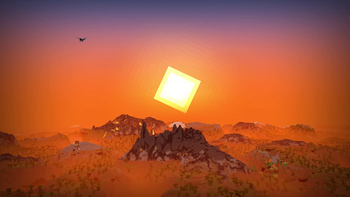
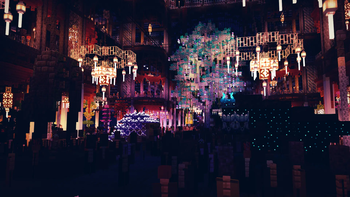
### Colored Lighting Stracciatella adds multi-lightsource colored lighting to Minecraft with excellent performance. Light emitting blocks glow bright and tint and shade the environment.
### Beautiful Distance Fog The Overworld and the Nether have highly optimized volumetric-like fog effects that look especially beautiful with Distant Horizons, such as dynamic fog based on height aswell as patches of dense fog that sweep the landscape.
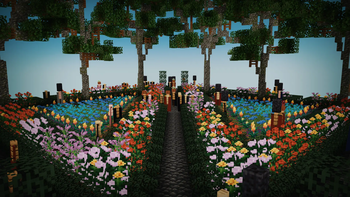
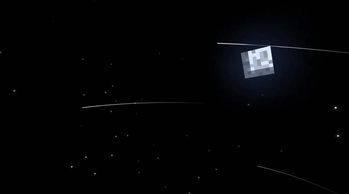
### Many Bells and Whistles Stracciatella is packed with many subtle but important visual improvements and quality of life features that improve Minecraft's look, such as rain refraction, puddles, shooting stars and much, much more!
### Configurable Make it yours! Stracciatella puts you in the driver's seat. All of Stracciatellas effects are highly customisable, so you can dial in the look exactly as you like it.
## Full Feature List
### Fog and Sky
- Fog - OFF, Border, Auto, Advanced
- Border:
- Simple, comparable to vanilla
- Auto:
- Enables "Advanced" fog when Distant Horizons is present
- Advanced:
- Border fog aswell as configurable exponential distance and height based fog
- - Advanced Fog
- - Global Fog Density
- Constant fog density applied to exponential fog
- Overworld, Nether and End densities are relative to this value
- - Overworld Fog Density
- Density of constant Overworld fog
- Relative to "Global Density"
- - Overworld Noise Fog
- - Overworld
- - Height Scale Multiplier
- Multiplier applied to the scale factor used to calculate height fog
- Higher values correspond to a harsher density falloff
- - Height Density Multiplier
- Multiplier applied to the density calculated from world height
- - Dynamic Density Start Height
- Fog density starts to increase with player height after the selected world height
- Set to the default value, this acts as a correctional factor to keep the fog density (visually) constant
- - Dynamic Density Multiplier
- Controls how much player height influences fog density
- - Anisotropic Sunset Fog
- Fog density at sunset and sunrise increases more in direction of the sun
- - Sunset Fog Anisotropy
- Amount of Anisotropy
- - Sunset Fog Multiplier
- Controls how much the fog changes during sunset and sunrise
- - Wind Speed
- - Noise Fog Scale
- - Noise Fog Fade
- - Noise Fog Density Multiplier
- - Nether Fog Density
- Density of constant Nether fog
- Relative to "Global Density"
- - Nether Noise Fog
- - Nether
- - Wind Speed
- - Noise Fog Scale
- - Noise Fog Fade
- - Near Fog Density Multiplier
- - End Fog Density
- Density of constant End fog
- Relative to "Global Density"
- - End
- - Fog Start
- Sets where the fog starts appearing
- Relative to render distance
- - Fog End
- Sets where the fog reaches its maximum
- Relative to render distance
- - Cave Fog and Sky
- - Cave Fog
- Fog changes to a different color when you are underground
- - Cave Sky
- Sky changes to a different color when you are underground
- - Cave Sky Height Threshold
- Controls which world height is necessary for the sky color to change
- - Cave Fog (RGB Color Picker)
- Color of fog inside of caves
- - Sun and Moon
- - Change Sun and Moon Size
- - Sun and Moon Size
- Changes the size of sun and moon
- - Sun Angle
- Tilts the rotation axis of sun and moon
- Vanilla is 0
- - Hide under Horizon
- Sun and moon start disappearing under the horizon
- - Transition Height
- Lower: sun and moon appear lower
- Higher: sun and moon appear higher
- - Transition
- Lower: Longer transition
- Higher: Shorter transition
- - Stars
- - Vanilla Star Brightness
- - Custom Stars
- - Size
- - Density
- - Coverage
- - Glow Radius
- - Glow Amount
- - Shooting Stars
- Only works with "Custom Stars" enabled
- - Direction
- - Density
- - Speed
- - Trail Length
- - Trail Thickness
- - Custom Sky Color
- - Sky Color Configuration
- - Custom Sunset
- - Sky Sunset (RGB Color Picker)
- - Sky Day (RGB Color Picker)
- - Sky Day Rain (RGB Color Picker)
- - Night Sky Brightness
- - Sky Night (RGB Color Picker)
- - Sky Night Rain (RGB Color Picker)
- - Custom Fog Color
- - Fog Color Configuration
- - Fog Day *(RGB Color
📊 Mod Details
- Game
- Minecraft Shaders
- Author
- DrDesten
- Version
- 1.6.4.1
- Downloads
- 163,351
- Endorsements
- 83
- Category
- colored-lighting
- Created
- 1/20/2025
- Updated
- 2/9/2026
- Game Versions
- 1.8.9, 1.9, 1.9.1, 1.9.2, 1.9.3
- Tags
- colored-lighting, potato, vanilla-like
🔧 How to Install Minecraft Shaders Mods
Download from Modrinth. Use Prism Launcher or drop into your mods folder.
📖 Full step-by-step install guide for Minecraft Shaders →
Visit the official mod page for specific installation instructions for this mod.
🎮 Need cheat codes or console commands? Check ur gaming wiki for Minecraft Shaders commands, item IDs, and more.
❓ Frequently Asked Questions
Which Minecraft Shaders versions does Stracciatella Shaders support?
The author lists 1.8.9, 1.9, 1.9.1, 1.9.2, 1.9.3, 1.9.4. Other versions may work but are untested by the author.
What is the latest version of Stracciatella Shaders?
Version 1.6.4.1, published 2026-02-09 with 163,351 downloads recorded at the source.
Keep browsing — more Minecraft Shaders mods await