RenderKit Utilities
🟡 Updated this year🖼️ Gallery (5 images)
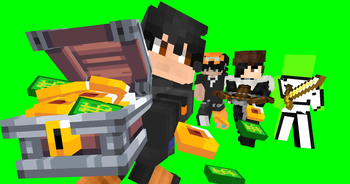
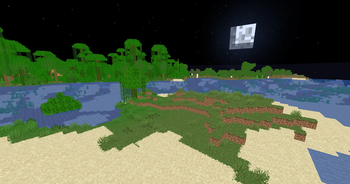
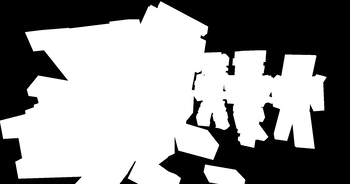
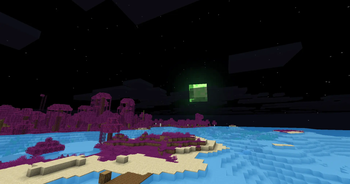
🔍 Analysis
- 🏆 #252 of 262 iris mods in this game by downloads
📋 About This Mod
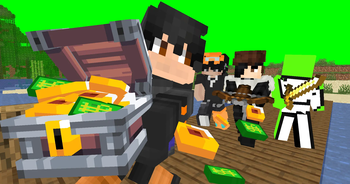
# RenderKit Utilities **A lightweight Iris shaderpack made for Minecraft thumbnails, renders and compositing.** RenderKit Utilities gives creators practical control over Minecraft's image without adding heavy visual effects. Create flat renders, isolate subjects, change block materials, recolor water and customize the sky from one simple settings menu. > **Beta:** currently tested on Minecraft 1.21.11. Mods with custom rendering > pipelines may bypass some shader options. ## Features - **Flat rendering:** toggle lightmaps, directional face shading, ambient occlusion, fog, clouds and vanilla entity blob shadows independently. - **Cutout tools:** use a custom chroma background, a white-on-black mask or an inverted black-on-white mask. The hand and block entities can be included. - **Block materials:** keep normal textures, convert blocks to grayscale or replace their visible pixels with a solid RGB color. - **Biome colors:** keep or disable color variation between biomes and apply a custom tint to grass, leaves and other tinted vegetation. - **Water controls:** keep normal water, hide it, tint its texture or replace its color while preserving transparency. Glass, ice, portals and lava remain unaffected. - **Sky controls:** show or hide the sun, moon and stars; recolor them; replace the sky color; or create a pure green celestial background. - **Color grading:** adjust exposure, contrast, saturation, gamma, temperature and posterization. - ## Quick profiles | Profile | Purpose | | --- | --- | | **No shading** | Flat render with normal Minecraft textures. | | **Vanilla look** | Restores vanilla lighting and environmental effects. | | **Green screen** | Keeps subjects over a pure green background. | | **White/black mask** | Creates a ready-to-use selection mask. | | **Grayscale blocks** | Converts blocks and block entities to grayscale. | | **Green-screen sky** | Replaces only the sky and celestial elements with pure green. | All options are organized into six categories: **Rendering and lighting**, **Cutout**, **Blocks and biomes**, **Water**, **Sky** and **Color grading**. ## Compatibility - **Tested Minecraft version:** 1.21.11 - **Tested Iris version:** 1.10.7 - **Tested Sodium version:** 0.8.12 - **Required OpenGL version:** 3.3 - **Iris required; OptiFine is not officially supported** ## License Created by **Hohigamer** and released under the **MIT License**. Modification, redistribution and modpack inclusion are allowed as long as the license notice is retained.
# RenderKit Utilities
A lightweight Iris shaderpack made for Minecraft thumbnails, renders and compositing.
RenderKit Utilities gives creators practical control over Minecraft's image without adding heavy visual effects. Create flat renders, isolate subjects, change block materials, recolor water and customize the sky from one simple settings menu.
> Beta: currently tested on Minecraft 1. 21. 11. Mods with custom rendering > pipelines may bypass some shader options.
## Features
- Flat rendering: toggle lightmaps, directional face shading, ambient
- occlusion, fog, clouds and vanilla entity blob shadows independently.
- Cutout tools: use a custom chroma background, a white-on-black mask or an
- inverted black-on-white mask. The hand and block entities can be included.
- Block materials: keep normal textures, convert blocks to grayscale or
- replace their visible pixels with a solid RGB color.
- Biome colors: keep or disable color variation between biomes and apply a
- custom tint to grass, leaves and other tinted vegetation.
- Water controls: keep normal water, hide it, tint its texture or replace
- its color while preserving transparency. Glass, ice, portals and lava remain
- unaffected.
- Sky controls: show or hide the sun, moon and stars; recolor them; replace
- the sky color; or create a pure green celestial background.
- Color grading: adjust exposure, contrast, saturation, gamma, temperature
- and posterization.
- ## Quick profiles
| Profile | Purpose | | --- | --- | | No shading | Flat render with normal Minecraft textures. | | Vanilla look | Restores vanilla lighting and environmental effects. | | Green screen | Keeps subjects over a pure green background. | | White/black mask | Creates a ready-to-use selection mask. | | Grayscale blocks | Converts blocks and block entities to grayscale. | | Green-screen sky | Replaces only the sky and celestial elements with pure green. |
All options are organized into six categories: Rendering and lighting, Cutout, Blocks and biomes, Water, Sky and Color grading.
## Compatibility
- Tested Minecraft version: 1. 21. 11
- Tested Iris version: 1. 10. 7
- Tested Sodium version: 0. 8. 12
- Required OpenGL version: 3. 3
- Iris required; OptiFine is not officially supported
Created by Hohigamer and released under the MIT License. Modification, redistribution and modpack inclusion are allowed as long as the license notice is retained.
📊 Mod Details
- Game
- Minecraft Shaders
- Author
- Hohigamer
- Version
- 1.0.0
- Downloads
- 163
- Endorsements
- 0
- Category
- iris
- Created
- 7/19/2026
- Updated
- 7/14/2026
- Game Versions
- 1.20.1, 1.20.2, 1.20.3, 1.20.4, 1.20.5
- Tags
- potato, shadows, vanilla-like
🔧 How to Install Minecraft Shaders Mods
Download from Modrinth. Use Prism Launcher or drop into your mods folder.
📖 Full step-by-step install guide for Minecraft Shaders →
Visit the official mod page for specific installation instructions for this mod.
🎮 Need cheat codes or console commands? Check ur gaming wiki for Minecraft Shaders commands, item IDs, and more.
❓ Frequently Asked Questions
Which Minecraft Shaders versions does RenderKit Utilities support?
The author lists 1.20.1, 1.20.2, 1.20.3, 1.20.4, 1.20.5, 1.20.6. Other versions may work but are untested by the author.
What is the latest version of RenderKit Utilities?
Version 1.0.0, published 2026-07-14 with 163 downloads recorded at the source.
Keep browsing — more Minecraft Shaders mods await