Refract Shaders
🟡 Updated this year🖼️ Gallery (5 images)
🔍 Analysis
- 🏆 #60 of 72 colored-lighting mods in this game by downloads
📋 About This Mod
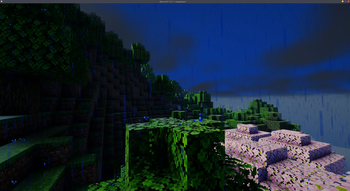
# Refract Shaders **Refract Shaders**, a visual overhaul designed to let a new light onto your Minecraft worlds! This pack focuses on creating a vibrant environment --- !(https://cdn.modrinth.com/data/cached_images/a2268517ce099b665099190e0cbd9959b587d4b2.jpeg) --- ## Downloads > ### (https://modrinth.com/shader/refract-saders/versions) > *Make sure to select the latest version* --- ### This shader pack includes: * **Colored Shadows Through Glass:** look as sunlight filters dynamically through stained glass blocks, casting beautifully tinted shadows across parts of your interiors and builds. * **High-Quality Water:** Dive into gorgeous, detailed water environments that look good whether you are standing on the shore or exploring the deep. * **Dynamic Shadows:** Experience crisp, real-time shadows that ground your structures, foliage, and landscapes in reality during the day. * **Stunning Night Sky & Stars:** Look up to experience a densely packed, glowing starry night sky that makes nighttime exploration a visual treat. (night work in progress) --- ## Installation To run Refract Shaders: 1. **Install a Shader Loader:** First, ensure you have the **Iris mod** (recommended for performance) or **OptiFine** installed for your desired Minecraft version. 2. **Access the Shaders Menu:** Launch the game, navigate to **Options** -> **Video Settings**, and click on **Shader Packs** (or **Shaders**). 3. **Open the Folder:** Click the **Open Shader Pack Folder** button to open the directory on your computer. 4. **Add the Shader:** Download the Refract Shaders `.zip` file from the downloads section above and drop it directly into the folder. *(Do not unzip the file)*. 5. **Activate:** Return to the game, select **Refract Shaders** from the in-game list, click **Apply** this shader pack is still in development
# Refract Shaders
Refract Shaders, a visual overhaul designed to let a new light onto your Minecraft worlds! This pack focuses on creating a vibrant environment
!(https://cdn.modrinth.com/data/cached_images/a2268517ce099b665099190e0cbd9959b587d4b2.jpeg)
## Downloads
> ### [ Click Here to Download Refract Shaders on Modrinth ](https://modrinth.com/shader/refract-saders/versions) > Make sure to select the latest version
- --
- ### This shader pack includes:
- Colored Shadows Through Glass: look as sunlight filters dynamically through stained glass blocks, casting beautifully tinted shadows across parts of your interiors and builds.
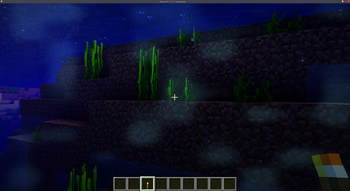
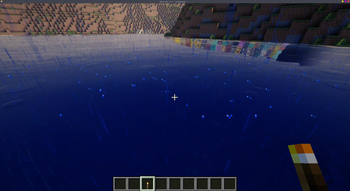
- High-Quality Water: Dive into gorgeous, detailed water environments that look good whether you are standing on the shore or exploring the deep.
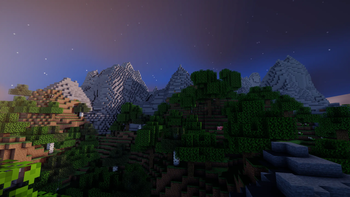
- Dynamic Shadows: Experience crisp, real-time shadows that ground your structures, foliage, and landscapes in reality during the day.
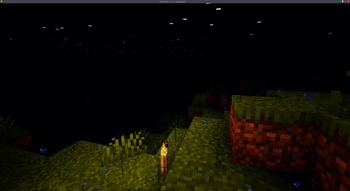
- Stunning Night Sky & Stars: Look up to experience a densely packed, glowing starry night sky that makes nighttime exploration a visual treat. (night work in progress)
## Installation
To run Refract Shaders:
1. Install a Shader Loader: First, ensure you have the Iris mod (recommended for performance) or OptiFine installed for your desired Minecraft version. 2. Access the Shaders Menu: Launch the game, navigate to Options -> Video Settings, and click on Shader Packs (or Shaders). 3. Open the Folder: Click the Open Shader Pack Folder button to open the directory on your computer. 4. Add the Shader: Download the Refract Shaders `.zip` file from the downloads section above and drop it directly into the folder. (Do not unzip the file). 5. Activate: Return to the game, select Refract Shaders from the in-game list, click Apply
this shader pack is still in development
📊 Mod Details
- Game
- Minecraft Shaders
- Author
- leaife__
- Version
- 22.2.17
- Downloads
- 439
- Endorsements
- 0
- Category
- colored-lighting
- Created
- 7/27/2026
- Updated
- 7/22/2026
- Game Versions
- 1.16, 1.16.1, 1.16.2, 1.16.3, 1.16.4
- Tags
- colored-lighting, shadows, vanilla-like
🔧 How to Install Minecraft Shaders Mods
Download from Modrinth. Use Prism Launcher or drop into your mods folder.
📖 Full step-by-step install guide for Minecraft Shaders →
Visit the official mod page for specific installation instructions for this mod.
🎮 Need cheat codes or console commands? Check ur gaming wiki for Minecraft Shaders commands, item IDs, and more.
❓ Frequently Asked Questions
Which Minecraft Shaders versions does Refract Shaders support?
The author lists 1.16, 1.16.1, 1.16.2, 1.16.3, 1.16.4, 1.16.5. Other versions may work but are untested by the author.
What is the latest version of Refract Shaders?
Version 22.2.17, published 2026-07-22 with 439 downloads recorded at the source.
Keep browsing — more Minecraft Shaders mods await