No Light — No Color!
🟡 Updated this year🖼️ Gallery (6 images)
🔍 Analysis
- 👍 0.6% endorsement rate
📋 About This Mod
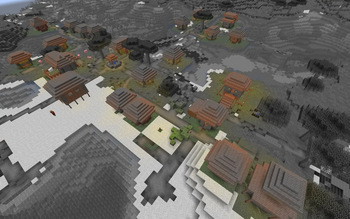
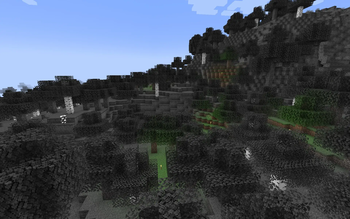
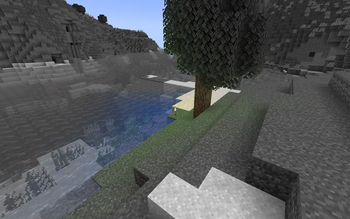
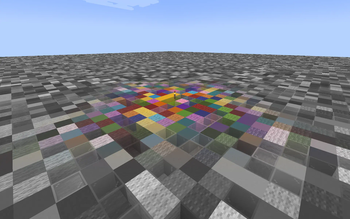
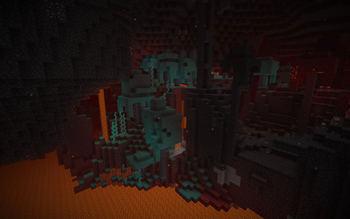
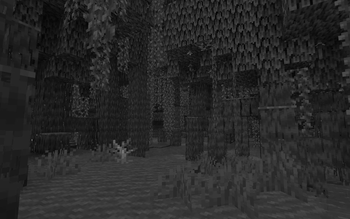
## No Light — No Color! !(https://cdn.modrinth.com/data/cached_images/33485936c705e5279cde430b8d14ac0ac58a4c04.jpeg) --- This resource pack makes blocks smoothly become less colorful when they have less block light. Sky light doesn't affect this, only block light. Please note — this resource pack applies only **to most of the blocks**. Entities, some block entities, particles and other stuff will not be affected due to a different lighting method. Maybe I'll try to make entities and block entities work in the future. ### Versions: <FONT COLOR="#3598db">1.17</FONT> — <FONT COLOR="#ff39eb">1.21.11+</FONT> ### **Doesn't require** <FONT COLOR="#e74c3c">**Optifine**</FONT>, and works with it too. ### Works with (https://modrinth.com/mod/lambdynamiclights) mod. ### Does <FONT COLOR="#fa1111">**NOT**</FONT> work with Sodium. --- ## Customization You can also adjust radius and smoothness of how light will colorize blocks. Go into the resource pack into a file `assets/minecraft/shaders/include/no_light_no_color.glsl`. You can change the numbers in the first 2 lines. The variables don't work very intuitively so just play around until you are comfortable with the result. Radius variable here is set to 82: !(https://cdn.modrinth.com/data/cached_images/4f9331d6088e779a74cbfc3c07aa50dff09ba8a5.png)
## No Light — No Color!
!(https://cdn.modrinth.com/data/cached_images/33485936c705e5279cde430b8d14ac0ac58a4c04.jpeg) --- This resource pack makes blocks smoothly become less colorful when they have less block light. Sky light doesn't affect this, only block light. Please note — this resource pack applies only to most of the blocks. Entities, some block entities, particles and other stuff will not be affected due to a different lighting method. Maybe I'll try to make entities and block entities work in the future.
### Versions: 1. 17 — 1. 21. 11+
### Doesn't require Optifine, and works with it too. ### Works with (https://modrinth.com/mod/lambdynamiclights) mod. ### Does NOT work with Sodium. --- ## Customization You can also adjust radius and smoothness of how light will colorize blocks. Go into the resource pack into a file `assets/minecraft/shaders/include/no_light_no_color.glsl`. You can change the numbers in the first 2 lines. The variables don't work very intuitively so just play around until you are comfortable with the result.
Radius variable here is set to 82: !(https://cdn.modrinth.com/data/cached_images/4f9331d6088e779a74cbfc3c07aa50dff09ba8a5.png)
📊 Mod Details
- Game
- Minecraft Shaders
- Author
- SuperAnt_
- Version
- 1.0
- Downloads
- 21,407
- Endorsements
- 124
- Category
- blocks
- Created
- 10/1/2024
- Updated
- 1/3/2026
- Game Versions
- 1.20.2, 1.20.3, 1.20.4, 1.20.5, 1.20.6
- Tags
- blocks, core-shaders, cursed
🔧 How to Install Minecraft Shaders Mods
Download from Modrinth. Use Prism Launcher or drop into your mods folder.
📖 Full step-by-step install guide for Minecraft Shaders →
Visit the official mod page for specific installation instructions for this mod.
🎮 Need cheat codes or console commands? Check ur gaming wiki for Minecraft Shaders commands, item IDs, and more.
❓ Frequently Asked Questions
Which Minecraft Shaders versions does No Light — No Color! support?
The author lists 1.20.2, 1.20.3, 1.20.4, 1.20.5, 1.20.6, 1.21. Other versions may work but are untested by the author.
What is the latest version of No Light — No Color!?
Version 1.0, published 2026-01-03 with 21,407 downloads recorded at the source.
Keep browsing — more Minecraft Shaders mods await