Mathematically Unplayable
🟠 Updated over a year ago🖼️ Gallery (1 images)
🔍 Analysis
- 👍 0.2% endorsement rate
- 🏆 #23 of 85 cursed mods in this game by downloads
📋 About This Mod
# Warning! > **_!! INCLUDES FLASHING COLORS !!_** # About "Mathematically Unplayable" is an experimental shaderpack for Minecraft: Java Edition designed for OptiFine. It dramatically alters the game's visual presentation by applying a series of mathematical transformations to world geometry, textures, and screen output. This pack is intended for users interested in exploring extreme visual effects, understanding shader capabilities, and experiencing Minecraft in a uniquely distorted and chaotic way. Visual examples showcasing the shader's transformative style can be found in the "Gallery" section. # Showcase 2.0.0: <iframe width="560" height="315" src="https://www.youtube-nocookie.com/embed/7EtbiAIsVuM" title="YouTube video player" frameborder="0" allow="accelerometer; autoplay; clipboard-write; encrypted-media; gyroscope; picture-in-picture; web-share" allowfullscreen></iframe> 1.0.0: <iframe width="560" height="315" src="https://www.youtube-nocookie.com/embed/0M67RkgHx0M" title="YouTube video player" frameborder="0" allow="accelerometer; autoplay; clipboard-write; encrypted-media; gyroscope; picture-in-picture; web-share" allowfullscreen></iframe> # Feedback & Support: Found an issue or have a suggestion? Please report it here: (https://github.com/JamesCoalchiPortfolio/MathematicallyUnplayable/issues) # Installation * Modrinth launcher: 1. Open the mathematically unplayable shader page. 2. Click install. 3. Choose instance. 4. Start the game. * Official launcher: 1. Open the mathematically unplayable shader page. 2. Download the "Mathematically Unplayable" shaderpack ZIP file. 3. Place the ZIP file into your Minecraft `shaderpacks` folder: 4. Start the game
# Warning! > _!! INCLUDES FLASHING COLORS !!_
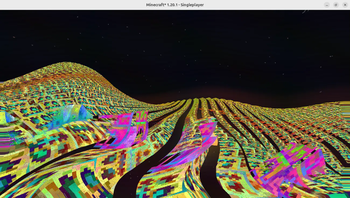
"Mathematically Unplayable" is an experimental shaderpack for Minecraft: Java Edition designed for OptiFine. It dramatically alters the game's visual presentation by applying a series of mathematical transformations to world geometry, textures, and screen output. This pack is intended for users interested in exploring extreme visual effects, understanding shader capabilities, and experiencing Minecraft in a uniquely distorted and chaotic way. Visual examples showcasing the shader's transformative style can be found in the "Gallery" section.
# Showcase 2. 0. 0: 1. 0. 0: # Feedback & Support: Found an issue or have a suggestion? Please report it here: (https://github.com/JamesCoalchiPortfolio/MathematicallyUnplayable/issues)
# Installation
Modrinth launcher: 1. Open the mathematically unplayable shader page. 2. Click install. 3. Choose instance. 4. Start the game. Official launcher: 1. Open the mathematically unplayable shader page. 2. Download the "Mathematically Unplayable" shaderpack ZIP file. 3. Place the ZIP file into your Minecraft `shaderpacks` folder: 4. Start the game
📊 Mod Details
- Game
- Minecraft Shaders
- Author
- ultraepicultramods
- Version
- 2.0.0
- Downloads
- 10,942
- Endorsements
- 22
- Category
- cursed
- Created
- 6/2/2025
- Updated
- 7/1/2025
- Game Versions
- 1.16, 1.16.1, 1.16.2, 1.16.3, 1.16.4
- Tags
- cursed
🔧 How to Install Minecraft Shaders Mods
Download from Modrinth. Use Prism Launcher or drop into your mods folder.
📖 Full step-by-step install guide for Minecraft Shaders →
Visit the official mod page for specific installation instructions for this mod.
🎮 Need cheat codes or console commands? Check ur gaming wiki for Minecraft Shaders commands, item IDs, and more.
❓ Frequently Asked Questions
Which Minecraft Shaders versions does Mathematically Unplayable support?
The author lists 1.16, 1.16.1, 1.16.2, 1.16.3, 1.16.4, 1.16.5. Other versions may work but are untested by the author.
What is the latest version of Mathematically Unplayable?
Version 2.0.0, published 2025-07-01 with 10,942 downloads recorded at the source.
Keep browsing — more Minecraft Shaders mods await