Gray&Black Shader
🟠 Updated over a year ago🖼️ Gallery (2 images)
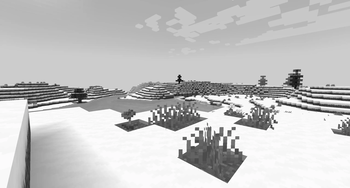
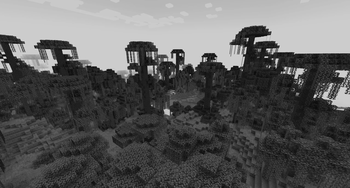
🔍 Analysis
- 👍 0.1% endorsement rate
- 🏆 #86 of 223 atmosphere mods in this game by downloads
📋 About This Mod
**English version:** **Gray&Black Shader** This shader turns your Minecraft world into stylish grayscale! Compatible with versions 1.7.2 to 1.21.5. If you have any questions, join our Discord or follow for updates so you don’t miss anything! Also check out my other mods! 😎✨ Enjoy the cinematic atmosphere! **How to install:** 1. Install OptiFine or Iris for your Minecraft version. 2. Download the Gray\&Black Shader zip file. 3. Put the zip file in your `shaderpacks` folder (found in your Minecraft directory). 4. Launch Minecraft, go to Options → Video Settings → Shaders, and select "Gray\&Black Shader". 5. Enjoy the black & white world! **Русская версия:** **Gray\&Black Shader** Этот шейдер превращает ваш мир Minecraft в стильное чёрно-белое кино! Работает с версиями от 1.7.2 до 1.21.5. Если возникли вопросы — заходите в наш Discord или подпишитесь на обновления, чтобы ничего не пропустить! Также посмотрите другие мои моды! 😎✨ Наслаждайтесь кинематографичной атмосферой! **Как установить:** 1. Установите OptiFine или Iris для вашей версии Minecraft. 2. Скачайте архив Gray\&Black Shader (zip-файл). 3. Поместите zip-файл в папку `shaderpacks` (в вашей директории Minecraft). 4. Запустите Minecraft, зайдите в Настройки → Графика → Шейдеры, выберите "Gray\&Black Shader". 5. Наслаждайтесь чёрно-белым миром!
English version:
Gray&Black Shader
This shader turns your Minecraft world into stylish grayscale! Compatible with versions 1. 7. 2 to 1. 21. 5.
If you have any questions, join our Discord or follow for updates so you don’t miss anything! Also check out my other mods! 😎✨
Enjoy the cinematic atmosphere!
How to install:
1. Install OptiFine or Iris for your Minecraft version. 2. Download the Gray\&Black Shader zip file. 3. Put the zip file in your `shaderpacks` folder (found in your Minecraft directory). 4. Launch Minecraft, go to Options → Video Settings → Shaders, and select "Gray\&Black Shader". 5. Enjoy the black & white world!
Русская версия:
Gray\&Black Shader
Этот шейдер превращает ваш мир Minecraft в стильное чёрно-белое кино! Работает с версиями от 1. 7. 2 до 1. 21. 5.
Если возникли вопросы — заходите в наш Discord или подпишитесь на обновления, чтобы ничего не пропустить! Также посмотрите другие мои моды! 😎✨
Наслаждайтесь кинематографичной атмосферой!
Как установить:
1. Установите OptiFine или Iris для вашей версии Minecraft. 2. Скачайте архив Gray\&Black Shader (zip-файл). 3. Поместите zip-файл в папку `shaderpacks` (в вашей директории Minecraft). 4. Запустите Minecraft, зайдите в Настройки → Графика → Шейдеры, выберите "Gray\&Black Shader". 5. Наслаждайтесь чёрно-белым миром!
📊 Mod Details
- Game
- Minecraft Shaders
- Author
- Multiverse
- Version
- 1.0.0-legacy
- Downloads
- 5,711
- Endorsements
- 4
- Category
- atmosphere
- Created
- 5/31/2025
- Updated
- 6/21/2025
- Game Versions
- 1.7.2, 1.7.3, 1.7.4, 1.7.5, 1.7.6
- Tags
- atmosphere, potato, realistic
🔧 How to Install Minecraft Shaders Mods
Download from Modrinth. Use Prism Launcher or drop into your mods folder.
📖 Full step-by-step install guide for Minecraft Shaders →
Visit the official mod page for specific installation instructions for this mod.
🎮 Need cheat codes or console commands? Check ur gaming wiki for Minecraft Shaders commands, item IDs, and more.
❓ Frequently Asked Questions
Which Minecraft Shaders versions does Gray&Black Shader support?
The author lists 1.7.2, 1.7.3, 1.7.4, 1.7.5, 1.7.6, 1.7.7. Other versions may work but are untested by the author.
What is the latest version of Gray&Black Shader?
Version 1.0.0-legacy, published 2025-06-21 with 5,711 downloads recorded at the source.
Keep browsing — more Minecraft Shaders mods await