FilterLite Shaders
🟡 Updated this year🖼️ Gallery (3 images)
🔍 Analysis
- 👍 0.1% endorsement rate
- 🏆 #115 of 223 atmosphere mods in this game by downloads
📋 About This Mod
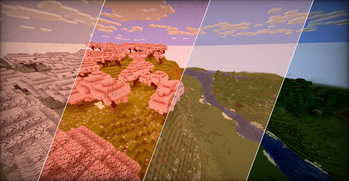
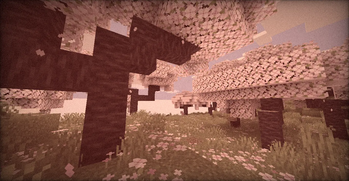
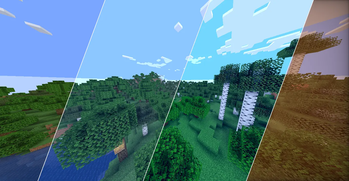
# FilterLite Shaders A pure post-processing shader designed to act like a built-in Lightroom / camera filter for your game. It doesn’t add heavy dynamic shadows, waving leaves, or realistic water-instead, it focuses 100% on screen-space color manipulation. The result is a photographic look that runs on literally any machine. ## Features * **Full Color Grading Suite:** Manual control over Exposure, Contrast, Saturation, Temperature (Kelvin), and Tint. * **Camera Effects:** Toggleable Sepia, Screen Vignette, and dynamic (animated) Film Grain. * **20 Built-in Profiles:** Don't want to tweak sliders? Just pick a preset: * *Clean & Natural:* Default, Lark, Reyes, Ludwig, Perpetua * *Warm & Cozy:* Gingham, Slumber, Crema, Aden, Seventies, Toaster * *High Contrast / Vibrant:* Clarendon, Juno, Lo-Fi, Kelvin * *Retro & Monochrome:* Moon, Inkwell, Vintage, Nashville, Cinematic * **Zero Lag:** Built on standard `#version 120` GLSL math. If your PC can run the base game, it can run this at full speed. ## Compatibility * Fully compatible with **Iris Shaders** and **OptiFine**. * Version agnostic (Works on virtually any Minecraft update). ## How to install 1. Download the `.zip` file. 2. Drop it into your `shaderpacks` folder. 3. Select it in-game and use the Shader Options menu to pick your favorite profile.
# FilterLite Shaders
A pure post-processing shader designed to act like a built-in Lightroom / camera filter for your game.
It doesn’t add heavy dynamic shadows, waving leaves, or realistic water-instead, it focuses 100% on screen-space color manipulation. The result is a photographic look that runs on literally any machine.
## Features
Full Color Grading Suite: Manual control over Exposure, Contrast, Saturation, Temperature (Kelvin), and Tint. Camera Effects: Toggleable Sepia, Screen Vignette, and dynamic (animated) Film Grain. 20 Built-in Profiles: Don't want to tweak sliders? Just pick a preset: Clean & Natural: Default, Lark, Reyes, Ludwig, Perpetua Warm & Cozy: Gingham, Slumber, Crema, Aden, Seventies, Toaster High Contrast / Vibrant: Clarendon, Juno, Lo-Fi, Kelvin Retro & Monochrome: Moon, Inkwell, Vintage, Nashville, Cinematic Zero Lag: Built on standard `#version 120` GLSL math. If your PC can run the base game, it can run this at full speed.
## Compatibility
Fully compatible with Iris Shaders and OptiFine. Version agnostic (Works on virtually any Minecraft update).
## How to install
1. Download the `.zip` file. 2. Drop it into your `shaderpacks` folder. 3. Select it in-game and use the Shader Options menu to pick your favorite profile.
📊 Mod Details
- Game
- Minecraft Shaders
- Author
- Niix-Dan
- Version
- 1.0.0
- Downloads
- 2,039
- Endorsements
- 3
- Category
- atmosphere
- Created
- 6/29/2026
- Updated
- 6/26/2026
- Game Versions
- 1.12, 1.12.1, 1.12.2, 1.13, 1.13.1
- Tags
- atmosphere, potato, vanilla-like
🔧 How to Install Minecraft Shaders Mods
Download from Modrinth. Use Prism Launcher or drop into your mods folder.
📖 Full step-by-step install guide for Minecraft Shaders →
Visit the official mod page for specific installation instructions for this mod.
🎮 Need cheat codes or console commands? Check ur gaming wiki for Minecraft Shaders commands, item IDs, and more.
❓ Frequently Asked Questions
Which Minecraft Shaders versions does FilterLite Shaders support?
The author lists 1.12, 1.12.1, 1.12.2, 1.13, 1.13.1, 1.13.2. Other versions may work but are untested by the author.
What is the latest version of FilterLite Shaders?
Version 1.0.0, published 2026-06-26 with 2,039 downloads recorded at the source.
Keep browsing — more Minecraft Shaders mods await