EzRGB
🟡 Updated this year🖼️ Gallery (3 images)
🔍 Analysis
- 🏆 #204 of 223 atmosphere mods in this game by downloads
📋 About This Mod
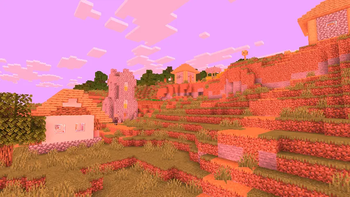
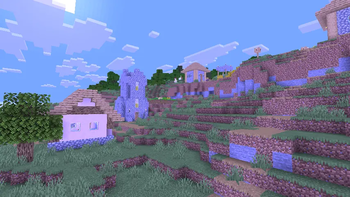
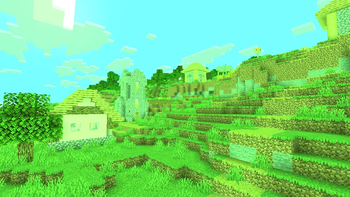
# EzRGB EzRGB is an ultra-lightweight shader pack for **Iris Shaders** that adds configurable **Red**, **Green**, and **Blue** sliders, allowing you to customize Minecraft's color balance in real time without affecting lighting, shadows, or overall performance. Designed to be simple and efficient, EzRGB only modifies the game's RGB color channels, making it ideal for players who want warmer, cooler, or completely customized color tones while preserving Minecraft's original lighting and art style. <details> <summary><strong>Features</strong></summary> * Adjustable Red slider * Adjustable Green slider * Adjustable Blue slider * Extremely lightweight with minimal performance impact * Does not modify lighting, shadows, reflections, or other visual effects * Compatible with Iris Shaders * Simple plug-and-play installation </details> ## RGB Showcase Each RGB slider supports the following values: ```text 0.0 0.05 0.10 0.15 0.20 0.25 0.30 0.35 0.40 0.45 0.50 0.55 0.60 0.65 0.70 0.75 0.80 0.85 0.90 0.95 1.00 1.05 1.10 1.15 1.20 1.25 1.30 1.35 1.40 1.45 1.50 1.55 1.60 1.65 1.70 1.75 1.80 1.85 1.90 1.95 2.00 3.00 100 ``` ## Slider Reference | Value | Result | |------:|--------| | **0.0** | Removes the selected color channel | | **1.0** | Default Minecraft color intensity | | **2.0** | Doubles the selected color channel | | **3.0** | Strong color intensity | | **100** | Maximum color intensity for experimentation | ## Supported Versions * Minecraft **1.17** through **26.2** * Iris Shaders **v1.7.0+** (including Iris 1.8.x) * GLSL **Version 120** and above **Note:** Version support may expand with future updates.
EzRGB is an ultra-lightweight shader pack for Iris Shaders that adds configurable Red, Green, and Blue sliders, allowing you to customize Minecraft's color balance in real time without affecting lighting, shadows, or overall performance.
Designed to be simple and efficient, EzRGB only modifies the game's RGB color channels, making it ideal for players who want warmer, cooler, or completely customized color tones while preserving Minecraft's original lighting and art style.
Features
Adjustable Red slider Adjustable Green slider Adjustable Blue slider Extremely lightweight with minimal performance impact Does not modify lighting, shadows, reflections, or other visual effects Compatible with Iris Shaders Simple plug-and-play installation
## RGB Showcase
Each RGB slider supports the following values:
```text 0. 0 0. 05 0. 10 0. 15 0. 20 0. 25 0. 30 0. 35 0. 40 0. 45 0. 50 0. 55 0. 60 0. 65 0. 70 0. 75 0. 80 0. 85 0. 90 0. 95 1. 00 1. 05 1. 10 1. 15 1. 20 1. 25 1. 30 1. 35 1. 40 1. 45 1. 50 1. 55 1. 60 1. 65 1. 70 1. 75 1. 80 1. 85 1. 90 1. 95 2. 00 3. 00 100 ```
## Slider Reference
| Value | Result | |------:|--------| | 0. 0 | Removes the selected color channel | | 1. 0 | Default Minecraft color intensity | | 2. 0 | Doubles the selected color channel | | 3. 0 | Strong color intensity | | 100 | Maximum color intensity for experimentation |
## Supported Versions
Minecraft 1. 17 through 26. 2 Iris Shaders v1. 7. 0+ (including Iris 1. 8.x) GLSL Version 120 and above
Note: Version support may expand with future updates.
📊 Mod Details
- Game
- Minecraft Shaders
- Author
- GamesofDev
- Version
- v1
- Downloads
- 294
- Endorsements
- 0
- Category
- atmosphere
- Created
- 7/1/2026
- Updated
- 6/30/2026
- Game Versions
- 1.20, 1.20.1, 1.20.2, 1.20.3, 1.20.4
- Tags
- atmosphere, potato, vanilla-like
🔧 How to Install Minecraft Shaders Mods
Download from Modrinth. Use Prism Launcher or drop into your mods folder.
📖 Full step-by-step install guide for Minecraft Shaders →
Visit the official mod page for specific installation instructions for this mod.
🎮 Need cheat codes or console commands? Check ur gaming wiki for Minecraft Shaders commands, item IDs, and more.
❓ Frequently Asked Questions
Which Minecraft Shaders versions does EzRGB support?
The author lists 1.20, 1.20.1, 1.20.2, 1.20.3, 1.20.4, 1.20.5. Other versions may work but are untested by the author.
What is the latest version of EzRGB?
Version v1, published 2026-06-30 with 294 downloads recorded at the source.
Keep browsing — more Minecraft Shaders mods await