EntityMask shader
🟠 Updated over a year ago🖼️ Gallery (3 images)
🔍 Analysis
- 👍 0.6% endorsement rate
- 🏆 #149 of 262 iris mods in this game by downloads
📋 About This Mod
<details> <summary>RU-Русский</summary> # ✨ Описание 🎯 Этот шейдер упрощает процесс создания **качественного хромакея**, используя рендер с шейдером в качестве маски игрока вместо сложных настроек освещения и фона. ⚡ С его помощью вы сможете быстро отделить персонажа от фона без традиционной работы с зелёным экраном. --- ## 🛠 Как это работает 1️⃣ Установите данный шейдер. 2️⃣ Запишите **два футажа** с помощью любого мода для записи, например 🎥 (https://www.replaymod.com/) или 📀 (https://modrinth.com/mod/flashback): - 🎨 Один — с **активным шейдером** (он будет служить маской игрока). - 🖤 Второй — **без шейдера** (основная картинка). 3️⃣ В программе для монтажа примените эффект **Ключ маски дорожки** 🖌 к основному футажу, используя запись с шейдером как маску. 4️⃣ Получите аккуратный 🎯 **хромакей персонажа**, готовый к дальнейшему использованию в ваших видео. --- ## 💎 Преимущества - 🪄 **Простота** — не требуется настраивать освещение или подбирать фон. - 🎯 **Качество** — ровная маска персонажа без артефактов. --- ## 📋 Требования - 🔹 Любой загрузчик шейдеров ((https://modrinth.com/mod/iris) или (https://optifine.net/)). - 🔹 Мод для записи футажей (рекомендовано: (https://www.replaymod.com/) или (https://modrinth.com/mod/flashback)). - 🔹 Программа для монтажа с поддержкой эффекта `Ключ маски дорожки`. --- Так же в помощь мой ролик про шейдеры: <iframe width="560" height="315" src="https://www.youtube-nocookie.com/embed/QTYocqSbYK4" title="YouTube video player" frameborder="0" allow="accelerometer; autoplay; clipboard-write; encrypted-media; gyroscope; picture-in-picture; web-share" allowfullscreen></iframe> </details> <details open> <summary>EN-English</summary> # ✨ Description 🎯 This shader simplifies the process of creating a **high-quality chroma key**, using a render with the shader as a player mask instead of complex lighting setups and backgrounds. ⚡ With it, you can quickly separate the player from the background without the traditional hassle of setting up a green screen. --- ## 🛠 How It Works 1️⃣ Install this shader. 2️⃣ Record **two footages** using any recording mod, for example 🎥 (https://www.replaymod.com/) or 📀 (https://modrinth.com/mod/flashback): - 🎨 One — with **the shader enabled** (this will serve as the player mask). - 🖤 Another — **without the shader** (main video). 3️⃣ In your video editing software, apply the **Track Matte Key** 🖌 effect to the main footage, using the shader render as the mask. 4️⃣ Get a clean 🎯 **player chroma key**, ready to use in your videos. --- ## 💎 Benefits - 🪄 **Simplicity** — no need to adjust lighting or set up a background. - 🎯 **Quality** — clean player mask without artifacts. --- ## 📋 Requirements - 🔹 Any shader loader ((https://modrinth.com/mod/iris) or (https://optifine.net/)). - 🔹 A recording mod (recommended: (https://www.replaymod.com/) or (https://modrinth.com/mod/flashback)). - 🔹 Video editing software with support for `Track Matte Key` (or similar) effects. <a href="https://modrinth.com/mod/iris" target="_blank"> <img src="https://cdn.modrinth.com/data/cached_images/7430916afcb02682ee201c111dfdbcf9a45ed2bb.png" alt="iris" width="275px"/> <a href="https://discord.gg/D69W4yVQxP" target="_blank"> <img src="https://i.imgur.com/7XvFjbl.png" alt="ds" width="400px"/> </a> </details>
RU-Русский
# ✨ Описание 🎯 Этот шейдер упрощает процесс создания качественного хромакея, используя рендер с шейдером в качестве маски игрока вместо сложных настроек освещения и фона. ⚡ С его помощью вы сможете быстро отделить персонажа от фона без традиционной работы с зелёным экраном.
## 🛠 Как это работает 1️⃣ Установите данный шейдер. 2️⃣ Запишите два футажа с помощью любого мода для записи, например 🎥 (https://www.replaymod.com/) или 📀 (https://modrinth.com/mod/flashback): - 🎨 Один — с активным шейдером (он будет служить маской игрока). - 🖤 Второй — без шейдера (основная картинка).
3️⃣ В программе для монтажа примените эффект Ключ маски дорожки 🖌 к основному футажу, используя запись с шейдером как маску. 4️⃣ Получите аккуратный 🎯 хромакей персонажа, готовый к дальнейшему использованию в ваших видео.
## 💎 Преимущества - 🪄 Простота — не требуется настраивать освещение или подбирать фон. - 🎯 Качество — ровная маска персонажа без артефактов.
## 📋 Требования - 🔹 Любой загрузчик шейдеров ((https://modrinth.com/mod/iris) или (https://optifine.net/)). - 🔹 Мод для записи футажей (рекомендовано: (https://www.replaymod.com/) или (https://modrinth.com/mod/flashback)). - 🔹 Программа для монтажа с поддержкой эффекта `Ключ маски дорожки`.
- --
- Так же в помощь мой ролик про шейдеры:
EN-English
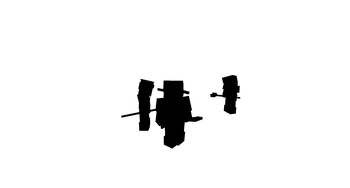
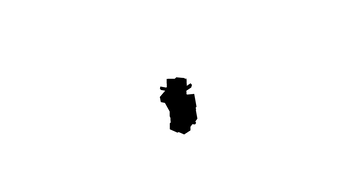
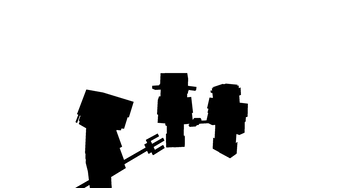
# ✨ Description 🎯 This shader simplifies the process of creating a high-quality chroma key, using a render with the shader as a player mask instead of complex lighting setups and backgrounds. ⚡ With it, you can quickly separate the player from the background without the traditional hassle of setting up a green screen.
## 🛠 How It Works 1️⃣ Install this shader. 2️⃣ Record two footages using any recording mod, for example 🎥 (https://www.replaymod.com/) or 📀 (https://modrinth.com/mod/flashback): - 🎨 One — with the shader enabled (this will serve as the player mask). - 🖤 Another — without the shader (main video).
3️⃣ In your video editing software, apply the Track Matte Key 🖌 effect to the main footage, using the shader render as the mask. 4️⃣ Get a clean 🎯 player chroma key, ready to use in your videos.
## 💎 Benefits - 🪄 Simplicity — no need to adjust lighting or set up a background. - 🎯 Quality — clean player mask without artifacts.
## 📋 Requirements - 🔹 Any shader loader ((https://modrinth.com/mod/iris) or (https://optifine.net/)). - 🔹 A recording mod (recommended: (https://www.replaymod.com/) or (https://modrinth.com/mod/flashback)). - 🔹 Video editing software with support for `Track Matte Key` (or similar) effects.

📊 Mod Details
- Game
- Minecraft Shaders
- Author
- Ramochnick
- Version
- 1.0
- Downloads
- 1,693
- Endorsements
- 10
- Category
- iris
- Created
- 8/22/2025
- Updated
- 8/15/2025
- Game Versions
- 1.20, 1.20.1, 1.20.2, 1.20.3, 1.20.4
- Tags
- vanilla-like
🔧 How to Install Minecraft Shaders Mods
Download from Modrinth. Use Prism Launcher or drop into your mods folder.
📖 Full step-by-step install guide for Minecraft Shaders →
Visit the official mod page for specific installation instructions for this mod.
🎮 Need cheat codes or console commands? Check ur gaming wiki for Minecraft Shaders commands, item IDs, and more.
❓ Frequently Asked Questions
Which Minecraft Shaders versions does EntityMask shader support?
The author lists 1.20, 1.20.1, 1.20.2, 1.20.3, 1.20.4, 1.20.5. Other versions may work but are untested by the author.
What is the latest version of EntityMask shader?
Version 1.0, published 2025-08-15 with 1,693 downloads recorded at the source.
Keep browsing — more Minecraft Shaders mods await