Dithered Shader
🟠 Updated over a year ago🖼️ Gallery (1 images)
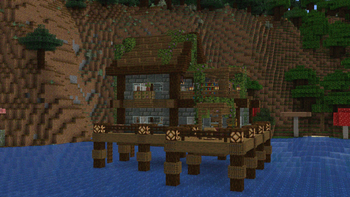
🔍 Analysis
- 👍 0.2% endorsement rate
- 🏆 #29 of 85 cursed mods in this game by downloads
📋 About This Mod
# Dithering Shader A Minecraft shader aimed to stylize your game using dithering effects ## Features - 6 dithering styles: - Ordered (Bayer) - Blue Noise - Triangular Noise - IGN Noise - Random Channels - Halftone - 6 Ordered Dithering (Bayer) Styles - Monochrome - Per-Channel - Original Color - Adjusted Threshold - Hue-Preserving - Smooth Gradient - Multiple Bayer matrix sizes: 2×2, 4×4, 8×8, 16×16, 32×32 - Adjustable posterization - Adjustable scaling factor (pixelation) ## Pictures <details> <summary>Ordered (Bayer) Dithering</summary> - 3× scale, Original Color, 8×8 !(https://github.com/user-attachments/assets/3700f726-7d13-4073-b871-7c13b0b9b5b2) - 3× scale, Monochrome, 8×8 !(https://github.com/user-attachments/assets/4f5d7bc4-2808-424a-b852-c97210f639dc) - 3× scale, Adjusted Threshold, 8×8 !(https://github.com/user-attachments/assets/d9dc6b3c-8b81-45e6-85cc-d2f65082b0c8) - 3× scale, Per-Channel, 8×8 !(https://github.com/user-attachments/assets/8e6ab818-6001-4f09-9a1a-19675b57449c) </details> <details> <summary>Blue Noise Dithering</summary> - 3× scale !(https://github.com/user-attachments/assets/36e46e10-c9f3-45ab-ac4a-369ae9b37a11) </details> <details> <summary>Triangular Noise</summary> - 3× scale !(https://github.com/user-attachments/assets/0b37c60e-3ced-4b3e-a8bf-733ffe44c4c6) </details> <details> <summary>IGN Noise</summary> - 3× scale !(https://github.com/user-attachments/assets/b575be7b-3be6-4bae-802b-380b896ea2dd) </details> <details> <summary>Random Channels</summary> - 3× scale !(https://github.com/user-attachments/assets/42df471d-1283-4bcb-9691-f3ba5720d2ca) !(https://github.com/user-attachments/assets/9e649139-4492-4652-9d09-f5e7808f3168) </details> <details> <summary>Halftone</summary> - 3× scale !(https://github.com/user-attachments/assets/54969583-eec8-4571-9095-08996cbaee44) - 6× scale !(https://github.com/user-attachments/assets/56dbc8a7-4c1d-4be7-bd4f-e6e1589507bd) </details> ### Installation 1. First you need to install either OptiFine or the Iris mod to be able to load shaderpacks. (Choose Iris if you are unsure) 2. Then you need to launch the game, and get to the Shaderpacks/Shaders menu in Video Settings. 3. Open the shaderpacks folder by clicking the button in the menu. Download the Dithered Shader and put it in the shaderpacks folder. 4. Get back in the game, and choose Dithered_Shader in the shaderpacks menu. (Refresh the menu if it doesn't appear)
# Dithering Shader
A Minecraft shader aimed to stylize your game using dithering effects
## Features
- 6 dithering styles:
- - Ordered (Bayer)
- - Blue Noise
- - Triangular Noise
- - IGN Noise
- - Random Channels
- - Halftone
- 6 Ordered Dithering (Bayer) Styles
- - Monochrome
- - Per-Channel
- - Original Color
- - Adjusted Threshold
- - Hue-Preserving
- - Smooth Gradient
- Multiple Bayer matrix sizes: 2×2, 4×4, 8×8, 16×16, 32×32
- Adjustable posterization
- Adjustable scaling factor (pixelation)
## Pictures
Ordered (Bayer) Dithering
- 3× scale, Original Color, 8×8
- !(https://github.com/user-attachments/assets/3700f726-7d13-4073-b871-7c13b0b9b5b2)
- 3× scale, Monochrome, 8×8
- !(https://github.com/user-attachments/assets/4f5d7bc4-2808-424a-b852-c97210f639dc)
- 3× scale, Adjusted Threshold, 8×8
- !(https://github.com/user-attachments/assets/d9dc6b3c-8b81-45e6-85cc-d2f65082b0c8)
- 3× scale, Per-Channel, 8×8
- !(https://github.com/user-attachments/assets/8e6ab818-6001-4f09-9a1a-19675b57449c)
Blue Noise Dithering
- 3× scale
- !(https://github.com/user-attachments/assets/36e46e10-c9f3-45ab-ac4a-369ae9b37a11)
Triangular Noise
- 3× scale
- !(https://github.com/user-attachments/assets/0b37c60e-3ced-4b3e-a8bf-733ffe44c4c6)
IGN Noise
- 3× scale
- !(https://github.com/user-attachments/assets/b575be7b-3be6-4bae-802b-380b896ea2dd)
Random Channels
- 3× scale
- !(https://github.com/user-attachments/assets/42df471d-1283-4bcb-9691-f3ba5720d2ca)
- !(https://github.com/user-attachments/assets/9e649139-4492-4652-9d09-f5e7808f3168)
Halftone
- 3× scale
- !(https://github.com/user-attachments/assets/54969583-eec8-4571-9095-08996cbaee44)
- 6× scale
- !(https://github.com/user-attachments/assets/56dbc8a7-4c1d-4be7-bd4f-e6e1589507bd)
### Installation 1. First you need to install either OptiFine or the Iris mod to be able to load shaderpacks. (Choose Iris if you are unsure) 2. Then you need to launch the game, and get to the Shaderpacks/Shaders menu in Video Settings. 3. Open the shaderpacks folder by clicking the button in the menu. Download the Dithered Shader and put it in the shaderpacks folder. 4. Get back in the game, and choose Dithered_Shader in the shaderpacks menu. (Refresh the menu if it doesn't appear)
📊 Mod Details
- Game
- Minecraft Shaders
- Author
- BouncingElf10
- Version
- 1.0
- Downloads
- 7,579
- Endorsements
- 15
- Category
- cursed
- Created
- 5/5/2025
- Updated
- 5/2/2025
- Game Versions
- 1.17, 1.17.1, 1.18, 1.18.1, 1.18.2
- Tags
- cursed, potato, vanilla-like
🔧 How to Install Minecraft Shaders Mods
Download from Modrinth. Use Prism Launcher or drop into your mods folder.
📖 Full step-by-step install guide for Minecraft Shaders →
Visit the official mod page for specific installation instructions for this mod.
🎮 Need cheat codes or console commands? Check ur gaming wiki for Minecraft Shaders commands, item IDs, and more.
❓ Frequently Asked Questions
Which Minecraft Shaders versions does Dithered Shader support?
The author lists 1.17, 1.17.1, 1.18, 1.18.1, 1.18.2, 1.19. Other versions may work but are untested by the author.
What is the latest version of Dithered Shader?
Version 1.0, published 2025-05-02 with 7,579 downloads recorded at the source.
Keep browsing — more Minecraft Shaders mods await