Vunyx's Redstone Pack
🟠 Updated over a year ago🖼️ Gallery (6 images)
🔍 Analysis
- 👍 0.6% endorsement rate
- 🏆 #282 of 333 minecraft mods in this game by downloads
📋 About This Mod
If you want to publish a project containing my work, please mention my username "Vunyx" somewhere. Also, a link to my project would be much appreciated.
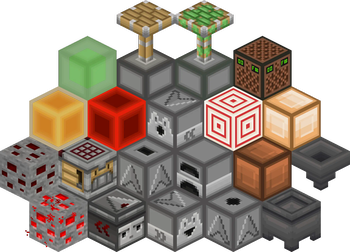
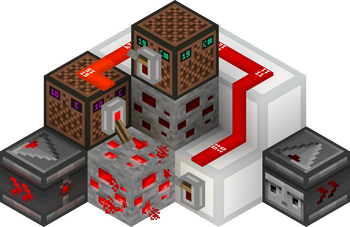
# Description This resource pack gives a clean look to all redstone components, while keeping a vanilla feel. It brings features from (https://vanillatweaks.net/picker/resource-packs), such as directional indicators for blocks like droppers or observers, and visual block states for blocks like note blocks.
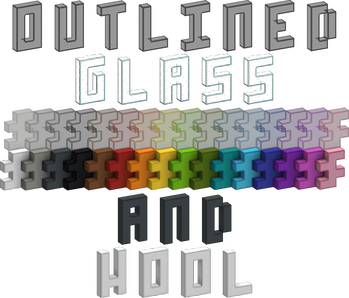
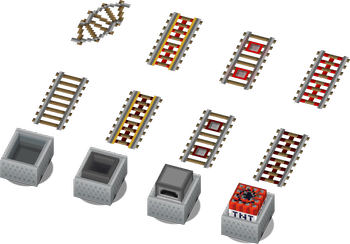
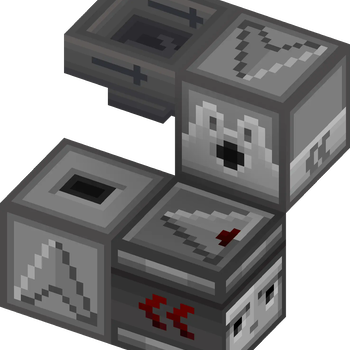
List of current features: - smooth clean look for all redstone related blocks (including rails and minecarts too) - directional indicators for dispensers, droppers, hoppers and observers - block states indicators for redstone dust, redstone ore, levers and note blocks - removes ambiguity between normal and sticky pistons - connected outline for all wool and glass blocks (you need (https://modrinth.com/mod/continuity) or (https://optifine.net/downloads) for the outlines to connect) - 3D item models for all types of torches, repeaters, comparators, levers, tripwire hooks, hoppers and cauldrons
Plans for the future: - add indicators for cauldrons, composters, beehives and bee nests - give a clean look to chests and barrels - versions for 1. 13 and older - reduce file size
### Here is a quick overview of the pack: !(https://cdn.modrinth.com/data/cached_images/ad02d0bfcd2ad53fa978c9fccfe530aa1e4a96ab.png)
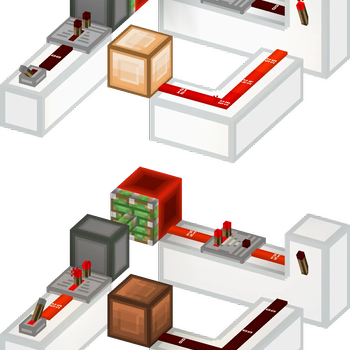
### This is how your redstone circuits will look like: !(https://cdn.modrinth.com/data/cached_images/c4e3cb7de07746734bb411e5be3076f5b8720569.png)
### Block states and direction indicators: !(https://cdn.modrinth.com/data/cached_images/aac791d5d0a6d8e80e196c22162e8a6b866079b9.png)
### No ambiguity between normal and sticky pistons: !(https://cdn.modrinth.com/data/cached_images/d1135bd14d1d9740d71b9398446ef057432750e9.png)
### 3D item models: !(https://cdn.modrinth.com/data/cached_images/958fb6dd7ee91361f4fd9684a57be4950be697a1.png)
# How to install After downloading the resource pack, go to options -> resource packs and click the Open Pack Folder button, or open `%appdata%\.minecraft\resourcepacks` directly. Put the resource pack in this folder. It should then show up under Available. Click the arrow to switch it to the Selected tab and click Done. That's it, the pack should now be installed properly.
📊 Mod Details
- Game
- Minecraft Resource Packs
- Author
- Vunyx
- Version
- 1.0
- Downloads
- 1,212
- Endorsements
- 7
- Category
- minecraft
- Created
- 1/22/2025
- Updated
- 1/20/2025
- Game Versions
- 1.14, 1.14.1, 1.14.2, 1.14.3, 1.14.4
- Tags
- simplistic, utility, vanilla-like
🔧 How to Install Minecraft Resource Packs Mods
Download from Modrinth. Use Prism Launcher or drop into your mods folder.
📖 Full step-by-step install guide for Minecraft Resource Packs →
Visit the official mod page for specific installation instructions for this mod.
🎮 Need cheat codes or console commands? Check ur gaming wiki for Minecraft Resource Packs commands, item IDs, and more.
❓ Frequently Asked Questions
Which Minecraft Resource Packs versions does Vunyx's Redstone Pack support?
The author lists 1.14, 1.14.1, 1.14.2, 1.14.3, 1.14.4, 1.15. Other versions may work but are untested by the author.
What is the latest version of Vunyx's Redstone Pack?
Version 1.0, published 2025-01-20 with 1,212 downloads recorded at the source.
Keep browsing — more Minecraft Resource Packs mods await