VIPack
⚪ Last updated 2023🖼️ Gallery (1 images)
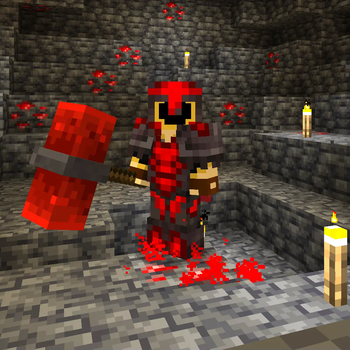
🔍 Analysis
- 👍 0.0% endorsement rate
- 🏆 #12 of 55 equipment mods in this game by downloads
📋 About This Mod
DE: Das VIPack wurde erstellt um Minecraft mehr Individualität zu verleihen. Es beinhaltet einige Sets die aus Rüstung, Werkzeugen und Co bestehen. Der Fokus liegt darauf, Texturen für Deutsche "VIPs" (YouTuber/Twitch-Streamer) zu erstellen. FAQ Wie funktioniert's? Optifine besitzt eine Funktion, welche es erlaubt, Items neue Texturen, basierend auf ihren Namen, zu geben. Wenn man Sodium + Iris / Fabric nutzt kann man diese Funktion mit Hilfe der Mod CIT Resewn hinzufügen. Alles, was man braucht, ist ein Amboss, um die Items umzubenennen, und los geht's. Die neuen Texturen werden angezeigt! Wo kann ich die Textur-Namen finden? Im zip Dokument. Dort befindet sich eine Datei mit dem Namen info_DE.png ENG: The VIPack was made to give Minecraft more individuality. It contains some sets of armor, tools and co. The focus is to make textures for german "VIPs", which means Youtuber/Twitch-Streamer. FAQ How does it work? Optifine has a feature implemented which gives items new textures, based on their names. When you use Sodium + Iris / Fabric than you can add this feature by using the mod called CIT Resewn You only need an anvil to rename your item and here you go. You now have a new texture! Where can I find the texture names? You can find the texture names in the zip file. There is a file called info_ENG.txt
Das VIPack wurde erstellt um Minecraft mehr Individualität zu verleihen.
Es beinhaltet einige Sets die aus Rüstung, Werkzeugen und Co bestehen. Der Fokus liegt darauf, Texturen für Deutsche "VIPs" (YouTuber/Twitch-Streamer) zu erstellen. FAQ
Wie funktioniert's?
Optifine besitzt eine Funktion, welche es erlaubt, Items neue Texturen, basierend auf ihren Namen, zu geben.
Wenn man Sodium + Iris / Fabric nutzt kann man diese Funktion mit Hilfe der Mod CIT Resewn hinzufügen. Alles, was man braucht, ist ein Amboss, um die Items umzubenennen, und los geht's. Die neuen Texturen werden angezeigt!
Wo kann ich die Textur-Namen finden? Im zip Dokument. Dort befindet sich eine Datei mit dem Namen info_DE.png
ENG: The VIPack was made to give Minecraft more individuality.
It contains some sets of armor, tools and co. The focus is to make textures for german "VIPs", which means Youtuber/Twitch-Streamer.
How does it work?
Optifine has a feature implemented which gives items new textures, based on their names.
When you use Sodium + Iris / Fabric than you can add this feature by using the mod called CIT Resewn You only need an anvil to rename your item and here you go. You now have a new texture!
Where can I find the texture names?
You can find the texture names in the zip file. There is a file called info_ENG.txt
📊 Mod Details
- Game
- Minecraft Resource Packs
- Author
- Blizzor
- Version
- 2.2.5
- Downloads
- 215,562
- Endorsements
- 14
- Category
- equipment
- Created
- 12/2/2023
- Updated
- 12/2/2023
- Game Versions
- 1.20, 1.20.1, 1.20.2
- Tags
- equipment
🔧 How to Install Minecraft Resource Packs Mods
Download from Modrinth. Use Prism Launcher or drop into your mods folder.
📖 Full step-by-step install guide for Minecraft Resource Packs →
Visit the official mod page for specific installation instructions for this mod.
🎮 Need cheat codes or console commands? Check ur gaming wiki for Minecraft Resource Packs commands, item IDs, and more.
❓ Frequently Asked Questions
Which Minecraft Resource Packs versions does VIPack support?
The author lists 1.20, 1.20.1, 1.20.2. Other versions may work but are untested by the author.
What is the latest version of VIPack?
Version 2.2.5, published 2023-12-02 with 215,562 downloads recorded at the source.
Keep browsing — more Minecraft Resource Packs mods await