Villagers to player
⚪ Last updated 2024🖼️ Gallery (2 images)
🔍 Analysis
- 👍 0.5% endorsement rate
- 🏆 #21 of 114 entities mods in this game by downloads
📋 About This Mod
# <font color="#f02222">**Not updated yet!!!! to match my other villagers pack!!! description doesn't fit the current file you can donwload**</font> This ressource pack in itself doesn't do much. It will only display a Steve and Alex texture for you villagers. It is meant to be edited by you so you can add player skins. # <font color="#daa520">Step 1</font> ### Setting up the texture path This first step in optional In ```\assets\minecraft\emf\cem``` you will find the model for both the villager and the baby villager. Internatly the files are the same. Open those files with a text editor. You need to change the third line about the texture ``` json "texture": "semos:textures/entities/humanoides/template/example.png", ``` You can set it to whatever file or folder you wanna your pack to use. Don't forget to do it for both models and save them. # <font color="#daa520">Step 2</font> ### Prepare your texture This second step is also optional BUT! you have to make sure your skin texture don't have any pixels outside of the normal texture zones. My packs uses some of those for eyes animations. If you want those eyes animations you should so edit the texture accordinly. Follow the template below for help. There is also the template in 64*64 in the pack so you can use it as a guide in your editing software. First, copy your face and the very top left. Edit this corner so it doesn't have what you want animated. (eyes, mouth, brows). Simply put the pixel of each part where they are in each square. You can check the steve texture of the pack for better understanding. Note, the white parts of the eyes needs to be extended to where the puplis are! !(https://cdn.modrinth.com/data/cached_images/2bf7cb88f4a43dac0e5abfba340c23eb9dc6c5b0.png) # <font color="#daa520">Step 3</font> ### This one is not optional :D Just put your texture from step 2 in the folder you choose in step 1. You can have many textures using the usual optifine method, but more on that below # <font color="#daa520">Step 4</font> ### This one is a little bit tricky. This is to make the model display the arms correctly if the skin is a slim one or not. Open the semos_villagers_to_player_animations.jpm that is located in ```assets\semos\entity_animations\non_lib_animations``` First, if the skin can be set by renaming the villagers, you'll need to add the custom name for the slim skin in the list of the variable ```"varb.slim_skin_custom_named"``` (If the custom name has a space in it, the regex need to be ```\\s``` instead (example: ```My slim skin``` would be ```My\\sslim\\sskin``` In the ```"var.texture"``` variable, ```round(lerp(random(id),2,4))``` 2 and 4 can be set to whatever you want. For each entity this number will be different and this will let you have group of skin if you will. But you will need to make sure this group is only made of slim or wide skins. You will also need to add the result for slim skin in the variable ```"varb.slim_skin"``` You will then use the variable ```var.texture``` in the .propertie like so: ``` properties var.1.texture=2 skins.1=1-9 ``` This would chose on skin between the sufix 1 to 9 when the variable is equal to 2 If you want custom names rules, they need to be set up BEFORE the var.x.texture ones You can add other variables in this file if you wish. But this is assuming you know how to do it # <font color="#daa520">Step 5</font> ### Load the game, load the pack and enjoy :) # <font color="#daa520">Addons:</font> ### This pack is compatible with the following addons of my other packs Keep track of what versions of my packs are compatible with wich addon version with this file: (https://1drv.ms/x/c/5017ea34619ff0f9/EYARtfWSbd1IsoYWCn7M-CkBHKTpT6MVfBMwl93LenDkAg?e=dbVTA0)] - ](https://modrinth.com/resourcepack/semos-animations-lib) With Semos Animations Lib the model will have Fresh Animations inspired animations. - ](https://modrinth.com/resourcepack/semos-cape-addon) Capes will have about 50% chances to render. The texture distribution follow the actual number of owner per cape - ](https://modrinth.com/resourcepack/semos-cosmetic-addon-lib) Let you use several cosmetics packs <font color="#eb7200">Warning! </font><font color="#f02222">Can be heavy on performances</font> - ](https://modrinth.com/resourcepack/semos-villagers-biome-fix) <font color="#f02222">For 1.21.9+</font> Display the biome outfits of villagers. <font color="#eb7200">Warning! </font><font color="#f02222">Very heavy on performances</font> - ](https://modrinth.com/resourcepack/semos-villagers-job-fix) <font color="#f02222">For 1.21.9+</font> Display the job outfits of villagers. <font color="#eb7200">Warning! </font><font color="#f02222">Very heavy on performanc
# Not updated yet!!!! to match my other villagers pack!!! description doesn't fit the current file you can donwload
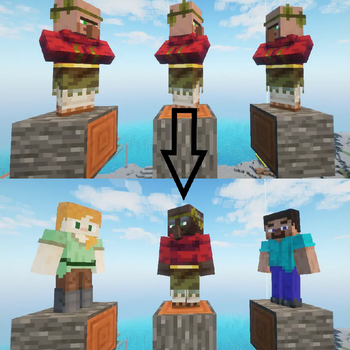
This ressource pack in itself doesn't do much. It will only display a Steve and Alex texture for you villagers. It is meant to be edited by you so you can add player skins.
# Step 1 ### Setting up the texture path This first step in optional In ```\assets\minecraft\emf\cem``` you will find the model for both the villager and the baby villager. Internatly the files are the same. Open those files with a text editor. You need to change the third line about the texture ``` json "texture": "semos:textures/entities/humanoides/template/example.png", ``` You can set it to whatever file or folder you wanna your pack to use. Don't forget to do it for both models and save them.
# Step 2 ### Prepare your texture This second step is also optional BUT! you have to make sure your skin texture don't have any pixels outside of the normal texture zones. My packs uses some of those for eyes animations. If you want those eyes animations you should so edit the texture accordinly. Follow the template below for help. There is also the template in 64*64 in the pack so you can use it as a guide in your editing software. First, copy your face and the very top left. Edit this corner so it doesn't have what you want animated. (eyes, mouth, brows). Simply put the pixel of each part where they are in each square. You can check the steve texture of the pack for better understanding.
Note, the white parts of the eyes needs to be extended to where the puplis are!
!(https://cdn.modrinth.com/data/cached_images/2bf7cb88f4a43dac0e5abfba340c23eb9dc6c5b0.png)
# Step 3 ### This one is not optional :D Just put your texture from step 2 in the folder you choose in step 1. You can have many textures using the usual optifine method, but more on that below
# Step 4 ### This one is a little bit tricky. This is to make the model display the arms correctly if the skin is a slim one or not. Open the semos_villagers_to_player_animations.jpm that is located in ```assets\semos\entity_animations\non_lib_animations```
First, if the skin can be set by renaming the villagers, you'll need to add the custom name for the slim skin in the list of the variable ```"varb.slim_skin_custom_named"``` (If the custom name has a space in it, the regex need to be ```\\s``` instead (example: ```My slim skin``` would be ```My\\sslim\\sskin``` In the ```"var.texture"``` variable, ```round(lerp(random(id),2,4))``` 2 and 4 can be set to whatever you want. For each entity this number will be different and this will let you have group of skin if you will. But you will need to make sure this group is only made of slim or wide skins. You will also need to add the result for slim skin in the variable ```"varb.slim_skin"```
You will then use the variable ```var.texture``` in the .propertie like so: ``` properties var. 1.texture=2 skins. 1=1-9 ``` This would chose on skin between the sufix 1 to 9 when the variable is equal to 2 If you want custom names rules, they need to be set up BEFORE the var.x.texture ones
You can add other variables in this file if you wish. But this is assuming you know how to do it
# Step 5 ### Load the game, load the pack and enjoy :)
# Addons: ### This pack is compatible with the following addons of my other packs
Keep track of what versions of my packs are compatible with wich addon version with this file: [[with this link](https://1drv.ms/x/c/5017ea34619ff0f9/EYARtfWSbd1IsoYWCn7M-CkBHKTpT6MVfBMwl93LenDkAg?e=dbVTA0)]
- [[Animations]](https://modrinth.com/resourcepack/semos-animations-lib) With Semos Animations Lib the model will have Fresh Animations inspired animations.
- [[Capes]](https://modrinth.com/resourcepack/semos-cape-addon) Capes will have about 50% chances to render. The texture distribution follow the actual number of owner per cape
- [[Cosmetics]](https://modrinth.com/resourcepack/semos-cosmetic-addon-lib) Let you use several cosmetics packs Warning! Can be heavy on performances
- [[Biome fix]](https://modrinth.com/resourcepack/semos-villagers-biome-fix)
- For 1. 21. 9+ Display the biome outfits of villagers. Warning! Very heavy on performances
- [[Job fix]](https://modrinth.com/resourcepack/semos-villagers-job-fix)
- For 1. 21. 9+ Display the job outfits of villagers. Warning! Very heavy on performanc
📊 Mod Details
- Game
- Minecraft Resource Packs
- Author
- SebSemos
- Version
- 1.0.1
- Downloads
- 3,549
- Endorsements
- 19
- Category
- entities
- Created
- 3/24/2024
- Updated
- 4/21/2024
- Game Versions
- 1.18, 1.18.1, 1.18.2, 1.19, 1.19.1
- Tags
- entities, tweaks, vanilla-like
🔧 How to Install Minecraft Resource Packs Mods
Download from Modrinth. Use Prism Launcher or drop into your mods folder.
📖 Full step-by-step install guide for Minecraft Resource Packs →
Visit the official mod page for specific installation instructions for this mod.
🎮 Need cheat codes or console commands? Check ur gaming wiki for Minecraft Resource Packs commands, item IDs, and more.
❓ Frequently Asked Questions
Which Minecraft Resource Packs versions does Villagers to player support?
The author lists 1.18, 1.18.1, 1.18.2, 1.19, 1.19.1, 1.19.2. Other versions may work but are untested by the author.
What is the latest version of Villagers to player?
Version 1.0.1, published 2024-04-21 with 3,549 downloads recorded at the source.
Keep browsing — more Minecraft Resource Packs mods await