Vanilla Shine
⚪ Last updated 2024🖼️ Gallery (2 images)
🔍 Analysis
- 👍 0.7% endorsement rate
- 🏆 #662 of 662 16x mods in this game by downloads
📋 About This Mod
- ## About > `Vanilla Shine` is a `PBR` texture that just makes the blocks in your game more 3d and rough. > __In the future it is planned to do the same with the textures of `items` and `enity` by making them 3d and rough__. - ## Installation & Use > Simply drag and drop the `file.zip` file into your path where your other texture packages are located. Example `.minecraft\resourcepacks`. > In order to use textures and they work, you `need shaders` that `support PBR` technology. For example, you can use such shaders as: (https://modrinth.com/shader/bsl-shaders/) (the textures were developed using these shaders). - ## ⚠️ Warning > To make the textures as voluminous, you will need to customise the shaders, for example here is my BSL shader settings: > ``` #Sun Feb 25 00:40:19 EET 2024 > LIGHT_DR=255 > PARALLAX_QUALITY=512 > AMBIENT_DR=255 > DESATURATION_FACTOR=0.0 > LIGHT_SHAFT_STRENGTH=2.00 > DOF=true > ADVANCED_MATERIALS=true >DYNAMIC_HANDLIGHT=true > ``` - ## You can also see a list of which blocks are fully finished, the status of what is done and what is not. > (https://docs.google.com/spreadsheets/d/e/2PACX-1vTANnjY4Wm3O9_ismok5iAETcztySGX-V2Sd89xDjihEw2B3rqi_0OH4LeoDUsb5BaklsjuOTIgrJzE/pubhtml).
- ## About
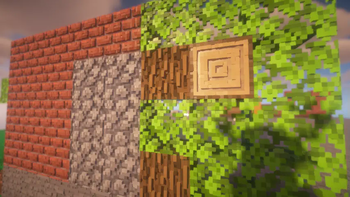
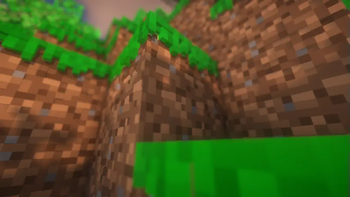
- > `Vanilla Shine` is a `PBR` texture that just makes the blocks in your game more 3d and rough.
- > __In the future it is planned to do the same with the textures of `items` and `enity` by making them 3d and rough__.
- ## Installation & Use
- > Simply drag and drop the `file.zip` file into your path where your other texture packages are located. Example `.minecraft\resourcepacks`.
> In order to use textures and they work, you `need shaders` that `support PBR` technology. For example, you can use such shaders as: [BSL](https://modrinth.com/shader/bsl-shaders/) (the textures were developed using these shaders). - ## ⚠️ Warning > To make the textures as voluminous, you will need to customise the shaders, for example here is my BSL shader settings: > ``` #Sun Feb 25 00:40:19 EET 2024 > LIGHT_DR=255 > PARALLAX_QUALITY=512 > AMBIENT_DR=255 > DESATURATION_FACTOR=0. 0 > LIGHT_SHAFT_STRENGTH=2. 00 > DOF=true > ADVANCED_MATERIALS=true >DYNAMIC_HANDLIGHT=true > ``` - ## You can also see a list of which blocks are fully finished, the status of what is done and what is not. > (https://docs.google.com/spreadsheets/d/e/2PACX-1vTANnjY4Wm3O9_ismok5iAETcztySGX-V2Sd89xDjihEw2B3rqi_0OH4LeoDUsb5BaklsjuOTIgrJzE/pubhtml).
📊 Mod Details
- Game
- Minecraft Resource Packs
- Author
- nxyzcio
- Version
- 0.3-Candidate1
- Downloads
- 1,999
- Endorsements
- 13
- Category
- 16x
- Created
- 2/22/2024
- Updated
- 8/2/2024
- Game Versions
- 1.19.4
- Tags
- 16x, core-shaders, vanilla-like
🔧 How to Install Minecraft Resource Packs Mods
Download from Modrinth. Use Prism Launcher or drop into your mods folder.
📖 Full step-by-step install guide for Minecraft Resource Packs →
Visit the official mod page for specific installation instructions for this mod.
🎮 Need cheat codes or console commands? Check ur gaming wiki for Minecraft Resource Packs commands, item IDs, and more.
❓ Frequently Asked Questions
Which Minecraft Resource Packs versions does Vanilla Shine support?
The author lists 1.19.4. Other versions may work but are untested by the author.
What is the latest version of Vanilla Shine?
Version 0.3-Candidate1, published 2024-08-02 with 1,999 downloads recorded at the source.
Keep browsing — more Minecraft Resource Packs mods await