Vanilla Mashup (PBR)
🟡 Updated this year🖼️ Gallery (8 images)
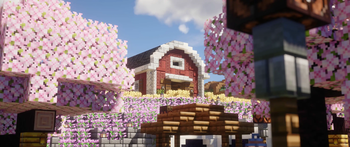
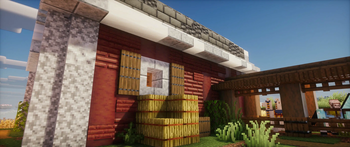
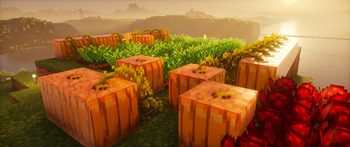
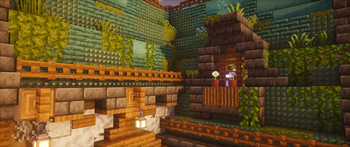
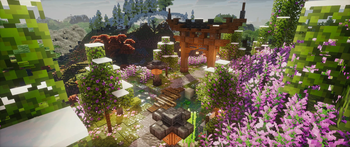
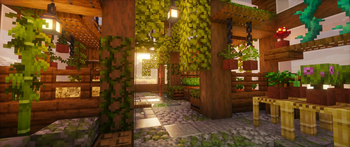
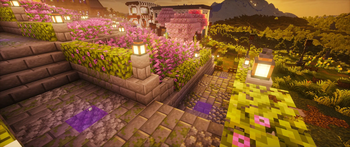
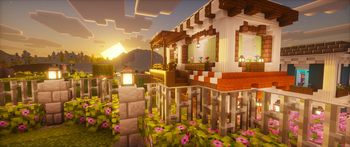
🔍 Analysis
- 👍 0.1% endorsement rate
- 🏆 #121 of 695 16x mods in this game by downloads
📋 About This Mod
<iframe width="560" height="315" src="https://www.youtube-nocookie.com/embed/URU12e-FEgA" title="YouTube video player" frameborder="0" allow="accelerometer; autoplay; clipboard-write; encrypted-media; gyroscope; picture-in-picture; web-share" allowfullscreen></iframe> # Vanilla Mashup I came up with the idea for this resource pack when I downloaded (https://modrinth.com/resourcepack/spbr) and wanted to use it with (https://www.curseforge.com/minecraft/texture-packs/stay-true)'s connected textures and overlays. I added PBR to all the overlay textures from Stay True and combined both packs. Initially, it was for personal use, so I decided to incorporate elements from other packs that I thought complemented each other well. I continued to work on it by adding PBR textures to some of the other packs' textures, and it turned out quite well. **This pack requires Optifine or mods that emulate Optifine features.** It works beautifully with (https://modrinth.com/modpack/fabulously-optimized). !(https://cdn.modrinth.com/data/cached_images/dfecfe6478b8fa372709a356ce63ddcf1e147dc6.jpeg) !(https://cdn.modrinth.com/data/cached_images/2b2899be9f1b9d1cfa7100fde9bb7e95e9039356.jpeg) !(https://cdn.modrinth.com/data/cached_images/80181feef834fa4b4beebf73d06a341da811ae88.jpeg) ## Credits **This pack is essentially a mix of (https://modrinth.com/resourcepack/spbr), (https://www.curseforge.com/minecraft/texture-packs/stay-true), and (https://modrinth.com/resourcepack/reimagined), along with other packs listed below:** - (https://modrinth.com/resourcepack/spbr) (Base PBR Textures) - (https://www.curseforge.com/minecraft/texture-packs/stay-true) (Overlay Textures) - (https://modrinth.com/resourcepack/reimagined) (Grass, Carpet, Sounds, Items, Some Block Textures) - (https://modrinth.com/resourcepack/fresh-textures) (Some Block Textures, Items, Font) - (https://modrinth.com/resourcepack/fire-rekindled) (Additional PBR Textures) - (https://modrinth.com/resourcepack/fancy-crops/version/1.0) (Crops) - (https://modrinth.com/resourcepack/detail-brush) (Items) - (https://modrinth.com/resourcepack/mistathings-groovier-discs) (Discs) - (https://vanillatweaks.net/picker/resource-packs/) (Miscellaneous) All credit for this pack goes to the respective authors of these packs. I essentially combined the best aspects of each pack, in my opinion, into a single pack. I also removed the custom menu panorama so you can use it with your favorite one. ## How to Enable/Disable PBR Textures This pack can be used without shaders, in which case you will only see the textures without PBR effects if you prefer. (You can also use shaders without LabPBR; in fact, you need to activate it manually for most shaders. There's a guide on how to do this on (https://modrinth.com/resourcepack/spbr)). ## Recommended Packs to Use Together - (https://modrinth.com/resourcepack/spbr-glowingore) (Makes the ores glow) - (https://modrinth.com/resourcepack/unique-dark) (My favorite GUI resource pack to date) - (https://modrinth.com/resourcepack/bushy-leaves) (If you like bushy leaves, this pack is the best) The pack icon was created by SkulkingShadow and is available (https://skulkingshadow.itch.io/custom-mc-icons).
# Vanilla Mashup
I came up with the idea for this resource pack when I downloaded (https://modrinth.com/resourcepack/spbr) and wanted to use it with (https://www.curseforge.com/minecraft/texture-packs/stay-true)'s connected textures and overlays. I added PBR to all the overlay textures from Stay True and combined both packs. Initially, it was for personal use, so I decided to incorporate elements from other packs that I thought complemented each other well. I continued to work on it by adding PBR textures to some of the other packs' textures, and it turned out quite well.
This pack requires Optifine or mods that emulate Optifine features. It works beautifully with (https://modrinth.com/modpack/fabulously-optimized).
!(https://cdn.modrinth.com/data/cached_images/dfecfe6478b8fa372709a356ce63ddcf1e147dc6.jpeg) !(https://cdn.modrinth.com/data/cached_images/2b2899be9f1b9d1cfa7100fde9bb7e95e9039356.jpeg) !(https://cdn.modrinth.com/data/cached_images/80181feef834fa4b4beebf73d06a341da811ae88.jpeg)
This pack is essentially a mix of (https://modrinth.com/resourcepack/spbr), (https://www.curseforge.com/minecraft/texture-packs/stay-true), and (https://modrinth.com/resourcepack/reimagined), along with other packs listed below:
- (https://modrinth.com/resourcepack/spbr) (Base PBR Textures)
- (https://www.curseforge.com/minecraft/texture-packs/stay-true) (Overlay Textures)
- (https://modrinth.com/resourcepack/reimagined) (Grass, Carpet, Sounds, Items, Some Block Textures)
- (https://modrinth.com/resourcepack/fresh-textures) (Some Block Textures, Items, Font)
- (https://modrinth.com/resourcepack/fire-rekindled) (Additional PBR Textures)
- (https://modrinth.com/resourcepack/fancy-crops/version/1. 0) (Crops)
- (https://modrinth.com/resourcepack/detail-brush) (Items)
- (https://modrinth.com/resourcepack/mistathings-groovier-discs) (Discs)
- (https://vanillatweaks.net/picker/resource-packs/) (Miscellaneous)
All credit for this pack goes to the respective authors of these packs. I essentially combined the best aspects of each pack, in my opinion, into a single pack. I also removed the custom menu panorama so you can use it with your favorite one.
## How to Enable/Disable PBR Textures
This pack can be used without shaders, in which case you will only see the textures without PBR effects if you prefer. (You can also use shaders without LabPBR; in fact, you need to activate it manually for most shaders. There's a guide on how to do this on (https://modrinth.com/resourcepack/spbr)).
## Recommended Packs to Use Together
- (https://modrinth.com/resourcepack/spbr-glowingore) (Makes the ores glow)
- (https://modrinth.com/resourcepack/unique-dark) (My favorite GUI resource pack to date)
- (https://modrinth.com/resourcepack/bushy-leaves) (If you like bushy leaves, this pack is the best)
The pack icon was created by SkulkingShadow and is available (https://skulkingshadow.itch.io/custom-mc-icons).
📊 Mod Details
- Game
- Minecraft Resource Packs
- Author
- pedrowav
- Version
- 1.5
- Downloads
- 322,330
- Endorsements
- 432
- Category
- 16x
- Created
- 7/25/2024
- Updated
- 10/5/2025
- Game Versions
- 1.21.8, 1.21.9, 1.21.10, 1.21.11, 26.1
- Tags
- 16x, tweaks, vanilla-like
🔧 How to Install Minecraft Resource Packs Mods
Download from Modrinth. Use Prism Launcher or drop into your mods folder.
📖 Full step-by-step install guide for Minecraft Resource Packs →
Visit the official mod page for specific installation instructions for this mod.
🎮 Need cheat codes or console commands? Check ur gaming wiki for Minecraft Resource Packs commands, item IDs, and more.
❓ Frequently Asked Questions
Which Minecraft Resource Packs versions does Vanilla Mashup (PBR) support?
The author lists 1.21.8, 1.21.9, 1.21.10, 1.21.11, 26.1, 26.1.1. Other versions may work but are untested by the author.
What is the latest version of Vanilla Mashup (PBR)?
Version 1.5, published 2025-10-05 with 322,330 downloads recorded at the source.
Keep browsing — more Minecraft Resource Packs mods await